
Every real estate agent I’ve talked to uses some version of the same broken stack: WPResidence handles the listings, HubSpot or Pipedrive handles the leads, and a spreadsheet handles the part where those two things need to talk to each other.
The spreadsheet is always the answer when two tools refuse to speak the same language.
You get a contact form submission from a buyer who wants a 3-bedroom apartment under $450,000 in the city center. That lead arrives in your email. You copy it into HubSpot. You create a deal. You manually tag the buyer’s preferences. You go back to WordPress to look for matching listings. You email them manually. A week later, nobody followed up because the task was in HubSpot but the listing was in WordPress and the agent is doing seventeen other things.
That lead went cold. You paid for the lead. You paid for HubSpot. And you lost the deal anyway.
That’s the problem WPEstate CRM is built to fix.
What WPEstate CRM Actually Is
WPEstate CRM is a companion plugin for WPResidence — a full real estate CRM system that lives inside your WordPress site, knows what a property is, and is already wired into your contact forms on day one.
Not a third-party integration. Not a webhook pointing at Zapier pointing at HubSpot pointing at a spreadsheet.
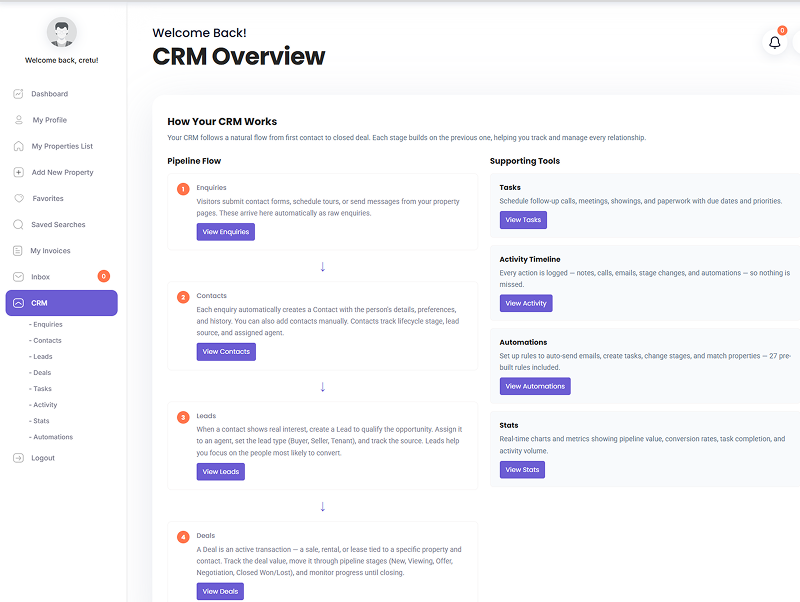
It runs on 8 custom database tables, handles contacts, deals, activities, tasks, notes, automations, and analytics — and it exposes a full 9-page frontend dashboard so your agents never need to go into wp-admin to do their job.
The Problem With Every Other CRM You’ve Tried
Generic CRMs are built for software companies. They know about contacts, pipelines, and deals. They do not know what a property is.
So when a buyer submits a contact form on your site — saying they want to buy a 3-bed condo, max $480K, in downtown — your generic CRM creates a contact and throws the raw message in a notes field. That’s it. Someone now has to manually read that message, translate it into preferences, go back to your listings, find the matches, and send them over.
That manual step is where leads die.
Beyond that: per-seat SaaS pricing gets expensive fast. A real estate team of 5 agents paying $45/seat for HubSpot Professional is $2,700/year — for a tool that still doesn’t understand your listing data. You end up maintaining two separate systems that share nothing except the anxiety of keeping them in sync.
How WPEstate CRM Solves It
Leads auto-capture from your existing forms
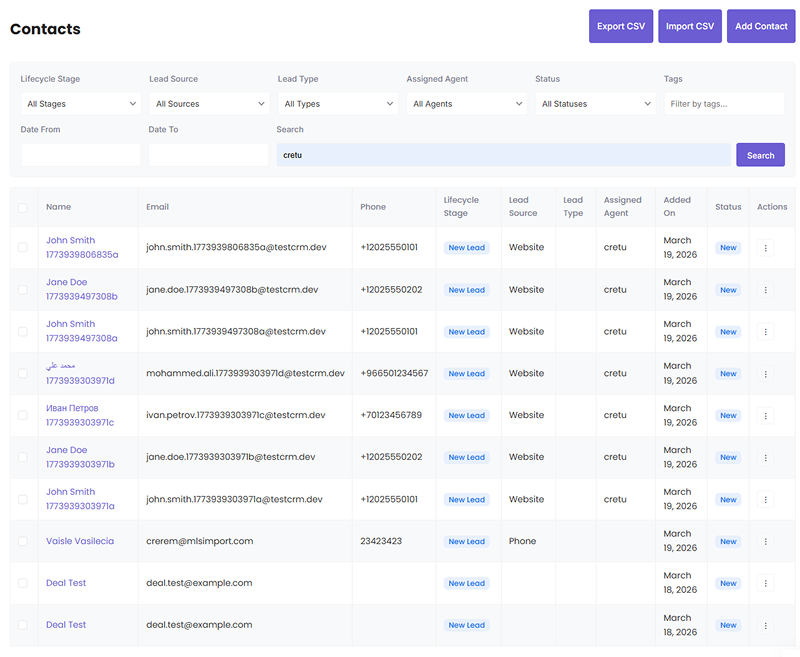
WPEstate CRM hooks directly into WPResidence’s contact forms — the standard contact form, the schedule-a-tour form, the estimate request form. When a visitor submits any of those, a CRM contact is created automatically. No copy-pasting, no manual import, no webhook required.
If the form came from a property listing page, the buyer preferences (property type, price range, location) get pulled from that listing and populated in the contact record on the spot. The contact arrives in your CRM already described as a buyer.
A tracking cookie is also set, so if that same visitor comes back later and fills out another form, the CRM recognizes them and updates the existing contact rather than creating a duplicate.
Buyer preferences matched against live listings
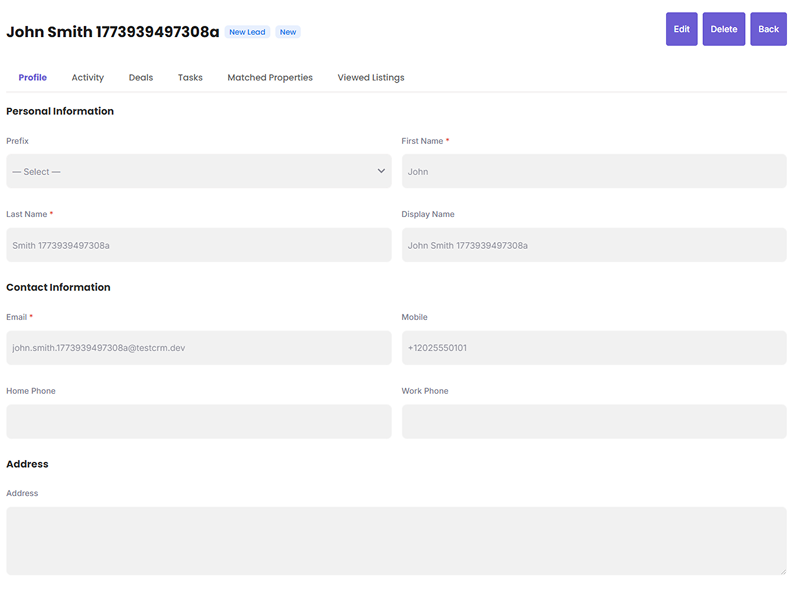
Each contact has a Buyer Preferences section: property type, property status, price min/max, beds min/max, baths min/max, area size, and preferred locations. When you hit “Find Matching Properties,” the CRM runs a query against your live WPResidence listings and returns the matches.
This works because the CRM is inside WordPress. It queries your actual `estate_property` posts using the same taxonomy and meta structure WPResidence uses. No API sync, no delay, no stale data.
You can email the matched listings directly to the contact from inside the CRM — one click, no leaving the page.
The deals pipeline — with drag-drop kanban
Deals live in a kanban board. Stages are configurable. You drag a deal card from one column to the next — the stage updates, the `stage_changed_at` timestamp records exactly when, and any automation rules watching for that stage change fire immediately.
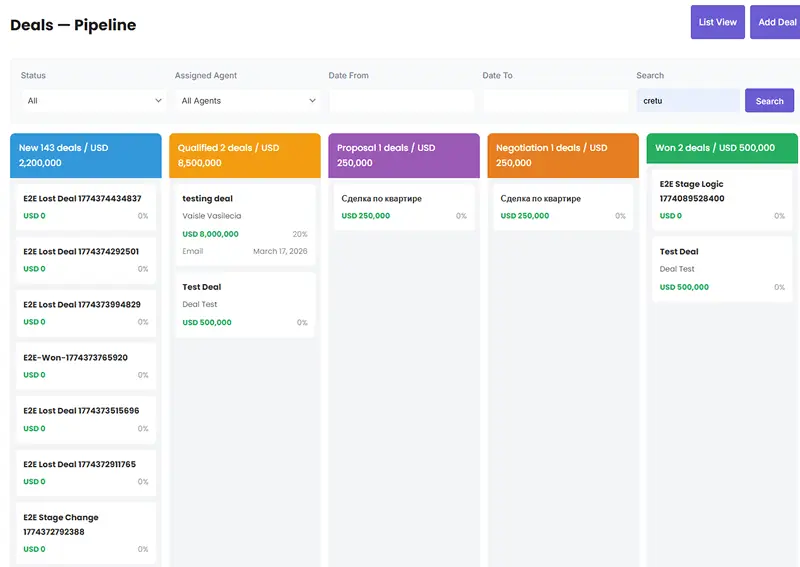
Switch to list view for bulk operations, filtering, and exports. Both views are on the same page — one toggle.
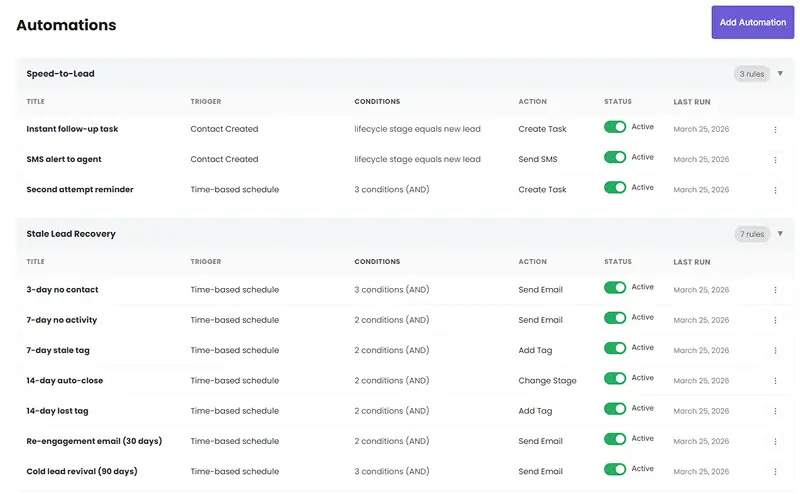
27 automation rules, active on day one
The automations engine ships with 27 pre-built rules, organized into five categories:
- New lead handling — immediate task for the agent, welcome email to the contact, SMS alert to the agent
- Stale lead recovery — reminders at 3 days, 7 days, 14 days no activity; auto-tag as stale; auto-close after 14 days; re-engagement email at 30 days; cold lead revival at 90 days
- Deal pipeline management — follow-up tasks when a deal moves to a new stage; alerts for deals stuck in the same stage too long; congratulation emails when a deal closes as won
- Task management — overdue task alerts; weekly task digest to agents
- Property matching — auto-run matching and notify agent when a new buyer arrives
Rules are either event-based (fires immediately when something happens) or time-based (runs hourly via WP-Cron and evaluates conditions). Each rule has 8 possible actions: send email, send SMS, change lifecycle stage, create a task, assign an agent, add a tag, run property matching, or send a weekly digest.
You can toggle any rule on or off. You can edit the default rules or build your own from scratch.
Email + SMS notifications
Six notification event types are built in: new contact, contact assigned to agent, deal stage changed, task overdue, task due today, and weekly digest. Each event has a configurable email template with 20 placeholder tokens — things like `{contact_name}`, `{listing_title}`, `{deal_value}`, `{crm_contact_url}` — that resolve at send time.
SMS delivery goes through Twilio. Connect your Twilio account in the CRM settings, configure your from-number, and SMS notifications start working on the same event types. Each event can be enabled or disabled independently for both email and SMS.
The full activity timeline
Every meaningful action on a contact gets recorded: form submissions, emails sent, phone calls logged, deals created, tasks completed, automations triggered, listings viewed. This timeline shows up on the contact detail page in chronological order.
When an agent picks up a lead, they see the full history of every interaction — not just the last note someone typed. That context is the difference between a relevant follow-up and a generic “checking in” email.
Tasks that actually get tracked
Tasks have a type (call, email, meeting, follow-up), a priority (low, medium, high, urgent), a due date, and a link to a contact or deal. They show up in the Tasks dashboard page, sortable by due date and priority.
Overdue tasks trigger notifications automatically (if that automation rule is active). The weekly digest automation emails each agent a summary of their tasks due in the current week.
CSV import and export
Export your contacts, leads, enquiries, deals, or tasks to CSV with a single click. The export includes a UTF-8 BOM so it opens correctly in Excel regardless of character encoding. Import back in the same format — the importer checks for duplicates by email on contact imports.
HubSpot two-way sync — for teams that want to keep it
If your sales operations team lives in HubSpot and isn’t moving, that’s fine. WPEstate CRM connects to the HubSpot CRM v3 API. When a new lead comes in through your WPResidence forms, the plugin creates a contact, a deal, and a ticket in HubSpot simultaneously — and associates all three objects.
When a deal stage changes in the CRM, that change syncs back to HubSpot. When a contact is updated, the HubSpot record reflects it.
You can configure this globally in the CRM settings, or per-agent and per-agency using the existing HubSpot API fields in the WPResidence agent/agency posts. Independent agents can each use their own HubSpot account.
The frontend dashboard — 9 pages, no wp-admin required
Your agents should not need administrator access to manage their leads. WPEstate CRM creates 9 WordPress pages automatically on activation, each using a dedicated page template:
- CRM Overview (the main dashboard)
- Contacts
- Leads & Inquiries
- Enquiries
- Deals (kanban + list view)
- Tasks
- Activity
- Stats & Analytics
- Automations
These pages live inside the WPResidence theme — they use the same header, footer, and sidebar as your agent dashboard. Agents log in, navigate to their CRM section, and do everything there: add contacts, move deals, log activities, build automations.
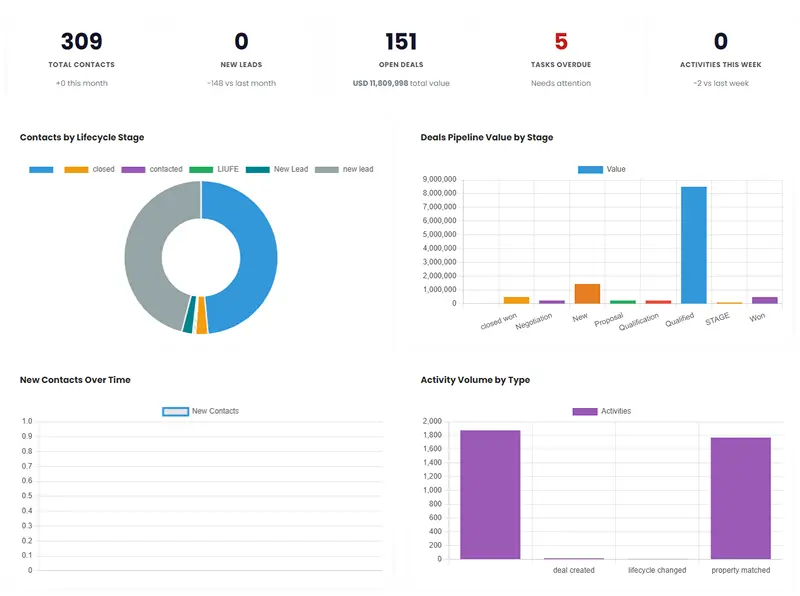
The Stats page shows 5 metric cards server-side on load (total contacts, new leads this month, open deals, overdue tasks, activities this week), plus 6 Chart.js chart containers that pull data via AJAX. Admins see all records; agents see only their own.
Key Benefits
- Zero per-seat SaaS fees. Install the plugin, pay nothing monthly. Scale to 50 agents — same cost.
- Leads captured automatically. No manual imports. Contact forms in WPResidence feed directly into the CRM with buyer preferences pre-populated from listing context.
- Matching built in. Buyer preferences → matching listings → email to contact, all inside WordPress, all using your live property data.
- 27 automation rules ship ready. A complete lead follow-up workflow is active the moment you install the plugin. Turn rules off if you don’t need them; build new ones from the frontend dashboard.
- 8 action types including SMS. Send emails, send SMS via Twilio, change lifecycle stage, create tasks, assign agents, add tags, run property matching, send weekly digests — all from a single automation rule.
- HubSpot stays in the picture. If your team is invested in HubSpot, the plugin syncs contacts, deals, and tickets to it automatically. You get both.
- Agents work on the frontend. No wp-admin access required. The full CRM runs on 9 frontend pages that look and feel like the rest of your WPResidence site.
How to Get Started
Install the plugin from your WPResidence account area. On activation, 8 custom database tables are created, the 9 dashboard pages are generated, and 27 automation rules are seeded in paused state.
Connect your notification settings (from email, optionally Twilio for SMS). Review the default automation rules and activate the ones that fit your workflow. If you use HubSpot, add your API token in the CRM settings.
From that point forward, every contact form submission on your WPResidence site lands in the CRM automatically.
What about my existing leads? Use the CSV import to bring in your current contacts. The importer deduplicates by email, so if a contact already exists from a previous form submission, it won’t create a duplicate.
A Note on What This Is Not
WPEstate CRM is not a marketing automation platform. It does not do email sequences, landing page builders, or ad retargeting. It does real estate CRM: contact management, deal pipeline, buyer preference matching, task tracking, activity logging, and the automations that keep lead follow-up from falling through the cracks.
If you’re running HubSpot because of its reporting or because your sales team requires it, keep it — the sync works well for that. But if you’re running HubSpot because it was the only tool that would catch your WPResidence form submissions, you now have a better option.
Update WPResidence, install WPEstate CRM, and stop paying for the spreadsheet in the middle.
WPEstate CRM is available now for WPResidence customers. Download it from your account dashboard.
FAQ
How does WPEstate CRM capture leads from my WPResidence site without Zapier or manual copy-paste?
WPEstate CRM hooks directly into WPResidence contact forms, including the standard contact form, schedule-a-tour, and estimate request forms. When a visitor submits any of these, the plugin automatically creates a CRM contact inside your WordPress site – no manual import, no webhook, and no third-party connector required.
If the submission came from a specific property listing page, WPEstate CRM also pulls context from that listing (such as property type, price range, and location) and populates the contact as a buyer immediately. It also sets a tracking cookie so returning visitors are recognized and their existing contact record is updated instead of creating duplicates.
Can WPEstate CRM match a buyer’s requirements to my live WPResidence listings?
Yes. Each contact includes a Buyer Preferences section where you can store criteria like property type and status, price min/max, beds and baths min/max, area size, and preferred locations. When you click “Find Matching Properties,” the CRM queries your live WPResidence listings and returns matches based on those preferences.
This works because WPEstate CRM runs inside WordPress and queries your actual estate_property posts using the same taxonomy and meta structure WPResidence uses, so there is no API sync delay or stale inventory problem. You can then email the matched listings to the contact directly from inside the CRM.
What automations and notifications are included, and how do SMS alerts work?
WPEstate CRM includes an automations engine with 27 pre-built rules across areas like new lead handling, stale lead recovery, deal pipeline management, task management, and property matching. Rules can be event-based (fire immediately) or time-based (run hourly via WP-Cron), and you can toggle rules on or off, edit the defaults, or create new rules from scratch.
Each rule can take actions such as sending email, sending SMS, changing lifecycle stage, creating tasks, assigning agents, adding tags, running property matching, or sending weekly digests. For notifications, there are built-in event types (including new contact, contact assignment, deal stage change, task overdue, task due today, and weekly digest) with configurable email templates that support placeholder tokens. SMS delivery is handled via Twilio: connect your Twilio account, set your from-number, and enable SMS per event type as needed.
Do my agents need wp-admin access to use WPEstate CRM?
No. WPEstate CRM creates a 9-page frontend dashboard inside your WPResidence site so agents can manage their workflow without going into wp-admin. The pages are generated automatically on activation and use dedicated templates that match the look and feel of your WPResidence dashboard area.
From the frontend, agents can work with contacts, leads and inquiries, deals (kanban and list view), tasks, activity history, stats and analytics, and automations. Admins can see all records, while agents only see their own.
Can I keep HubSpot and sync data both ways with WPEstate CRM?
Yes. If your team wants to keep HubSpot, WPEstate CRM supports two-way sync via the HubSpot CRM v3 API. When a new lead comes in through WPResidence forms, the plugin can create a contact, a deal, and a ticket in HubSpot and associate those objects.
Deal stage changes in WPEstate CRM can sync back to HubSpot, and contact updates in the CRM can be reflected in the corresponding HubSpot record. Sync can be configured globally in CRM settings, or per-agent and per-agency using the existing HubSpot API fields in WPResidence agent and agency posts, which also allows independent agents to use their own HubSpot accounts.







