

Every serious real estate website has the same invisible problem: a lead fills in a contact form, the agent gets an email — and then someone has to manually copy that lead into a spreadsheet, a CRM, or a follow-up tool. It slows down response times, introduces errors, and means hot leads go cold while data entry happens.
WPResidence now includes a built-in webhook system that eliminates that gap entirely.
The Problem
Real estate agents and property managers typically juggle multiple tools: an email inbox, a CRM like HubSpot or Pipedrive, an automation platform like Zapier or Make, and sometimes a scheduling system too. When a lead submits a contact form on a WPResidence-powered site, that data historically stayed inside WordPress — visible as an email notification and a dashboard entry, but isolated from everything else.
Getting leads into external systems meant either installing third-party form plugins that replace the native contact experience, or hiring a developer to build a custom integration. Neither option is ideal.
The Solution
WPResidence now lets you enter a single webhook URL in Theme Options. The moment a visitor submits any contact form on your site — whether it’s a property enquiry, a schedule tour request, an agent contact, an agency contact, or a developer inquiry — the full form data is automatically forwarded to that URL as a structured JSON payload.
No extra plugins. No third-party form builders. No custom code.
One URL. Every lead. Automatically delivered to wherever your team works.
The system supports two layers of integration:
- Global webhook — one URL in Theme Options that covers all your contact forms, with a separate enable/disable toggle for each form type.
- Per-form webhook — individual URLs set inside each Elementor Contact Form Builder widget, so different forms can route to different destinations simultaneously.
Key Benefits
- Works with the tools you already use. Zapier, Make, HubSpot, Pipedrive, Airtable, Google Sheets — if it accepts a webhook, WPResidence can feed it.
- No data entry lag. Lead data arrives in your CRM within seconds of the form being submitted, not minutes or hours later.
- Schedule tour data included. When a visitor requests a property viewing, the webhook payload includes the requested date, time, and meeting mode (in person or video chat) — ready to create a calendar entry automatically.
- Granular control per form type. Enable the webhook only for the form types that matter to your workflow. Agency contact forms, developer inquiries, and schedule tour requests can each be toggled independently.
- Clean, structured data. All values are sanitized and empty fields are stripped before sending, so your CRM receives tidy, consistent records every time.
How It Works
Setup takes under two minutes:
- Go to Theme Options > Webhook URL in your WordPress admin.
- Paste your webhook endpoint (from Zapier, Make, HubSpot, or your own server) into the URL field.
- Set each form type toggle to yes to activate delivery for that form.
- Save. Done.
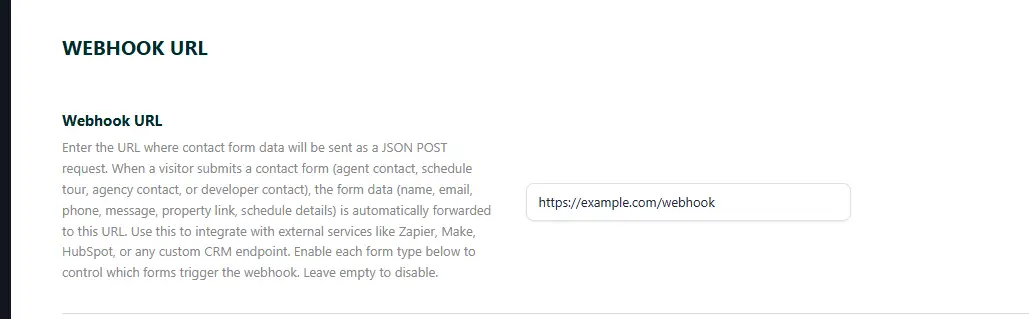
From that point on, every enabled form submission sends a JSON POST to your URL containing the visitor’s name, email, phone number, message, the URL of the property or profile page they contacted from, and — for schedule tour requests — the requested date, time, and meeting mode.
For sites using the Elementor Contact Form Builder widget, each form can also have its own webhook URL set directly inside the widget’s Email Settings tab. This is ideal for sites where different pages, campaigns, or team members need leads routed to different systems.
Try It Now
If you are on WPResidence, the webhook feature is already available in your Theme Options panel — no update needed. Open Theme Options > Webhook URL, connect it to a free webhook.site test URL to see the payload structure, then point it at your real CRM or automation workflow.
WPResidence — the real estate theme built for serious property businesses.
FAQ
How do I connect WPResidence contact forms to my CRM or automation tool?
In WPResidence, go to your WordPress admin and open Theme Options > Webhook URL. Paste the webhook endpoint from your destination (for example Zapier, Make, HubSpot, Pipedrive, Airtable, Google Sheets, or your own server), then enable delivery by setting the toggle to yes for each form type you want to send. Save your changes, and every enabled contact form submission will be sent automatically as a JSON POST to that URL.
Which WPResidence form submissions can trigger the webhook?
The webhook can fire for any WPResidence contact form submission, including property enquiries, schedule tour requests, agent contact forms, agency contact forms, and developer inquiries. You can also control this granularity by toggling webhook delivery on or off separately for each form type in Theme Options.
What data does WPResidence send in the webhook payload?
WPResidence sends a structured JSON payload that includes the visitor’s name, email, phone number, message, and the URL of the property or profile page they contacted from. For schedule tour requests, it also includes the requested date, time, and meeting mode (in person or video chat), so the receiving system can create follow-ups or calendar entries automatically.
Can I send different forms to different destinations?
Yes. WPResidence supports a global webhook URL set in Theme Options (covering all contact forms you enable), and it also supports per-form webhooks when you use the Elementor Contact Form Builder widget. In that case, you can set an individual webhook URL inside each widget’s Email Settings tab so different forms can route to different CRMs, automations, or team workflows at the same time.
Do I need extra plugins or custom code to use WPResidence webhooks?
No. The webhook system is built into WPResidence, so you can connect your forms without installing additional plugins, replacing your native contact experience with third-party form builders, or hiring a developer to build a custom integration. You only need to provide a webhook URL and enable the form types you want to send.





