
Customize real estate theme templates with Elementor and WPBakery
Last updated: June 1, 2026
By Elena Marin, WPResidence Theme Development Lead
Trying to build a custom real estate website with Elementor, and wondering how far a real estate theme will actually let you customize templates before you hit a wall? Here is the short version.
WPResidence is a real estate theme, Elementor users run on the free plugin, with no Pro license required. You can also customize real estate theme templates in WPBakery (bundled at no extra cost) or Gutenberg (added in version 1.50.1), using whichever builder you already know. On top of Elementor sits Studio, WPResidence’s real estate template layer. It maps live property data such as price, status, and custom fields into Elementor dynamic tags, then assigns a different layout per property category with no PHP.
The package includes four base single-property layouts (V1 through V4), a drag-and-drop Property Card Composer, 11 search-layout presets, and a header and footer builder. All 450+ theme options and custom field definitions live in the WordPress database, not in theme files, so your configuration survives each update. A ready-made child theme ships in the ThemeForest download for deeper work, though most projects never reach for it.
Which page builders work with WPResidence’s real estate theme, and what’s included for free?
All three of the major WordPress builders work with WPResidence, and you don’t buy a single extra license to use any of them. Elementor runs on the free plugin, WPBakery comes bundled, and Gutenberg has been supported since version 1.50.1. Many real estate themes quietly assume you already own Elementor Pro. WPResidence does not.
Elementor (free version): 212 real estate widgets, no Pro required
Two companion plugins ship with the theme: WPResidence Elementor and WPResidence Elementor Studio. Both run on the free Elementor plugin, so Elementor Pro is not required for any theme feature.
The widget library runs to more than 170 real estate elements (over 110 named widgets, the rest sub-variants): property list grids, sliders, advanced search forms, agent and agency boxes, and map views. You only reach for a handful on any given template.
WPBakery: bundled license, legacy content still works
WPBakery Page Builder is bundled inside the download, so there’s no separate ThemeForest or CodeCanyon purchase. On top of the standard WPBakery toolkit, the theme adds its own real estate shortcodes: property lists, sliders, agent lists. Current demos and Studio templates are Elementor-first, so WPBakery now mostly serves older migrated content.
Gutenberg blocks since version 1.50.1
Since version 1.50.1, the theme adds a WpResidence Gutenberg Blocks category to the block inserter, wrapping its shortcodes as native blocks. Gutenberg is the lightest builder, best for simple content: blog posts, neighborhood guides, information pages. Property data lives in custom post meta outside the block editor, so complex property templates belong in Elementor and Studio.
Mixing all three on one site
You can run all three builders on a single install: Elementor and Studio for property templates and the homepage, Gutenberg for blog pages, WPBakery for older content. Competing themes such as RealHomes and MyHome have narrowed to Elementor-only, and RealHomes dropped WPBakery in newer versions. WPResidence keeps all three active.
Customize real estate theme templates: single-property layouts, cards, and archives
Template-level design is where most of your time goes, and it’s all visual, with no PHP file to touch.
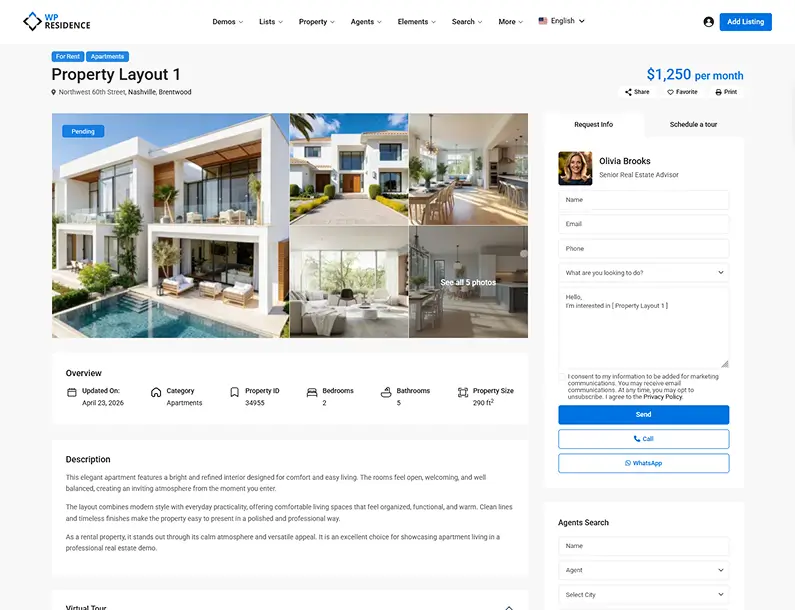
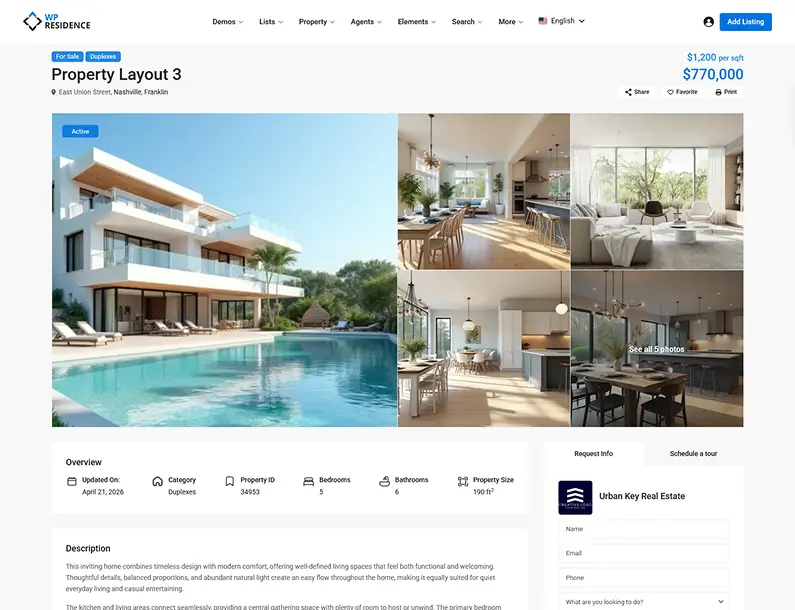 WPResidence V1 and V3 single-property templates side by side showing different gallery and map section arrangements
V1 to V4 starter single-property templates
WPResidence ships four named base layouts for single-property pages: V1, V2, V3, and V4. Each opens directly in Elementor or WPBakery, and you edit it without writing PHP. You drag sections around (gallery, price widget, map, contact form, description) and save.
Start with the V1 to V4 layout closest to your design, then reshape it.
The Property Card Composer: controlling the “rows of homes” without code
Open the Composer and you’ll see a live card on the canvas, where you set the thumbnail, title, price badge, status label, and meta fields. It’s built on Elementor inside Studio, and it controls every grid of listings on the site.
Those layouts apply across grid, list, and half-map views, so one choice carries through every results page. You can add up to five custom fields to a card, and any new field you create in theme options appears automatically. There’s a set of ready-made card designs to start from, with full field-level control in the Composer.
Archive and search-results layout options
Studio’s archive templates shape your property search-results pages. You choose grid, list, or half-map mode, then assign the layout to a page, a taxonomy archive, or a search-results URL, with 11 search-form layouts to pair with them. The archive templates are taxonomy-aware: your “Luxury” listings can render differently from your “Vacation Rental” listings, assigned automatically by category. Elementor-only themes like MyHome and RealHomes hand the same design to every listing.
Header and footer builder
Studio’s header and footer builder is separate from the page-content builder. Header types include classic horizontal, centered, vertical, transparent, and sticky, and you assign a header or footer per page template or per property category.
How the WPResidence Studio template builder works
Studio is not a fourth page builder. It’s a real estate template layer built on top of Elementor.
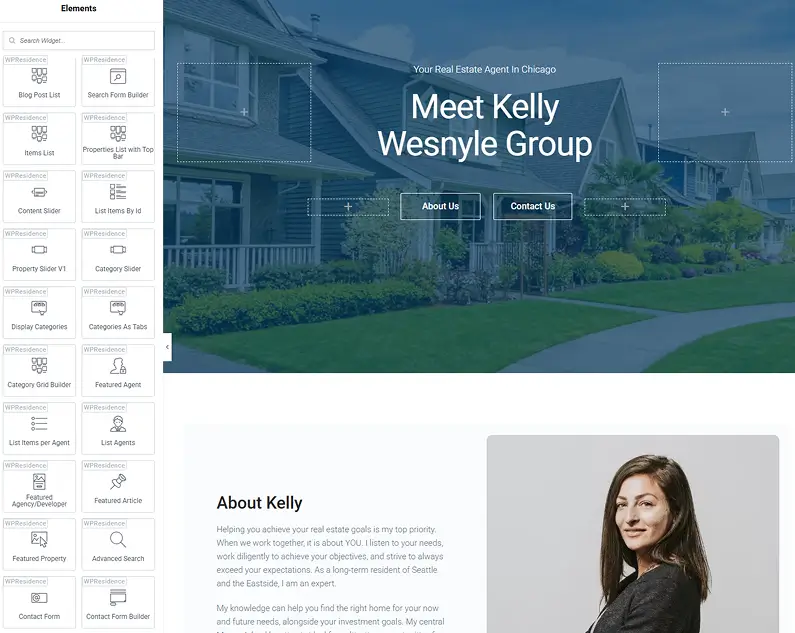
Studio is an Elementor layer, not a fourth builder
You’ll see Studio called “Design Studio,” “WPResidence Studio,” or “Elementor Studio” in different places. They’re the same thing: Studio templates are just Elementor templates under the hood. What Studio bolts on are real estate dynamic tags that pull live property fields (price, status, custom meta) straight into Elementor widgets, plus a template-assignment screen that connects templates to content types and taxonomy terms.
Assign templates by content type and taxonomy, not by URL slug
A Studio template can be assigned to single-property pages, archives, specific taxonomy archives (every “Luxury Condos” listing, for example), agent profiles, agency pages, and the 404 and search-results pages. On the Studio management screen you’ll see your templates listed, each with a dropdown to pick the content type or taxonomy term it applies to. No custom query, no conditional code. One template can govern thousands of listings at once, finer-grained than a theme like Houzez, which leans on one main template site-wide.
Export and import Studio templates between installs
Export a Studio template from one install and import it into another. That’s the backbone of agency multi-site work: build a property template on a staging site, then drop it into each client’s site. Theme Options export and import separately, in under 30 seconds.
Custom 404 and empty-search-results pages
WPResidence treats both as designable templates, not error screens you’re stuck with.
Building the 404 page with Elementor
The theme has built-in support for a custom 404 layout. You assign a Studio or Elementor template to the 404 content type, just like any other assignment. A useful 404 usually carries a branded logo, a short message, a property search form, and a button to featured listings. For deeper control (logging 404 hits, A/B testing, conditional elements), the theme respects a child-theme 404.php override.
Search-results template options and the “no results found” message
A Studio archive or taxonomy template controls what a buyer sees after a filter search, in grid, list, or half-map mode. The “no results found” state is separately customizable: instead of a blank page, you can show featured listings, popular areas, or a shortened search form to pull the visitor back in. You can also place SEO and brand content (a neighborhood description, schema-ready text) before and after the results grid without touching the property loop.
Conditional template assignment by taxonomy applies automatically
The taxonomy-aware system applies to search results too: a search filtered to “Luxury Condos” renders differently from “Vacation Rentals,” automatically. Listings imported through MLSImport are native WordPress posts, so they use the same 404 and search-results templates as hand-entered ones.
Custom fields, taxonomies, and niche market configuration
Real estate isn’t one market but dozens, each needing different fields. WPResidence handles this with a visual custom-fields builder and seven built-in taxonomies, all configured without code.
Visual custom fields builder: no PHP, unlimited fields
The custom fields builder lives inside Theme Options, not in Elementor or Gutenberg. You click “Add Field,” name it, pick a type (text, long text, number, dropdown, checkbox, date), and toggle three visibility settings independently: show in the property details area, in the front-end submit form, and as an advanced search filter. Fields reorder by drag and drop.
Storage is in the database as post meta and options, so a theme update never erases your fields. In our experience, most production sites run 20 to 40 custom fields and 10 to 20 active search filters, and the best-performing search forms keep visible fields to 12 to 15 at most, because past that you’re buying decision fatigue, not flexibility.
Seven built-in property taxonomies
WPResidence registers seven property taxonomies out of the box: Category, Type, Status, City, Area, State, and Features/Amenities. Status and Category together drive the tabbed search interface (For Sale, For Rent, Vacation Rentals). You can relabel any built-in taxonomy through the theme’s translation tools, so “Property Type” becomes “HDB Type” for a Singapore portal, with the slug and every URL left untouched. Extra custom taxonomies get registered through a child theme or CPT UI.
Advanced search builder: 11 ready-made layouts
The advanced search builder offers 11 distinct search-form layouts. Each is built by drag and drop: add, remove, and reorder fields, choose the input type (dropdown, slider, text input, checkbox group, min/max range pair), and set numeric comparison operators. Those operators (equals, greater than, less than, between, like) are what let you build a “Cap Rate at or above 5%” filter without code.
Multi-level location dropdowns support up to four tiers (Country, State, City, Area) plus a radius or geolocation search. Results update over AJAX, and buyers can save searches and receive email alerts. The builder also works with Advanced Custom Fields: mirror the searchable parts as WPResidence custom fields and keep ACF for the rest.
Real-world niche configuration examples
A commercial site adds Cap Rate, NOI, and Zoning Code. A luxury waterfront site adds Boat Dock Length and Waterfront Type. A Singapore portal relabels “Property Type” to “HDB Type” and adds HDB Town Code and Ethnic Quota. A vacation rental adds Minimum Stay and Pet Policy. Every one needs only the visual fields panel and taxonomy renaming, no PHP.
Child themes, hooks, and custom CSS: safe customization through updates
If PHP is not your area, this section is skippable; most WPResidence sites never need a developer and never override these files directly. But when you do reach for code, the path is the standard WordPress one, built to survive updates. The rule that holds it together: configuration lives in the database, and code lives in a child theme, so a parent-theme update can’t overwrite either.
The child theme ships inside the ThemeForest download
A ready-made child theme is included inside the main download. Installation is the normal WordPress routine (upload, activate, start overriding) and takes about one to two minutes. The child theme’s functions.php is the correct, safe home for all your PHP customizations. With it active, the parent’s core files stay untouched, so an update replaces the parent and leaves every customization in place.
Template overrides and pluggable functions
WPResidence follows the standard WordPress template hierarchy. To override a template, copy the file from the parent, mirror its folder path inside the child theme, and edit the child copy. Files you’ll commonly override include single-estate_property.php for the single property page, archive-estate_property.php for the property archive, taxonomy-property_category.php for category archives, the card partials at templates/property_cards/property_card.php and property_unit.php, and single-estate_agent.php for agent pages.
Templates load through get_template_part(), so you can replace just the card markup without copying a whole page. Most core functions are wrapped in an if ( ! function_exists() ) guard, the standard WordPress pluggable pattern, so you can redeclare them in functions.php and the parent version steps aside. Beyond template overrides, WPResidence exposes the standard WordPress action and filter hooks. You can hook into property and lead events, for example to push data to a CRM over REST or a webhook when a listing is saved or a lead comes in. Filters let you adjust things like search query arguments, field labels, and meta keys. All of it lives in the child theme’s functions.php, so core files stay untouched.
Custom CSS panel: cascade, scope, and when to migrate to a file
Theme Options includes a Custom CSS field stored in the database, not in a file. It’s printed in the document head after the main stylesheet and after Elementor and Studio styles, so rules here win the cascade without leaning on !important. The codebase is Bootstrap 5 with CSS custom properties, giving you stable hooks plus predictable class names such as .property_card_wrapper, .advanced_search_shortcode, and body.single-estate_property. Rule of thumb: small site-wide tweaks belong in the panel; once you are past a few hundred lines, move them into the child theme style.css.
When do you actually need a developer?
For most real estate sites, customization stays in settings, Studio, and 20 to 30 lines of custom CSS. A developer earns their fee on a shorter list: registering custom post types beyond the built-in Agents, Agencies, and Developers (use CPT UI or a child-theme register_post_type call), wiring external API integrations, modifying search queries beyond the 11 built-in layouts, or replacing a built-in widget with a heavily modified version (deregister it, then re-register under the same tag). To rename a property URL slug (say, estate_property to homes), there’s no code at all: change it in Theme Options and flush permalinks.
Design system, branding, and white-label options
The most common worry from agencies is that every WPResidence real estate theme site will look like the same demo. It won’t.
450+ theme options and the Import/Export shortcut
The theme options panel covers color palettes, typography, spacing, header behavior, listing-card defaults, payment settings, and label overrides, 450+ settings in all. The Import/Export Theme Options function copies the entire settings payload between installs: configure brand settings once on a staging site, then import into the next project. A REST API exposes properties, agents, taxonomies, and custom fields as JSON endpoints for headless or app builds, and RTL layout is supported for Arabic and Hebrew markets without editing a CSS file.
White-label panel
The white-label panel lets you rename the theme in the admin, swap the admin logo, change the author and URL attribution, hide theme panels from clients, and remove any “powered by” line. You can also lock the settings so a client cannot modify them.
Bootstrap 5 CSS variables and future-proofing
Override a global brand token (a CSS variable) and the change propagates across every Bootstrap-aware component at once. Agencies tend to keep a “starter” CSS file of 50 to 150 lines and reuse it per client, adjusting only the token values. The same approach keeps the responsive layout consistent without per-page fixes.
Demos and starter sites: 50 one-click templates
WPResidence ships 50 one-click demo imports, each bringing content, page templates, demo images, menu structure, and theme settings together. Every demo and Studio template is in the standard ThemeForest purchase, with no upsell tier.
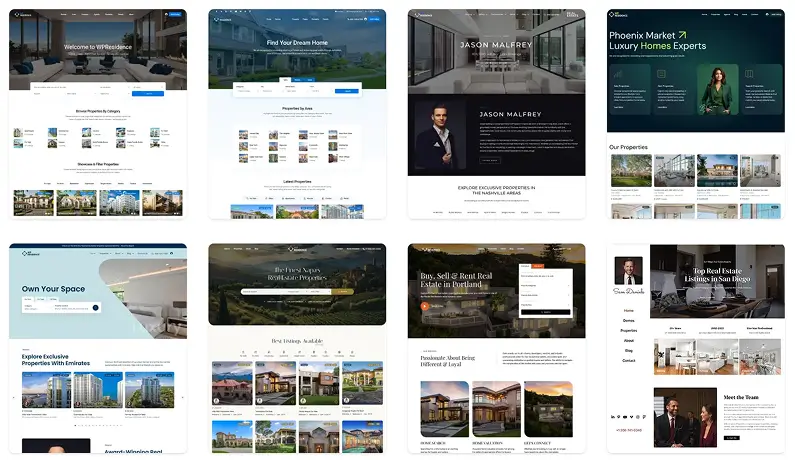
The demos span the full range: solo agent sites, brokerage directories, large portals, vacation rental aggregators, luxury showcases, and commercial catalogs. None are locked, so after import every page opens in Elementor to rebuild or revise.
Start by importing the demo closest to the client’s niche, apply the brand’s color and typography tokens in Theme Options, swap the placeholder images, and start adding listings. You can also combine pieces from different demos, pairing a portal homepage from one with a luxury single-property layout from another, without re-running a full demo import. You can browse the full WPResidence demo library first to see the range.
How MLSImport brings live listings into your custom templates
If you’re feeding the site from an IDX or MLS source, the question is whether all this template work still applies. It does. MLSImport is the IDX plugin solution we recommend for WPResidence, and it uses the RESO Web API standard to bring MLS listings in as native WordPress posts in the estate_property post type.
Because they’re native posts, imported listings inherit every Studio template you assigned: the same V1 to V4 layouts, Property Card Composer designs, search-form layouts, and custom 404 page. There’s no separate configuration for imported versus manual listings.
Each imported listing is a crawlable, indexable page on your own domain. Iframe-based IDX serves content from a third-party domain, and search engines can’t properly index content inside an iframe, so those listings build no SEO equity for your site. Sync runs daily or hourly depending on your hosting. For bulk loads and migrations, the official WP All Import add-on maps CSV and XML data, custom field columns and taxonomy terms included, into native property posts.
Key Takeaways
- WPResidence includes Elementor (free version), WPBakery (bundled), and Gutenberg (since v1.50.1); Elementor Pro is not required for any theme feature.
- Studio is not a standalone builder; it is WPResidence’s real estate template layer on top of Elementor, adding property dynamic tags and per-taxonomy template assignment.
- Custom fields, taxonomy settings, and all 450+ theme options are stored in the database, not in theme files, so they survive every theme update.
- You can assign different single-property, archive, and search-results templates per property category (Luxury, Rental, Commercial) without writing PHP conditionals.
- Most real estate sites stay in settings and Studio; a child theme plus 20 to 30 lines of custom CSS covers the remaining edge cases.
Frequently Asked Questions
Do I need Elementor Pro to use WPResidence’s real estate widgets?
No. Both bundled WPResidence companion plugins run on the free Elementor plugin, so all 212 real estate widgets work without a Pro license. Adding Pro only unlocks Elementor’s own features, not anything the theme adds.
Is WPBakery included with WPResidence, or is it a separate purchase?
WPBakery is bundled in the WPResidence download at no extra cost, so there’s no separate CodeCanyon license to buy. It stays fully active for legacy content, even though current demos and Studio templates are Elementor-first.
Can I run Elementor and WPBakery on the same WPResidence site?
Yes, all three builders can run on one WPResidence install. The changelog regularly ships compatibility patches after major WordPress or builder updates, so mixing Elementor, WPBakery, and Gutenberg stays supported.
If I edit a Studio template, do all properties assigned to it update at the same time?
Yes. Edit and save a Studio template in WPResidence and the change propagates immediately to every listing assigned to it, whether that’s 20 properties or 2,000, with no bulk edit or per-listing re-save.
Can I rename a built-in taxonomy label, for example “Property Type” to “HDB Type,” without code?
Yes. Relabel any built-in WPResidence taxonomy through the theme’s translation tools (Loco Translate, WPML, Polylang, or PoEdit): the database slug stays the same so no URLs break, while the label buyers see changes. No PHP or child theme needed.
Do my custom fields and taxonomy settings survive a WPResidence theme update?
Yes. WPResidence stores field definitions and taxonomy settings as database options and post meta, never in a theme file. A theme update only replaces the parent’s PHP and CSS, so your fields, their search, submit, and details toggles, and your taxonomy terms all carry over untouched.
Do MLS-imported listings automatically use my custom 404 and search-results templates?
Yes. MLSImport saves each listing as a native estate_property post, so it inherits the same Studio assignments, Card Composer layouts, archive templates, and custom 404 page WPResidence applies to hand-entered listings. There’s no separate setup for imported versus manual inventory.
Do I need a child theme for minor CSS changes in WPResidence?
No. The WPResidence Custom CSS field in Theme Options is stored in the database, survives updates, and loads after the main stylesheet so your rules win. Move to a child-theme style.css only once you’re past a few hundred lines or the stylesheet becomes project-specific.
Can I build a site with only Gutenberg, without a page builder?
Yes for content pages. WPResidence has been Fully Gutenberg Ready since version 1.50.1 and adds a “WpResidence Gutenberg Blocks” category to the inserter, which is the lightest option for blog posts and simple landing pages. Property card and single-listing layouts still live in Studio and the Card Composer, which are Elementor-first, so most teams keep one page builder active for the listing side and use Gutenberg for everything else.
Can a non-technical agent edit layouts and add listings without touching code?
Yes. Everyday editing in WPResidence is drag-and-drop: the Property Card Composer, the 11 search-layout presets, and Studio templates all configure visually with no HTML or CSS. Listings go in through the theme’s submit form, and a non-designer can reshape a page in Elementor or WPBakery without code. Code only enters the picture for unusual, project-specific work.
Can I add or rearrange search fields and listing layouts without editing PHP?
Yes. The Custom Fields Builder in WPResidence is drag-and-drop: add, remove, and reorder fields, set their input type, and choose which appear in search, the submit form, and listing details, all from the admin with no PHP. Tabbed search lets you run different field sets for For Sale, For Rent, and Commercial in the same form.
Will a WordPress or builder update break my existing Elementor layouts?
Rarely, and the theme is built to absorb it. The WPResidence changelog regularly ships compatibility fixes after major WordPress, Elementor, and WPBakery updates. Your layouts, field definitions, and 450+ theme options live in the database rather than parent-theme files, so an update replaces only PHP and CSS and leaves your configuration intact.
Can agencies reuse templates and settings across multiple client sites?
Yes. WPResidence Studio templates export and import between installs, and Import/Export Theme Options copies an entire configuration site-to-site in well under a minute. Agencies typically keep a starter setup (headers, footers, card layouts, and a 50 to 150 line CSS file), then clone it per client and reskin, instead of rebuilding from scratch each time.
If you want to see how far the visual tools go before code enters the picture, the fastest path is to open the WPResidence demo library, import the starter closest to your market, and start reshaping a single-property template in Elementor.







