
How a WordPress site built on WPResidence compares with Wix, Squarespace and Placester on data ownership, cost, design, SEO and support.
Last updated: September 28, 2026
By Cris Bean
In the WordPress vs Wix real estate choice, most agents and agencies who want to own their listing data, get each listing indexed by Google and keep costs under their control do better with a self-hosted WordPress site. WPResidence is a real estate WordPress theme for that kind of site. Wix, Squarespace and Placester are hosted platforms: you pay a monthly fee and the platform runs the site.
Self-hosting asks more of you at the start: you choose hosting, set up the site and keep it updated. A solo agent who wants no maintenance and no MLS listings is often better served by a hosted platform. The sections below compare both on data ownership, cost, design, SEO, setup, support and lock-in.
WPResidence is the theme our team builds and sells.
Wix and Squarespace are general website builders, used for portfolios, small shops and more. Neither is built for real estate, so neither has built-in MLS listings; to show them, you add a listings widget or an embedded feed from another service.
Placester is built for real estate agents and brokerages. It is still a hosted platform you pay for monthly, with the same ownership and exit questions as any rented site.
The sections below compare self-hosted WordPress with all three.
On a self-hosted WordPress site, the database and files sit on hosting you pay for, and you can export them at any time. On a hosted platform, the vendor runs the database, and what you can take with you depends on its export tools.
On a WPResidence site, listings, agents, leads and images live in your WordPress database. You can export them with WordPress's own export tool, with a plugin such as WP All Export, or with direct database access.
Hosted platforms often offer a CSV or API export, which may leave out lead history, custom fields or images. You get a copy of some of your data, not the working site.
MLS listings work the same way: MLSImport (sold separately) imports each MLS listing as a property on your site, which you can edit or hide like any other listing.
Theme Options has an export and import tool, so a full site setup copies to a staging site or a new client site.
If a hosted vendor changes prices, closes your account or shuts down, the live site can go offline. WordPress is open source, so you can copy, move and rebuild your site on any host.
WPResidence stores properties, agents and agencies in its own post types and fields. You keep that data and can export it, but moving to another real estate theme means mapping those fields to the new theme's structure, which is a technical job. A plugin-based setup such as WPCasa keeps listing data separate from the theme.
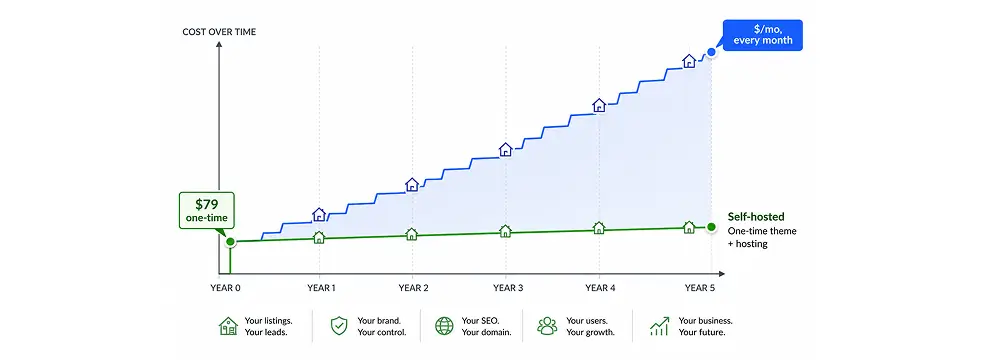
Over three to five years, a self-hosted site usually costs less than a hosted platform, and the difference grows for agencies that run several sites.
WPResidence costs $49 a year for one website, $99 for three and $249 for ten, each with a year of updates and support. For MLS listings, MLSImport costs $49 a month for one MLS, after a 30-day free trial. Hosting is separate and paid to the host you choose.
Two years of WPResidence and MLSImport comes to $1,274 ($49 × 2 years plus $49 × 24 months), before hosting. These costs stay the same when you add listings or agents.
A hosted platform at $49 a month costs $1,764 over three years and $2,940 over five. Across plans of $48 to $149 a month, five years comes to about $2,900 to $9,000. We estimate five years of a self-hosted WPResidence site, with hosting, a domain, plugins and some developer time, at $1,500 to $4,000, of which hosting is often $500 to $1,500.
WPResidence licenses are per website: one for $49 a year, three for $99 or ten for $249. A brokerage running 10 agent sites on a hosted platform at $50 a month each pays $6,000 a year in platform fees.
Several client sites on one server can bring hosting under $20 per site a month, and reusing Theme Options exports and Studio templates saves hours on each new build.
Other platforms change their prices; check each vendor's current pricing.
On a self-hosted WPResidence site you control every layout, down to a different property page per category. Most hosted platforms give every listing the same template and limit code access.
Theme Options covers layouts, colors, labels, search and paid listings. WPResidence also has 212 Elementor widgets for real estate that show live property data such as price, address, map and agent contact. They work with the free version of Elementor, and the theme also works with WPBakery and the block editor.
With WPResidence Studio you design a property page template and apply it to all listings, to one listing or to one category, such as luxury homes, rentals or land, without code.
The Custom Fields Builder adds your own property details as short text, long text, number, date or dropdown fields. Each field can be a filter in the advanced search, next to the price slider, dropdowns, feature checkboxes and address autocomplete.
Each listing can show Walk Score, nearby places from Yelp, video from YouTube, Vimeo or TikTok, and a virtual tour embed such as Matterport.
WPResidence has 50 ready-made demos. Each one imports a full site with menus, pages, widgets and sample listings in one click, so a freelancer can import a demo, rebrand it and hand over a working first version in one to two days.
MLS listings imported as WordPress posts get their own pages on your domain, which Google can crawl and index: every address, description and feature list is part of your site. Listings shown in an iframe or an external feed are usually credited to the feed's source, so they add less to your own site's search presence.
MLSImport, our MLS plugin, syncs listings every hour through the RESO Web API (the real estate industry's standard data feed) from 800+ MLS feeds in the US and Canada. Each listing becomes a property with its own public URL.
Each city, area and category also gets its own listings page, and you can add your own text above the listings on those pages; see city and neighborhood pages for local SEO. For meta titles, descriptions, sitemaps and structured data, use an SEO plugin such as Yoast SEO or Rank Math.
If you move from a hosted platform, keep your URLs where you can, set 301 redirects for the ones that change (the Redirection plugin is one option), submit a new sitemap in Google Search Console and watch for crawl errors in the weeks after launch.
Setup takes longer on day one than a hosted builder, and gets faster with each build.
Start by importing one of the 50 demos: it loads a full site with menus, pages, sample listings and widgets in one click. Then set your logo, colors, map provider, search and payments in Theme Options. A first version comes together in one to two days.
We estimate a freelancer's first WPResidence build at 25 to 40 hours. Building the same custom fields, search and templates from generic WordPress tools adds about 30 to 80 hours.
From the second or third project, exported Theme Options and saved Studio templates bring setup down to a few hours per site.
WPResidence suits agents who know WordPress or work with a freelancer or agency. Hosting, domain and DNS setup, plugin updates and security are the site owner's job, where a hosted platform does them for you. If you can't do this routine maintenance or pay someone to, a hosted platform is the better start.
WPResidence support runs through private tickets at care.wpestate.org, answered by our in-house team. Every license includes a year of support and updates, and you can renew at any time. When support ends, the site keeps working as before.
A hosted platform's support covers its own system, and the vendor decides the roadmap, staffing and prices. Theme support covers one product, so answers go straight to how to set up your site.
WordPress runs about 43% of all websites (W3Techs), so hosts, plugins and developers are easy to find, whatever any single vendor decides.
A hosted platform can change its terms, add fees or close, and no other provider can run your site. With WordPress, you can move to another host or developer at any time.
WPResidence gets regular updates with new features; see what's new in WPResidence. The theme is built on Bootstrap 5, so menus, sliders and layouts adapt to phones. For hosting and speed, see the WPResidence speed and hosting guide.
Moving to another theme or platform takes technical work: keep your URLs, set 301 redirects for any that change, submit a new XML sitemap in Google Search Console and watch for crawl errors after launch. You plan the move yourself, with no vendor to ask.
The main differences in one table.
Each row is a trade-off. Which best real estate website platform suits you depends on the rows that matter most to you.
| Feature | WPResidence (self-hosted WordPress) | Hosted platform or site builder |
|---|---|---|
| Data ownership | You own the database, files and exports | The vendor runs the database; CSV or API export |
| Platform fee | $49 a year license, no platform fee; hosting paid monthly; MLSImport $49 a month if you need MLS listings | About $48 to $149 a month (estimate) |
| 5-year cost (estimate) | $1,500 to $4,000, with hosting, plugins and some developer time | $2,900 to $9,000+ |
| Design control | Studio templates per category; 212 Elementor widgets | One template for all listings; limited code access |
| MLS listings | MLSImport (sold separately): listings imported as posts, synced every hour, $49 a month | Varies; often an iframe or embedded feed |
| SEO | Every listing is a page on your domain; use the SEO plugin you prefer | Iframe feeds add little to your own domain |
| Setup | Slower on day one; faster from the second build | Fast to start; less room to customize |
| Support | Private tickets at care.wpestate.org; a year included | Vendor help desk; the vendor sets roadmap and staffing |
| Maintenance | The site owner handles hosting, backups, updates and security | The vendor handles hosting and updates |
| Lock-in | Low: open source and your own data; moving is technical work you control | Higher: the vendor sets terms, prices and export |
| Best fit | Agents and agencies who want control, SEO and several sites | A solo agent who wants no maintenance |
Hosted platform prices are estimates; check each platform’s current pricing.
A hosted platform such as Wix, Squarespace or a real estate platform is the better choice for some agents.
That is the solo agent who wants to launch in under a day, needs no MLS listings or property search, and doesn't want to handle hosting, plugin updates or security. A hosted platform does all of that for you.
It also fits an agent who needs a one-page bio site with a contact form and a few featured listings, which a site builder delivers in hours.
An agent or brokerage without a developer, freelancer or agency to help should start on a hosted platform until that help is in place.
For vacation rentals with nightly prices, booking calendars and iCal sync, WPResidence is the wrong theme: WPRentals, our rental theme, is built for bookings.
The main points of this page.
On a self-hosted WPResidence site, the database, files and domain are yours to export or move at any time.
WPResidence is $49 a year for one website. We estimate five years self-hosted at $1,500 to $4,000, against $2,900 to $9,000+ for a hosted platform.
Studio templates per category, 212 Elementor widgets and your own custom fields in search.
MLSImport imports MLS listings as pages on your own domain, synced every hour.
Hosting, backups and updates are the site owner's job; a hosted platform does them for you.
A solo agent who wants no maintenance and no MLS listings is better served by a hosted platform.
There is no platform fee. The license is $49 a year for one website, with a year of updates and support, and the site keeps working if you don't renew. Hosting is paid to your host, and MLSImport costs $49 a month for one MLS if you want MLS listings.
Yes. When a hosted subscription lapses, the live site usually goes offline, and you keep only what the platform lets you export, often a CSV of listings. A self-hosted WPResidence site keeps running as long as you pay for hosting.
Self-hosting means managing hosting, plugin updates, backups and security. If you can't do that or pay a freelancer or agency to, a hosted platform is the more practical start.
Yes. The site is standard WordPress files and a MySQL database: copy the files, move the database, update wp-config.php and switch DNS. No vendor permission is needed.
Agencies with several sites, freelancers who build client sites, and agents who want their MLS listings indexed on their own domain. It suits teams who know WordPress or work with someone who does.
Yes, with hosting sized for the site. MLSImport syncs listings every hour; for large inventories, use dedicated or managed WordPress hosting rather than a shared plan.
Keep your page URLs where you can: WPResidence lets you set the words in listing and city URLs, so you can often match the old structure. Add 301 redirects for URLs that change, for example with the Redirection plugin, submit a new XML sitemap in Google Search Console and watch for crawl errors in the weeks after launch.
More guides: how WPResidence handles MLS and IDX integration, WPResidence demo import and WPResidence compared with other real estate themes.