Lead Generation

Real estate website lead generation with WPResidence

See how WPResidence handles real estate website lead generation: native forms, agent routing, HubSpot sync, and third-party CRM connections explained.

wpresidence.net
WPResidence property listing page showing the built-in property inquiry form in the sidebar beside agent contact details
6
native form types, no plugin
<30 min
to connect HubSpot
10-20
agents on one install
1-3s
listing page load

Last updated: June 30, 2026

By Cris Bean

Full disclosure: WPResidence is the theme our team builds and sells, and MLSImport is our own IDX add-on. This guide reflects how we built the lead pipeline, so weigh it with that in mind.

Do you want your real estate website lead generation working the day the site goes live, capturing every inquiry, routing it to the right agent, and landing it in your CRM, without stitching together a separate form plugin, a connector, and a HubSpot add-on first?

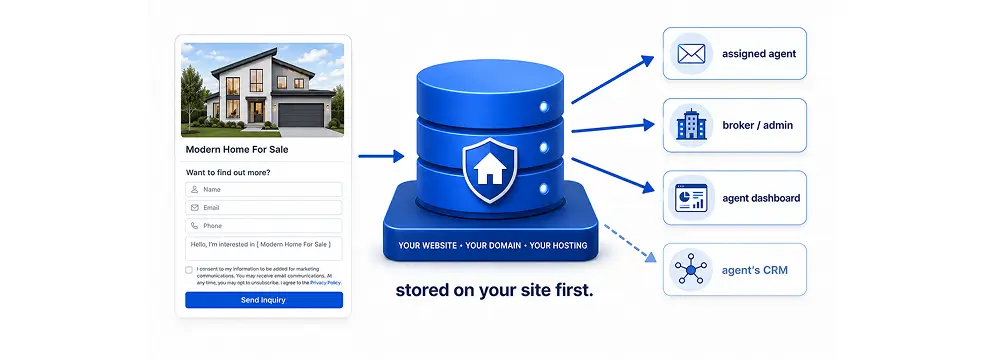
WPResidence handles real estate website lead generation natively, out of the box. The theme ships with native forms (property inquiry, agent contact, Schedule-a-Tour) that go live the moment you install it. Every submission is stored as a structured record in the built-in WP Estate CRM, then routed by email to the listing’s assigned agent. From there it can push outward: HubSpot connects natively with a single API key, in real time, with the property title and URL attached. Other platforms (Salesforce, Follow Up Boss, Zoho, Pipedrive) connect through form plugins, Zapier, or the theme’s WordPress hooks. And because WPResidence is self-hosted WordPress software, every lead lives in your own database, on your hosting, not inside a vendor’s closed SaaS.

  1. What lead capture forms come built into WPResidence?
  2. How WPResidence routes inquiries to the right agent
  3. The WP Estate CRM: real estate CRM for WordPress
  4. How does the native HubSpot integration work?
  5. Connecting Salesforce, Follow Up Boss, and other CRMs
  6. Email marketing and automated lead nurturing
  7. GDPR, data ownership, and what you actually control
  8. MLS-imported listings and the shared lead pipeline
  9. Speed, mobile UX, and plugin compatibility
  10. Measuring real estate website lead generation ROI with WPResidence
  11. Key Takeaways
  12. Frequently Asked Questions
Lead Capture

What lead capture forms come built into WPResidence?

6 native form types, no plugin
What lead capture forms come built into WPResidence?
Forms
Six native form types included
Schedule-a-Tour date & time picker
AJAX submit with spam protection
WhatsApp, call & email CTAs

Real estate website lead generation should work from install day, and with WPResidence it does. Beyond a standard property inquiry form, WPResidence ships a dedicated Schedule-a-Tour form with its own date and time picker and an in-person versus video tour selector, a specific form type that is not standard equipment in most real estate theme packages.

Inquiry, scheduling, and contact form types

WPResidence gives you six distinct native form types out of the box:

Forms can appear in several spots on a listing (sidebar, below the details, near the gallery), so you can test placement without a page builder. To extend the default fields, the native Elementor Contact Form Builder adds custom fields, dropdowns, checkboxes, and consent boxes. Every placement still triggers the same email routing and HubSpot sync, so nothing slips through.

Spam protection and AJAX submission

The native forms submit over AJAX, so there's no full page reload on send. Every form carries a WordPress nonce, and you can switch on Google reCAPTCHA, honeypot fields, and required-field enforcement. That stack is why the forms are production-ready without a separate security plugin.

Quick-contact CTAs and forced registration

Some buyers won't fill out a form. WPResidence covers that with per-agent quick-contact channels: a WhatsApp click-to-chat number that opens a pre-filled chat, a click-to-call link, and an email button. You set these per agent profile, and they show up near the key listing details where a hot lead is already looking.

The other side of capture is gated access. The theme can require registration after a configurable number of listing views (say 2, 3, or 5), and it can gate actions like saving favorites or unlocking extra gallery photos. Treat this as a lead-conversion mechanism, not just access control: every forced registration creates a new contact record.

Lead Routing

How WPResidence routes inquiries to the right agent

2 inboxes notified per lead

A lead in the wrong inbox is a lead you've already lost. On a multi-agent site, WPResidence routes automatically, so the right person gets the inquiry without anyone playing email traffic cop.

Assigned-agent routing and double notification

Every property listing is tied to an assigned agent account in the WordPress admin. When a visitor submits any inquiry form on that listing, the theme auto-routes a notification email to two places: the assigned agent's registered email address and the site administrator.

There's also an optional global "watch" email field in Theme Options. Drop a central broker or office address in there and every inquiry, regardless of which property it came from, copies to that inbox. The assigned agent also sees the lead inside their front-end dashboard inbox.

A lead is never silently swallowed. If the agent misses the email or it lands in spam, the dashboard copy survives. Agents work their leads from the front-end dashboard, so they never need WordPress admin access to do their job.

Routing for MLS-imported leads and category splits

Listings imported through MLSImport, our own IDX add-on for WPResidence, can be assigned to specific agent or agency accounts. So a lead from an imported MLS property routes exactly like a lead from a manually created listing: same email, same dashboard, same CRM entry.

Want leads split by listing category (rentals to one team inbox, sales to another)? Build that on the agent-assignment system plus a connector or a small custom hook. And if you ever swap the native forms for Contact Form 7 or Gravity Forms, you can keep agent routing by using the documented agent-reference tags in the form's email template.

Built-in CRM

The WP Estate CRM: real estate CRM for WordPress

50-100 leads/month before a cloud CRM
How does lead routing work
CRM
Every lead stored locally first
Full contact, source & form record
Status labels, notes and assignment
Role-based front-end agent dashboard

The WP Estate CRM is what makes a WPResidence site behave like a lead system, not just a listing catalog. WPResidence stores every lead locally first, then pushes it out to your external CRM. If an external API call to HubSpot or Salesforce fails mid-submission, the lead is already safe in your database. Any setup where the external CRM is the only record of a submission can lose a lead silently when the API is unavailable. This one keeps a local copy regardless.

What each lead record contains

Each lead in the WP Estate CRM stores a full record: contact name, email address, phone number, message text, the source property URL, the form type (inquiry, agent contact, tour request), and the date and time of submission. On top of that, every record has editable status labels (New, Contacted, Closed), a free-text notes field, and an assignment field linking the lead to a specific agent.

This data lives in your own MySQL database, on your hosting, not in a vendor's SaaS.

Front-end agent dashboard and role-based visibility

Agents log into the site's front-end dashboard. No wp-admin access required. From there, each agent sees only the leads tied to their own listings, while admins and brokers see every lead across every agent.

The dashboard gives you status filters (last 24 hours, last 7 days, last 30 days) and a private messaging inbox for replying to prospects. That role-based visibility is what lets a 10 to 20 agent brokerage share one installation without agents peeking at each other's pipeline.

When to graduate to a cloud CRM

As a rough guide, the built-in WP Estate CRM is comfortable for solo agents and small teams processing up to roughly 50 to 100 leads per month. In practice, per-agent keys and role-based visibility scale to around 10 to 20 agents without a rebuild.

Once your lead volume or your automation needs climb past that, the move is to run a cloud CRM (HubSpot, Salesforce, Follow Up Boss) in parallel with the built-in CRM, not instead of it. The local CRM stays as your safety net, so a failed external call never costs you a lead. You can start on the built-in CRM and add an external integration later, without rebuilding the site.

HubSpot Sync

How does the native HubSpot integration work?

<30 min to connect HubSpot

This is the integration question agents ask most, and the HubSpot connection needs zero connector plugins.

Setup in under 30 minutes

Open Theme Options or the WP Estate CRM settings panel, paste a single HubSpot API key, and save. From that point, every native form submission fires a real-time sync to HubSpot. The payload includes the contact fields (name, email, phone) plus property context: the listing title and the property URL. That context is what lets HubSpot automation fire property-specific sequences without you tagging anything by hand.

Plan for usually under 30 minutes start to finish, including testing. The full walkthrough lives in the WPResidence documentation.

Note: The native HubSpot sync fires only on WPResidence's own form submissions. If you replace the native forms with Contact Form 7 or Gravity Forms, the sync stops, so you'll need to wire HubSpot through that plugin's own HubSpot add-on instead.

Per-agent HubSpot keys and bonus HubSpot tooling

On a multi-agent site, each agent or agency user can enter their own personal HubSpot API key in their user profile. When a visitor inquires about one of that agent's listings, the lead goes to the agent's own HubSpot account while still logging in the shared WP Estate CRM. The broker's site-level key captures everything; the agent's key routes their share.

That's a useful pattern for franchise offices where independent agents want their own pipeline but the brokerage still needs a complete record. Separately, the official HubSpot WordPress plugin adds pop-ups, live chat, and visitor tracking on top of the native sync.

CRM Integrations

Connecting Salesforce, Follow Up Boss, and other CRMs

Zapier plus Make, hooks & REST API

HubSpot gets the native treatment, but plenty of agents are locked into Salesforce or Follow Up Boss and aren't switching. WPResidence connects to almost any CRM, and the connection method just depends on the platform.

Salesforce via Web-to-Lead or connector plugins

You've got two paths to Salesforce. First, embed a Salesforce Web-to-Lead form inside a WPResidence page using the native Elementor form builder or a shortcode, pasting in the Salesforce-generated HTML. Second, use a WordPress-to-Salesforce connector plugin from the plugin directory that maps WPResidence form fields to Salesforce contact or lead fields.

Email-parsing CRMs: Follow Up Boss and LionDesk

Follow Up Boss and LionDesk both use a lead-capture email model: each account gives you a dedicated inbox address, and anything forwarded there is parsed into a lead. Wire it by dropping that capture address into WPResidence's BCC or watch-email field, and every inquiry forwards automatically. For field-level mapping instead of raw email, use Zapier.

No-code automation with Zapier and Make

For no-code and low-code connections, WPResidence's connector documentation covers Zapier, Make (formerly Integromat), and similar connectors. And if you'd rather keep contacts inside WordPress entirely, FluentCRM does exactly that.

Any of these can trigger on form submission to push a lead to kvCORE, Zoho CRM, Pipedrive, or any CRM with a webhook endpoint. A single submission can even fan out to several destinations through one multi-step Zap.

Custom hooks and REST API for developers

WPResidence fires action hooks on every form submission your site receives, so your child theme or a small plugin can catch that event and POST the full lead payload (contact name, email, phone, message, source property URL, property post ID, and assigned agent data) to any CRM's REST API. The hooks and Zapier guide walks through the patterns.

When you build a custom integration, add error logging to every API call, so a failed request shows up in a log instead of silently dropping the lead.

Note: Store API keys and authentication tokens in the WordPress options table or define them as constants in the wp-config.php file. Never hard-code keys into form templates or theme files.

There's also an optional REST API module with token-based authentication (Postman collections ship in the WPResidence documentation) that exposes property, user, and lead data for external apps and custom dashboards. Some documentation suggests a 15-minute polling cadence, but treat that as illustrative, not a documented spec.

Nurturing

Email marketing and automated lead nurturing

3 saved-search alert frequencies

WPResidence splits nurturing work cleanly: the theme handles transactional emails and property-match alerts, while external tools handle bulk campaigns and drip sequences.

Mailchimp and ActiveCampaign setup

Mailchimp connects through the "Mailchimp for WordPress" plugin. Install it, enter your Mailchimp API key, build a list opt-in form, and drop the shortcode into any page, widget area, footer, or property sidebar. Apply tags like "Property Inquiry" or "Tour Request" at the form level so you can segment by lead type later.

ActiveCampaign connects through its official plugin or by pasting the platform's embed-form HTML into a page or footer field, with the tracking script in WPResidence's header or footer code fields. Pair either platform with a connector to push every submission into a follow-up automation. MailPoet is a lighter self-hosted alternative. The email tools setup guide covers each one.

Saved Search alerts: built-in prospect re-engagement

The most underrated native nurturing tool in WPResidence is the Saved Search system. A visitor saves a search, say "3-bedroom homes under $400,000 in Brooklyn," and the theme sends an automatic email alert whenever a new listing matches. Alert frequency is configurable: instant, daily, or weekly. It runs on WordPress cron, so this job needs no third-party email service.

The system email templates are editable in Theme Options, so you can customize the subject and body for signup confirmations, submission acknowledgements, and new-listing alerts. Add the property city or listing type to the subject line to improve inbox sorting and open rates. Set a domain-based "from" name and address to reduce spam-folder placement.

Compliance

GDPR, data ownership, and what you actually control

EU data-residency ready

For EU-based agencies and privacy-conscious brokers, the compliance question is the one that blocks the buy. So let's be specific about what WPResidence covers natively, what depends on a hosting choice, and what still needs an external tool or a lawyer.

Consent tooling on native forms

WPResidence includes a cookie-notice bar toggle in Theme Options. You can add consent checkboxes with configurable opt-in text to any native form, using the Elementor Contact Form Builder or the theme's form settings, and link those checkboxes to your privacy policy page. For many small agencies, that's enough to run a GDPR-aware site without extra plugins.

On maps, the theme supports OpenStreetMap and Mapbox as privacy-friendly providers that avoid the extra Google cookies tied to the Google Maps embed, which matters for EU sites. One honest caveat: running a formally GDPR-compliant operation requires legal review beyond any theme's tooling. Treat these as technical tools, not legal advice. The GDPR and consent guide goes deeper.

EU residency and consent-gated CRM transfer

If you need EU-only data residency, two decisions follow: host WordPress on an EU-based server, and if you use HubSpot, enable HubSpot's EU data-center option in your account settings.

For any external CRM, a documented best practice is to gate the push on the consent checkbox: only transmit a lead when the visitor has actually ticked the field, which creates a recorded permission trail. Document every external service that receives personal data (HubSpot, Zapier, Mailchimp) in your privacy policy. Security primitives include SSL enforcement, WordPress nonces on every form, sanitized inputs, and the standard role and permission model.

CSV export and data portability

Every lead in the WP Estate CRM exports to CSV from the CRM admin panel. Property records export through WP All Export, and HubSpot contacts export from HubSpot independently. Because WPResidence is self-hosted, your agency owns the WordPress files and database outright, so backing up or migrating to a new host carries all your leads, contacts, and property content with it.

MLS listings imported via MLSImport become native WordPress custom post type entries. So if you later change IDX providers, those property posts stay in your database instead of vanishing the way a vendor's iframe feed does the day you cancel. There's more on content and data ownership when changing vendors.

MLS / IDX

MLS-imported listings and the shared lead pipeline

hourly MLS sync via RESO Web API
MLS and IDX integration
MLS/IDX
RESO Web API feed import
Native posts, not iframes
Same forms, routing and CRM
Hourly configurable sync

If you're pulling inventory from an MLS, the question you actually care about is whether IDX leads behave like every other lead, or whether you end up with a second, disconnected system to babysit. With WPResidence, it's the former.

MLSImport, the brand-default IDX and MLS add-on for WPResidence, connects to a broker's MLS data feed using the RESO Web API. Each imported listing is written into the WordPress database as a native custom post type property entry, not an embedded iframe from an external IDX vendor.

Because each MLS listing is a real WordPress post, your imported properties use the same WPResidence listing templates, the same property search and map modules, and, critically, the same contact inquiry forms, agent routing logic, and WP Estate CRM pipeline as a listing you created by hand. Leads from an MLS property route to the assigned agent's email, dashboard, and HubSpot account just like any other listing.

Sync frequency is configurable and can run as often as hourly. The pipeline scales fine with large imports; your hosting resources, not the theme, set the practical ceiling on listing volume. For anyone who's used iframe-based IDX and lost lead capture after switching vendors, that "native post, not iframe" design is the single biggest difference. One source notes iHomefinder and IDX Broker can be integrated via shortcodes as third-party IDX alternatives, but MLSImport is the recommended path for RESO-based access.

Performance

Speed, mobile UX, and plugin compatibility

1-3s listing page load

A slow mobile site suppresses conversions no matter how good your forms are, so it's fair to ask whether WPResidence is fast enough and plays nicely with the plugins you already run.

Performance targets and page-weight guidelines

A full listing page loads in roughly 1 to 3 seconds, with the faster 1 to 2 second end reachable on good hosting with caching enabled and lazy-loading active. As a rule of thumb, aim for about 2 to 3 MB and under about 90 HTTP requests per listing page.

The front-end is built on Bootstrap 5 (a mobile-first grid), images lazy-load natively, and the architecture is Cloudflare-compatible. Listings are standard WordPress custom post types with clean URL slugs, so they're fully indexable, and the theme emits RealEstateListing structured data and works cleanly with Yoast SEO and Rank Math. The theme speed and mobile guide shows how to test your own demo.

Key plugin coexistence notes

Three plugin categories need specific configuration alongside WPResidence.

Note: For WP Rocket, LiteSpeed Cache, and SG Optimizer, exclude the currency-preference and favorites cookies from the cache and bypass the cache entirely for logged-in users, the front-end agent dashboard, and checkout pages. Skip this and saved searches and favorites look stale or break.

The theme runs a built-in caching layer of its own, and the update cadence is roughly 2 to 4 major releases per year on the 5.x line, with detailed changelogs and child-theme support. The plugin compatibility guide has the full configuration checklist.

Measurement

Measuring real estate website lead generation ROI with WPResidence

1-3 inquiries per 100 visitors

Traffic is a vanity number. What pays your bills is real estate website lead generation you can trace to closed deals, and WPResidence gives you enough to answer that, as long as you set up the measurement before sending traffic.

Start by deciding which lead actions to measure:

Tag each CTA button as a GA4 event or a Google Tag Manager trigger, set your thank-you page as a goal conversion in GA4, and add call-tracking numbers (through a call-tracking service) so phone leads stay separate from form leads.

WPResidence also includes native property view counters in the dashboard and on listing cards, a lightweight interest signal you can compare against GA4 traffic to spot high-interest, low-inquiry gaps. To close the loop from lead to revenue, use CRM tags (buyer, seller, tenant, investor) plus UTM attribution to tie each lead to its channel, then track lead-to-appointment-to-closing ratios over time. The lead-tracking guide covers the GA4 wiring.

As a rough planning figure, a new real estate site with moderate traffic might track 1 to 3 form inquiries per 100 visitors in its early months. That comes from a single source, so treat it as an illustrative starting point, not a guarantee. The right benchmark depends on your traffic mix, market, and listing inventory.

WPResidence keeps the full lead pipeline under your control on your own hosting. The practical next step: test a live WPResidence demo to see the forms and dashboard in action, or install the theme on a staging site and connect a free HubSpot account to validate the native sync before going live.

WPResidence isn't the right fit for everyone. It's self-hosted, so you and your host own the hosting, backups, and updates; if you want a fully managed product with no server to run, a hosted listing platform is a better starting point than any WordPress theme. There's no built-in MLS feed either, so budget for MLSImport or a third-party IDX. And the built-in CRM has a real volume ceiling, while any CRM without a WordPress connector or webhook means custom code.

If you want to go deeper, the WPResidence site documents each of these pieces, from the inquiry forms and CRM dashboard to MLS import and localization.

At a glance

Key Takeaways

Each niche real estate website type demands a different audience focus, data schema, and proof of authority.

WPResidence ships six native lead capture form types out of the box, including a Schedule-a-Tour form with date/time picker and in-person versus video selection, with no form plugin required.

Every inquiry logs in the WP Estate CRM first, so a lead is never lost even if an external API call to HubSpot or Salesforce fails mid-submission.

The built-in WP Estate CRM suits teams handling up to roughly 50 to 100 leads per month; higher volumes warrant a parallel cloud CRM, not a replacement.

Each agent on a multi-agent site can connect a personal HubSpot account with a separate API key, routing their listing inquiries to their own pipeline.

MLSImport writes RESO Web API listings as native WordPress posts, so they share the same forms, routing, and CRM as manual listings.

Frequently Asked Questions

Does WPResidence include built-in contact forms, or do I need to install a form plugin?

No separate form plugin is needed. WPResidence ships with a native property inquiry form, agent contact form, Schedule-a-Tour form, and others, all active right after installation. The Elementor Contact Form Builder adds custom fields, dropdowns, and consent boxes without a third-party plugin.

Can I use the built-in WP Estate CRM and an external CRM at the same time?

Yes, and it's the recommended setup. Every submission logs in the WP Estate CRM first, then WPResidence pushes the same data to HubSpot or another CRM in parallel. If the external API call fails, the local copy stays intact and nothing is lost.

What happens to HubSpot sync if I replace native forms with Contact Form 7?

The native sync stops firing, because it's tied to WPResidence's own form submission events. To keep HubSpot connected when you use Contact Form 7, install the separate CF7 HubSpot add-on plugin and map the fields inside CF7's own settings.

How do Follow Up Boss and LionDesk receive leads from WPResidence?

Both platforms give you a dedicated lead-capture email address. Paste that address into WPResidence's BCC or watch-email field, and every inquiry is forwarded and parsed into the CRM automatically. A Zapier connection is the alternative when you want field-level mapping instead of raw email.

How many leads per month can the WP Estate CRM handle before I need a cloud CRM?

The built-in CRM in WPResidence is comfortable for roughly 50 to 100 leads per month, which covers a solo agent or a team of around 10 to 20 agents. Past that volume, or once you need heavy automation, run a cloud CRM in parallel.

Can each agent on a multi-agent site connect their own separate HubSpot account?

Yes. Each agent profile in WPResidence has a personal HubSpot API key field. Inquiries on that agent's listings sync to their individual HubSpot account while also logging in the shared WP Estate CRM, so the broker keeps a complete record.

Where should I store API keys for custom CRM integrations?

Store keys and tokens in the WordPress options table or define them as constants in the wp-config.php file. In WPResidence, never hard-code them into form templates, theme files, or JavaScript. Add server-side error logging to any custom call so a failed request doesn't silently drop a lead.

Does WPResidence include an MLS or IDX feed, or do I need a separate service?

WPResidence doesn't include MLS data access on its own. MLSImport is the brand-recommended add-on; it connects to your MLS through the RESO Web API and writes imported listings as native WordPress property posts. iHomefinder and IDX Broker are documented as third-party IDX alternatives.

Can I run a GDPR-compliant real estate site without hiring a developer?

For many small agencies, yes. WPResidence includes a cookie-notice bar toggle, consent checkboxes on forms, and support for privacy-friendly maps like OpenStreetMap and Mapbox. EU data residency also means choosing EU-based hosting and enabling HubSpot's EU data centers. Formal legal review stays separate.

How fast can I start capturing leads after installing the theme?

On the same day. Import one of the 45+ ready-made demos (per WPResidence's listing), set the notification email address and an optional HubSpot API key in Theme Options, and the native forms go live and route submissions right away. No custom development is required.