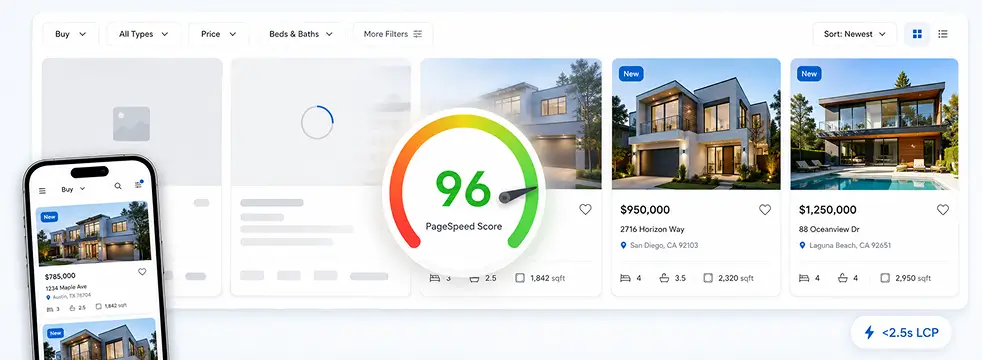
WPResidence scores 90 to 98 mobile PageSpeed when configured right. Get the hosting specs, caching stack, and image settings for real estate site speed.
By Cris Bean
Last updated: July 1, 2026
Real estate WordPress site speed comes down to two levers: your hosting and your images. Get both right and a WPResidence site loads fast with green Core Web Vitals even with a large catalog; get them wrong and it crawls, whatever theme you run. When a listing site feels slow, the cause is almost always the host or the photos, not the theme, and that is the difference between a cheap fix and a rebuild you don’t need.
This guide walks the fix in the order you would actually apply it: the server spec checklist, the built-in speed controls, hosting tiers by listing volume, the image workflow, the caching stack, and the five-year cost picture. The PageSpeed section below has the concrete before-and-after numbers.
Full disclosure: we build and sell WPResidence, so everything here reflects direct experience with the theme, including the parts where it isn’t the right tool for the job.
Real estate sites are architecturally different from a brochure site, and three things compound to slow them down.
First, a large catalog means many database queries per page load, because every listing grid, filter, and taxonomy page rebuilds from the database. Second, property photos are naturally big, with originals often at 2 to 5 MB each. Third, map-heavy search pages fire many simultaneous API and database requests at once.
Put those together and a page feels slow. But when a WPResidence site is slow, the cause is almost always underpowered hosting or uncompressed images, not the theme. That distinction matters, because one is a cheap fix and the other is a rebuild you don't need.
The clearest tell is Time to First Byte, or TTFB. On weak shared hosting, Lighthouse can swing 10 to 20 points between two runs a minute apart, because the server response is the bottleneck and the theme is just waiting on it.
WPResidence (and comparable options like Houzez or RealHomes) all get accused of bloat at some point. Real estate theme performance is a configuration and infrastructure problem, not a feature-count problem. The next sections cover what WPResidence does about it by design, and what you do on top.
All of the controls below live under Theme Options » Advanced » Site Speed, a panel of toggle switches, one per setting. Here's what each does and when to enable it, no code needed.
In that Site Speed panel, you'll see a toggle for the theme's internal cache. Switch it on and it stores property loops, taxonomy queries, listing grids, cards, and sidebar widgets, so the database isn't rebuilt on every page view.
It refreshes roughly every 4 hours, which keeps the server from rebuilding the same queries all day. The honest tradeoff is staleness: after a property sells or a price changes, a cached listing or search result can lag reality for up to that window, so when a specific change has to show immediately, clear the cache manually instead of waiting for the cycle. At a few dozen listings you won't notice much difference either way.
Once your catalog reaches several hundred to a few thousand properties, this cache is what stands between you and a crawling search page. It's distinct from a page cache plugin: this one targets real-estate-specific database queries directly.
Map pages are one of the heaviest load points on any listing site. In the same panel, you'll see a switch labeled "Read map pins from file." Flip it on and the theme writes your markers to a static file instead of running a live database query on every map load.
Once you have hundreds or thousands of pins, that one switch is the difference between a snappy map and dozens of lookups per view. Nearby, you'll find a max-pins-per-map limit, marker clustering (grouping nearby pins at low zoom), and on-demand loading that only pulls pins for the visible area.
Turn these on before your map feels slow, not after.
Each image in a property-card slider is another HTTP request, multiplied across every card on an archive page. Further down the panel sits an option to limit cards to a single static thumbnail instead of a multi-image slider, which cuts requests sharply on listing grids.
Native WordPress lazy loading (active in WP 6.7 and later) works alongside the theme's own lazy-loaded property slider, which serves small thumbnails and defers off-screen images. That deferral protects your LCP on gallery-heavy single-listing pages.
Near the bottom of the panel are toggles for CSS and JS minification. Paired with server-level gzip or Brotli compression, that trims asset sizes by roughly 20 to 40 percent.
You can also disable modules you don't use (payments, multi-currency, and similar) to reduce the code and queries loaded on every request. Minification is complementary to a caching plugin, not a replacement for one.
Each niche real estate website type demands a different audience focus, data schema, and proof of authority.
Mobile and desktop scores diverge a lot, and that’s normal. Mobile Lighthouse throttles the simulated connection and CPU, so desktop always looks better. The goal isn’t a perfect 100; it’s green Core Web Vitals on both, which is a reachable target.
Here’s the documented arc as you stack each optimization on a WPResidence site:
| Stage | What was done | Mobile PSI | Desktop PSI |
|---|---|---|---|
| Default | Shared hosting, no tuning | 50 to 70 | Much higher |
| Theme cache only | Site Speed internal cache enabled | 70 to 85 | High |
| Theme cache + page cache | Added a page cache plugin | 85 to 95 | Very high |
| Full stack | Above + image compression/WebP + CDN | 90 to 98 | 99 to 100 |
Desktop scores run consistently higher than mobile at every stage; only the full-stack desktop ceiling of 99 to 100 is cited because earlier-stage desktop numbers vary by host and page type.
A documented example shows the shape of it: a WordPress real estate site comparable in page weight to a WPResidence listing moved from 37 to 87 on mobile and 75 to 98 on desktop after image compression, WebP conversion, deferred JavaScript, a page cache plugin, and a CDN. It’s an illustrative case, not a live benchmark you can click through to, but the pattern is the ordinary one: nothing exotic, just the standard stack applied in order.
At the full-stack stage, your Core Web Vitals targets are LCP under 2.5 seconds, CLS under 0.1, and INP in the “good” range. The large-catalog proof point holds too: a WPResidence demo of about 2,500 properties loads in roughly 4 seconds on decent shared hosting with the theme cache on.
Time to First Byte is the wild card. On slow shared hosting, Lighthouse can swing 10 to 20 points from one run to the next, and no amount of theme tuning compensates for a server that’s slow to respond.
Once the theme hands off a cached response, it’s waiting on the host. So the rule is simple: if your scores bounce between runs, fix the host first, then tune the theme.
This is the section to print and hand to your host, or paste into a support ticket before you sign up. These are WPResidence's documented server requirements, and they're requirements, not gentle suggestions.
The two limits people underestimate are memory and execution time. Set them too low and you get import failures, property-save timeouts, and half-loaded maps. Many cheap shared plans quietly cap memory at 128M or 256M and set execution time well below 600 seconds, which is exactly the setup that fails an MLS import partway through.
WPResidence documentation names a few tested hosts: WP Engine (managed, with its EverCache full-page cache), InMotion Hosting (strong PageSpeed grades), and Kinsta (edge caching). Any host meeting the spec above works. And if your current host refuses to raise PHP limits, that's your signal to migrate, not to strip features out of the theme.
Hosting requirements scale with your listing count, import frequency, and traffic, not with the theme. That's good news, because a standard WordPress site moves hosts with a files-and-database export, not a rebuild. Our hosting partners page maps to the tiers below.
Who it suits: brochure and micro sites with a few dozen to a few hundred listings, and solo agents not yet driving sustained traffic. What breaks first is concurrency, since shared hosting slows noticeably past roughly 20 to 30 simultaneous visitors.
Budget is under $15 a month. Viable for launch with the theme cache enabled, but not a long-term home for a growing catalog.
Who it suits: agencies and teams with a few hundred to a few thousand listings, regular MLS imports, and steady traffic. Managed plans give you 2 to 4 vCPU, 4 to 8 GB RAM, server-level caching, and a control panel built for WordPress.
Budget runs $15 to $30 a month for a small plan and $25 to $40 for busier ones. MLSImport syncs run far more reliably here than on shared. An InMotion Hosting WP 2000S plan ran about 2,300 listings stably, and a Cloudways DigitalOcean 1 GB instance handled several thousand with a page cache plus Redis or Memcached.
Who it suits: high-volume portals with thousands of MLS listings, frequent full syncs, or sites expecting 20,000 or more monthly visits. Budget is roughly $40 to $80 and up per month.
You get dedicated resources, Redis object caching, Varnish or Nginx FastCGI, and on-demand scaling. A well-configured managed plan with a CDN can handle 20,000 to 50,000 monthly visits; VPS is the next step after that.
Upgrade at roughly 1,000 listings or a steady 10,000-plus monthly visits; MLS import timeouts usually signal the need before page-load time does. Upgrading adds resources, not a rebuild. A standard WordPress site moves by files plus a database export and import, and your theme configuration carries over intact.
Here's a limitation stated plainly: WPResidence does not compress images itself. That's by design. A dedicated image optimization plugin does the job better and gives you more control than a theme ever could, so pair one with the theme from day one.
The theme's documentation points to three optimizers that all work cleanly: Smush, EWWW Image Optimizer, and ShortPixel. Our go-to is EWWW, since it's free to start and handles bulk conversion from one screen. Compression plus WebP conversion cuts image weight by roughly 50 to 80 percent, depending on your source files.
On one real build, EWWW shrank about 60 property photos by roughly 80 percent with no visible quality loss. Enable lossy JPEG compression, run the plugin's bulk-convert tool across your existing library, then switch on auto-optimization so every new upload is processed automatically.
Upload originals at 1,600 to 2,000px wide. The theme registers multiple thumbnail sizes: roughly 400 to 600px for cards and 1,200 to 1,600px for galleries.
Visitors mostly see thumbnails, which land around 50 to 150 KB, not the originals. Aim to keep each full listing photo under about 200 KB after compression.
On count, 15 to 25 optimized images per listing is the sweet spot; a single listing with 50 uncompressed 4 MB originals will drag down any page it appears on. Membership packages can cap photo counts per plan, and a 2 to 5 MB upload cap per file is a sensible guardrail.
WPResidence includes dedicated fields for floorplans, PDFs, virtual tours, and video, each shown in tabs, accordions, or lightboxes and loaded on demand rather than inline. Compress floorplans like any other image; PDFs are download links, not embedded viewers.
For video, embed a YouTube, Vimeo, or Matterport link rather than self-hosting, since a self-hosted video walk-through would overwhelm any shared host. For 3D tours, paste the provider's iframe snippet and the theme displays it in the right tab.
If outside photographers upload for you, the theme supports an upload-only vendor role, meaning upload capability without permission to edit others' posts.
A CDN offloads 60 to 90 percent of your static file traffic, and a well-configured setup reaches roughly a 90 percent cache-hit rate on image requests. The free starting point is Cloudflare's free tier.
For high-volume libraries, BunnyCDN or a similar object-storage-backed CDN stays inexpensive, and an S3-style offload moves files off the web server entirely. To see optimized images in context, our property listing demos are a good reference.
Caching on a real estate site is layered: the theme's internal cache handles real-estate-specific database queries, and a page cache plugin stores the full HTML output. Neither replaces the other.
A page cache plugin stores the fully rendered HTML output, after the theme builds the page from database queries, and serves it on later requests without invoking PHP. Full page caching drops PHP generation time from roughly 800 to 1,000ms down to under 200ms.
Four caching plugins are confirmed compatible:
An object cache layer (Redis or Memcached, database-level caches your host can usually switch on from its control panel) adds another tier, and server-level Varnish or Nginx FastCGI adds one more. The highest-performing setup is a managed host with server-level cache, plus WP Rocket or LiteSpeed Cache, plus a Redis object cache.
These exclusions are mandatory; skipping them causes bugs that look like ghosts. Find the "Never Cache" or equivalent section in your caching plugin's settings and add each one.
Security firewalls like Wordfence sometimes flag the theme's AJAX calls (saved search, favorites, front-end submission). Run the firewall in learning mode for 24 hours after launch, then whitelist the flagged endpoints.
Properties are standard WordPress custom post types, so any backup plugin works. The challenge is file size: hundreds of listings times 10 to 20 images each adds up to several GB. Run daily database backups and nightly full-file backups at low-traffic hours, and lean on host snapshots.
Yes, though not in the way people hope. Core Web Vitals (LCP, CLS, and INP, the metrics Google uses to score page experience) are a confirmed ranking signal. Green scores don't guarantee rankings, but failing Core Web Vitals can suppress them, and that matters most in competitive local markets where the other signals are nearly equal.
Speed is only part of the SEO picture, though, and not the biggest part. While we're on rankings, the larger structural lever is indexability. WPResidence stores MLS and IDX data through MLSImport, our in-house integration, as native WordPress posts with crawlable URLs such as /city/property-type/property-title/. Search engines index every individual listing, and RealEstateListing structured data is supported through Yoast and Rank Math. Compare that to iframe-based IDX solutions, where listing content lives inside a frame that crawlers cannot read. That single architectural difference determines whether your listings can rank at all, independent of page speed.
For mobile visitors, aim for first-screen load under 3 seconds on a mid-range 4G connection, the search bar visible without scrolling on a 375px-wide screen, map or filter response around 300ms, and primary CTAs within about 100px of the bottom edge for comfortable thumb reach. WCAG 2.1 AA accessibility is achievable with proper configuration, which matters if you serve enterprise or public-sector clients.
Speed is worth paying for, so let's talk about what you're actually paying. The theme license is a one-time payment of about $79, which sits in the usual $69 to $89 band for real estate themes.
It includes lifetime updates and 6 months of support, with optional renewal at roughly 30 percent of the price. Bundled in are a page builder and slider worth around $80 to $150 separately, with no mandatory paid plugins for a fully functional portal.
One recurring cost is easy to hide, so we won't: a working listing site needs an IDX or MLS data layer, and that carries an ongoing fee whichever platform you choose. MLSImport, our in-house integration, is a paid data service like any other feed, and IDX add-ons on a WordPress build typically run anywhere from nothing up to a few hundred dollars a year depending on your MLS and volume. So the honest comparison is not "$79 one-time versus $150 a month." It's your full WordPress stack, license plus hosting plus IDX data, against the SaaS platform's all-in subscription.
On that basis: a self-hosted WPResidence build (theme, hosting, and typical add-ons) usually lands around $300 to $800 in year one on shared hosting, or $200 to $1,200 on a solo managed plan, and roughly $1,500 to $4,000 over five years. SaaS real estate platforms run $50 to $200 and up per month, which is about $2,900 over five years at $48 a month and $9,000 or more at $150. A custom portal built from scratch starts at $20,000 to $50,000-plus for the initial build alone.
The difference isn't that one side is free of recurring cost. It's that on the WordPress side your recurring spend is hosting and data volume you control, while the theme license stays a one-time payment, whereas a SaaS platform keeps billing every month whether you add listings or not.
Tiny brochure sites. A solo agent who wants to show four listings and a contact form does not need a full real estate portal. A simpler theme, or a Squarespace or Wix-tier solution, is a better fit.
Very unusual or enterprise workflows. Agencies with bespoke enterprise CRM integrations, complex multi-brand architectures, or heavy backend customizations that go well past what filters and hooks can reach may get more value from a custom-built solution over time.
Non-WordPress stacks. If your dev team is already committed to a React or headless architecture and wants to avoid WordPress entirely, WPResidence isn't the tool. It's a WordPress theme, and it expects to live on WordPress.
If none of those three describe you, and you're building a listing-heavy real estate site on WordPress, you're squarely in the group WPResidence is built for.
Speed is an infrastructure and configuration problem, not a theme-selection problem: get the host right, enable the built-in controls, add a page cache plugin and image optimizer, and let a CDN carry your static traffic. Do that in order and real estate WordPress site speed becomes a feature you can point to, not a worry. Real estate theme performance follows the same logic on any theme: the fundamentals are hosting, images, and caching.
You might also want to check out:
Each niche real estate website type demands a different audience focus, data schema, and proof of authority.
A tuned WPResidence site consistently scores 90 to 98 mobile PageSpeed with LCP under 2.5 seconds after adding image compression, a page cache plugin, and a CDN.
When a WPResidence site is slow, the cause is almost always underpowered hosting or uncompressed images, not the theme itself.
The internal cache, map-pin file mode, lazy loading, and slider limits all live in Theme Options » Advanced » Site Speed and need no code to enable.
Serving 15 to 25 compressed photos per listing, each under 200 KB and offloaded through a CDN, cuts listing-page image weight by roughly 50 to 80 percent.
Five-year self-hosted TCO runs about $1,500 to $4,000 versus $2,900 to $9,000-plus for comparable SaaS real estate platforms.
Yes, on a solid shared or managed plan. The four steps that move a stock install into green territory are the internal cache, a page cache plugin, WebP image compression, and a CDN; the arc table above shows where each one lands you. The one thing tuning can't rescue is a host with a slow TTFB underneath, so pick the plan before you chase the score.
Hosting and images, in the vast majority of cases. Here's a quick diagnostic: run Lighthouse twice a minute apart. If the two scores disagree by a wide margin, that's an unstable server response, not a theme problem, and no theme setting will fix it. Only go hunting for a plugin conflict once the site still underperforms on a host with a healthy, steady TTFB.
Documented WPResidence minimums: WordPress 6.7+, PHP 8.0+, MySQL 5.6+ or MariaDB, 512M memory limit, 600-second max execution time, and 64M upload and post size. Many cheap shared plans cap memory at 128M or 256M and set execution time well below 600 seconds, which fails MLS imports. Check these values before signing up; any host meeting the spec works.
Several thousand on a decent shared plan, once the internal cache and read-pins-from-file are on. The practical trigger to upgrade is around 1,000 listings or a steady 10,000-plus monthly visits, and in practice failing MLS imports flag the ceiling before page speed does, so watch your import logs, not just PageSpeed.
Yes, because they do different jobs. The theme cache targets real-estate-specific database queries, property loops, map pins, and taxonomy data, while a page cache plugin stores the finished HTML and serves it without touching PHP at all. Run only the theme cache and every visitor still triggers a PHP render; run only the page plugin and your uncached search queries stay heavy. They're complementary layers, not substitutes.
No, it doesn't, and that's deliberate. Run a dedicated optimizer instead; Smush, EWWW, and ShortPixel all hook cleanly into the galleries and sliders. Let one handle lossy compression plus WebP and it does the heavy lifting the theme intentionally leaves alone, which also means you keep control of the quality-versus-size tradeoff rather than the theme deciding it for you.
15 to 25 optimized shots is the sweet spot, enough for a buyer to judge a home without bloating the page. The more useful trick is enforcement: set membership photo caps on front-end submissions, because a single agent dropping 50 full-size originals into one listing is the usual reason a fast catalog has one stubbornly slow page.
A few known friction points. Firewalls like Wordfence may flag the WPResidence AJAX calls (saved searches, favorites, submission), so run the firewall in learning mode for 24 hours, then whitelist the flagged endpoints. For backups, properties are standard custom post types, so any backup plugin works; the challenge is file size, since hundreds of listings times 10 to 20 images means several GB. Keeping these plugins configured correctly ensures your real estate WordPress site speed gains aren't undermined by cached-page bugs.