Real Estate SEO

Real estate website SEO: what your theme handles

"WPResidence handles indexable listings, clean URLs, and local pages. Here's the clear split between what the theme does and what a plugin adds."

wpresidence.net
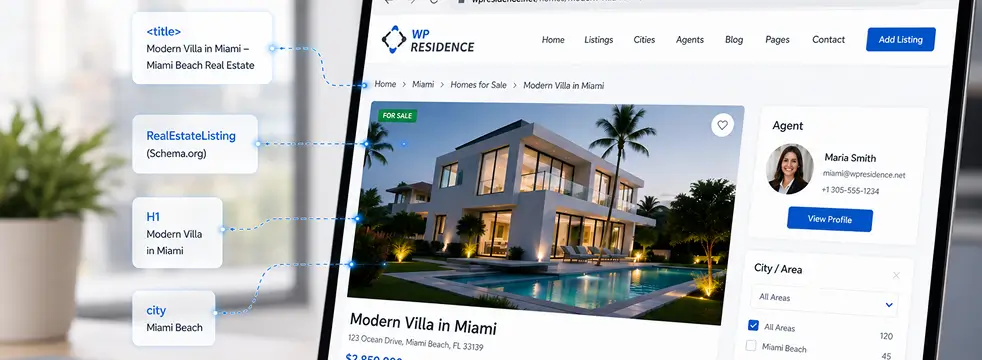
WPResidence real estate WordPress theme property search results page with city taxonomy filter and native listing URLs: real estate website SEO structure overview
90–95+
PageSpeed, 2,500 listings
200–500
words per city page
301
redirect map on migration
4–6 wks
typical Wix migration

By Cris Bean

Last updated: July 1, 2026

Disclosure: WPResidence is our own theme. We’ve tried to write this as honestly as useful, including the section on when it’s not the right fit.

Real estate website SEO comes down to four things: listings that search engines can index one by one, clean human-readable URLs, load times fast enough to pass Core Web Vitals, and dedicated local pages for the cities and neighborhoods you serve.

A real estate WordPress theme like WPResidence handles the structural half of that work. Every property is stored as a native WordPress post with its own URL, City, Area, and State taxonomies become real archive pages, and a property-level cache plus a Bootstrap 5 base keep large catalogs quick.

What the theme doesn’t do is generate meta descriptions, XML sitemaps, or JSON-LD schema. Those come from an SEO plugin, and Yoast SEO or Rank Math are the two documented options.

So the split is simple. The theme builds the structure and the speed, and the plugin completes the on-page signals.

  1. The real estate website SEO split
  2. Indexable property listings and clean URLs
  3. Does WPResidence output real estate schema?
  4. Sitemaps, meta descriptions, and canonical tags
  5. City and area pages: local real estate website SEO at scale
  6. Can WPResidence handle thousands of listings without slowing down?
  7. Building topical authority with a real estate content strategy
  8. Migrating from a closed builder without losing rankings
  9. When WPResidence is not the right fit
  10. Key Takeaways
  11. Frequently Asked Questions
At a glance

The real estate website SEO split: what WPResidence handles, what you add

Each niche real estate website type demands a different audience focus, data schema, and proof of authority.

WPResidence handles the structural and speed layer of real estate website SEO (indexable posts, clean URLs, breadcrumbs, taxonomy archives, and a property cache) but it deliberately does not output meta descriptions, XML sitemaps, or JSON-LD schema. Those always come from a plugin.

That line is the whole article in one sentence. Most SEO write-ups tell you to “just install an SEO plugin” and leave the division fuzzy.

Here’s the exact division, row by row, so you know which control lives where. Plugins like Yoast SEO, Rank Math, AIOSEO, or SEOPress handle the meta layer and the schema.

SEO responsibility WPResidence handles natively Requires an SEO plugin
Page title element Registers title-tag support; one H1 per listing; logical H2/H3 hierarchy Custom title formats and template variables
Meta descriptions Not output by the theme Custom meta description per page and listing
Clean URLs and permalinks CPT permalinks, slug rename, breadcrumb HTML Optional permalink plugin for city/type/name patterns
Breadcrumbs Native breadcrumb HTML trail (Theme Options toggle) BreadcrumbList JSON-LD schema
XML sitemaps Not generated Full sitemap for properties and taxonomy archives
Structured data / JSON-LD Not hard-coded; field markup kept neutral for mapping All schema output (RealEstateListing, LocalBusiness, BreadcrumbList)
Canonical / noindex / robots Default WP query behavior, so rules apply cleanly The actual canonical, noindex, and robots controls
Open Graph / Twitter Card Does not inject its own Social preview tags
Speed (cache, lazy load, Bootstrap 5, AJAX search, map caps) Yes, at theme level Page-cache plugin is complementary
City/Area/State archives Yes, real indexable taxonomy archives Index/noindex plus meta per archive
Image alt text Pulls from WP Media Library Not needed
Mobile-first responsive layout Yes, native Not needed

WPResidence owns the parts that are painful to bolt on later (the data structure, the URLs, the speed), and steps back from the parts a dedicated plugin does better. See how the structural side fits together on the WPResidence theme features overview.

Indexable Listings

Indexable property listings and clean URLs

1:1 native post per property
Indexable property listings and clean URLs
Listings
Native estate_property post per listing
Clean, human-readable permalinks
Rename slug in Theme Options
No iframes, each page crawlable

Every property in WPResidence is stored as a native WordPress post, the estate_property custom post type, with its own crawlable URL and readable HTML text rather than an iframe, so search engines can index each listing on its own.

That's the foundation the rest of your real estate website SEO stands on. A default property permalink looks like /properties/modern-villa-in-miami: title-based and human-readable out of the box.

If you want something cleaner, head to Theme Options » Permalinks and rename the estate_property base to something like "homes" or "listings," then flush your permalinks so the change takes effect. There's also an optional toggle to include the property ID in the URL when you want unique, stable slugs at scale.

Want the fuller /city/property-type/name/ pattern, like /denver/homes-for-sale/123-main-street/? That's possible by pairing the city taxonomy with CPT permalinks and a permalink plugin. It's not the native default, so treat it as an add-on.

Photo galleries, videos, and 360-degree tours all sit inside the listing, and their alt text is pulled straight from the WordPress Media Library, one less thing to wire up.

Native posts vs iframe IDX: what the difference means for crawlability

Iframe-based IDX can limit what search engines crawl, because the listing content lives inside an embedded frame rather than in your page's own HTML. MLS Import takes the other route: it connects through the RESO API and stores each imported listing as a native estate_property post, so every property is individually indexable like a hand-entered one.

iHomefinder is another named feed provider using the same native-post approach. Feed subscription fees are third-party and separate from the theme license, so budget for them alongside your hosting.

Listing lifecycle and archive freshness

A single property page targets essentially one intent: that specific address. The broad "homes for sale in [city]" queries are the job of your taxonomy and city pages, not the individual listing, which is why the local copy above matters so much.

The theme also supports a global listing duration with auto-expiration: expired listings drop out of public search, trigger an owner email, and need a paid package to relist.

The SEO payoff is subtle but real. Your public archives keep showing only live, accurate listings, which is a trust signal for both buyers and crawlers.

Structured Data

Does WPResidence output real estate schema?

3 schema types apply

No. WPResidence does not hard-code any JSON-LD schema markup. The theme keeps its property field output consistent and neutral so an SEO plugin can map those fields to structured data without fighting the theme.

This surprises people who assume a "real estate theme" bakes in rich snippets automatically. It doesn't. Because the theme registers title-tag support and stays out of the meta layer, there are no duplicate tags or conflicts when your SEO plugin takes over.

The theme's job is to output clean, predictable fields (price, address, features, description) in the same place every time. The plugin's job is to read those fields and emit the schema.

Mobile-first indexing is the reason responsive design and schema matter together here: Google predominantly reads the mobile version, and WPResidence renders the same structured content there as on desktop.

Which schema types apply to real estate pages

Three schema types cover almost everything a property site needs, and none of them require a PHP template edit:

You can still add an FAQ block to a listing or guide, but treat it as on-page content: Google restricted FAQ rich results to authoritative government and health sites, so FAQ schema on a property page no longer earns a rich snippet.

Rank Math, AIOSEO, and SEOPress cover LocalBusiness and BreadcrumbList; Yoast SEO Premium is the one named for RealEstateListing. Pick one plugin for all of them rather than mixing tools that fight over the same output.

Meta & Sitemaps

Sitemaps, meta descriptions, and canonical tags

100% meta layer via plugin
Sitemaps, meta descriptions, and canonical tags
Meta & Sitemaps
Meta descriptions from the plugin
XML sitemaps plugin-generated
Canonical, noindex, robots controls
Noindex utility and thank-you pages

WPResidence registers title-tag support and stops there. XML sitemaps, meta descriptions, canonical tags, noindex rules, and Open Graph previews all come from whichever SEO plugin you install.

Skip the plugin and nothing breaks, but you lose control of your snippets. Without a meta description, Google falls back to whatever on-page text it finds, which is rarely the sentence you would have chosen.

Your XML sitemap is plugin-generated too, listing both properties and taxonomy archives so crawlers find every page. Canonical, noindex, and robots rules are plugin-driven as well; because the theme sticks to default WordPress query behavior, those rules apply cleanly with nothing to override.

A practical move: noindex your utility pages. Dashboard, thank-you, and zero-result search pages waste crawl budget, so tell the plugin to keep them out of the index.

For multilingual sites, WPML handles per-language URLs, hreflang attributes, translated property slugs, and multilingual sitemaps (generated by your SEO plugin). WPResidence also supports reCAPTCHA on lead forms to keep spam off your contact and lead-gen pages.

Local Pages

City and area pages: local real estate website SEO at scale

200–500 words above the grid

WPResidence ships with City, Area, and State taxonomies that become real, indexable archive URLs rather than filter parameters, and the taxonomy template builder added in version 5.3 lets you design each page's layout without touching PHP.

A filter parameter is a dead end for local SEO; a real taxonomy archive is a landing page you can rank. Because every City, Area, and State term gets its own URL, you can build out /miami/, /coral-gables/, and so on as genuine destinations.

The template builder controls what sits above the property grid on each of those pages, so you're not stuck with a bare grid. You can pair the taxonomy with CPT permalinks and a permalink plugin for the combined /city/property-type/name/ pattern when you want it.

Agent profile pages help here too. Each agent gets a bio, photo, testimonials, and a permalink like /agent/jane-smith/.

Named agents with real profiles give those city pages more to stand on in local search. Browse the WPResidence demos to compare layouts.

Writing the local copy that makes a city page rank

A city page ranks on its copy, not its grid. Plan for roughly 200 to 500 words of unique local copy placed above the property listings on each taxonomy archive.

That copy has to be genuinely useful to someone searching "[city] homes for sale": what the market is like, which neighborhoods matter, what a buyer should expect. Thin pages that show only a listing grid rarely rank for competitive city queries, no matter how many listings they hold.

Internal links from your blog posts into these city pages add weight to those city pages and pass relevance where you want it.

Ranking timeline expectations for local pages

Name-level pages usually appear in results within about two to six weeks. Neighborhood and city pages typically take three to nine months to establish competitive rankings, and richer pages may need six to twelve months to outrank entrenched thin competitors.

These are typical time ranges, not promises or minimums, and they move with your market's competitiveness and how good your local copy is.

Speed at Scale

Can WPResidence handle thousands of listings without slowing down?

~4s 2,500-listing load
Can WPResidence handle thousands of listings without slowing down?
Speed
Theme cache plus page cache
~4s load at 2,500 listings
Bootstrap 5, lazy load, CDN
Map pin caps, AJAX search

Yes, with the right setup. According to WPResidence's own developer benchmark, a demo site with roughly 2,500 properties loads in about 4 seconds on a dedicated server and reaches a PageSpeed score in the 90 to 95+ range when both the theme cache and a page-cache plugin are active. Treat that as a tuned benchmark on good hosting, not an automatic result on any server.

The scores depend on your setup, so it helps to separate two contexts. A live WPResidence demo scores modestly on mobile, in the mid-60s or higher as a rough guide, because a public demo runs shared infrastructure and full feature loadouts.

Your own optimized production site, with caching and solid hosting, reaches the 90 to 95+ range, and 90+ mobile is achievable even at around 1,000 listings with compressed images. Don't blur the two: the demo is a showroom, your tuned site is the real target.

Speed comes from two caching layers that stack. The theme-level cache stores rendered property card HTML (the units in grids, lists, and search), refreshes every 4 hours, and can be cleared manually after a bulk import; you enable it under Theme Options » Site Speed.

On top of that, a page-cache plugin such as WP Rocket or WP Fastest Cache serves full static HTML to anonymous visitors and search bots. You need both.

The front end is built on a Bootstrap 5 base, and lazy loading plus CDN support help with Largest Contentful Paint. Core Web Vitals like Cumulative Layout Shift still come down to your own execution: size your images, reserve space for anything that loads late, and avoid font swaps. WPResidence's own estimate is that caching plus image optimization can cut load times by 30 to 60% on image-heavy catalogs, though that's a developer estimate, not a guarantee.

Map performance and AJAX search at scale

WPResidence caps map pins (for example, 200 pins) on half-map and full-map pages. A "read from file" option loads coordinates from a static file instead of hitting the database on each load.

The advanced search runs on AJAX, and an optional custom handler can bypass slower default WordPress query paths. PHP 8+ and a VPS or solid shared host round out the recommended setup.

You can pressure-test all of this on the WPResidence live demo sites.

Content Strategy

Building topical authority with a real estate content strategy

12–24 quality posts / year

A real estate site that publishes only property listings competes on listing content alone. A site that also publishes buyer guides, neighborhood overviews, and financing primers captures search traffic at every stage of the search, from first research to ready-to-buy.

WPResidence includes the full WordPress blog engine, posts, pages, categories, tags, and archives, with dedicated blog list and single templates. It works with Elementor and WPBakery, so your guide and landing pages can look like more than a default post. There's no hard theme limit on how many posts or pages you publish; your hosting is the practical ceiling.

On cadence, aim for roughly one to two quality posts per month, about 12 to 24 per year. Quality matters far more than volume here; one genuinely useful neighborhood guide beats four thin posts.

A steady two to three pieces per month can add roughly 24 to 36 new keyword targets over a year, but only if each piece earns its place. Link those posts internally to your city taxonomy pages to add weight to those city pages.

A built-in CRM and lead log ties leads to listings, with saved searches and email alerts, plus HubSpot CRM integration for blog lead attribution.

Safe Migration

Migrating from a closed builder without losing rankings

4–6 wks typical migration time
Migrating from a closed builder without losing rankings
Migration
Full 301 redirect map mandatory
Build and test on staging
Lower DNS TTL before cutover
WP All Import maps listings

Moving from Wix, Squarespace, or a proprietary real estate platform to WordPress takes about 4 to 6 weeks for a site under 100 listings and 20 pages, and the single step that most often causes real ranking loss is skipping the 301 redirect map.

That 4 to 6 week figure is typical, not universal. Small sites under 50 listings often wrap in 2 to 4 weeks, while large or messy datasets can stretch to around 3 months.

WPResidence's own migration guidance notes that some users report roughly 40% organic growth in about six months after moving off Wix, assuming pages are rebuilt properly and redirects are set; treat that as a user-reported outcome, not a guaranteed result. That guidance similarly notes some users report load times cut by more than half after leaving Wix, again on decent hosting rather than as a rule.

Build on staging, lower your DNS TTL to about 300 seconds before cutover, and switch at a low-traffic time. WPResidence is a one-time purchase with lifetime theme updates and no renewal fee, so the multi-year cost often lands below a monthly SaaS bill.

The 301 redirect map is not optional

A full 301 redirect map from every old URL to its new equivalent is mandatory to preserve link equity. The Redirection plugin, free on WordPress.org, handles the mapping at scale.

Skip it and old URLs return 404 errors, and you bleed ranking signals until the redirects are in place. Adding them late recovers much of the equity once Google recrawls, but recovery is partial and slow, so it's far cheaper to map the redirects before cutover than to chase them afterward. Monitor Google Search Console for 404s in the weeks after DNS cutover so you catch anything the map missed.

Importing existing listings with WP All Import

The official WP All Import WPResidence Add-On maps CSV or XML columns to the theme's property fields, saves the mapping for future runs, can auto-create agent user accounts, and supports hourly MLS sync. Importing roughly 1,000 listings takes hours of processing on a tuned server, not weeks. The multi-week timeline above isn't the import itself; it's the rebuild, the redirect mapping, content QA, and staging around it.

What if your old platform has no export tool? Then you're looking at manual recreation or a developer script, which is slower and usually the main cost driver; once your data is in WordPress, future migrations are straightforward.

MLSImport and iHomefinder are the named IDX feed providers, and their feed fees are third-party and separate from the theme license.

When To Skip

When WPResidence is not the right fit

$50–100 /mo hosting at scale

WPResidence is a self-hosted WordPress theme, which means it's not the right choice if you want a fully managed platform where hosting, updates, and support are bundled into one monthly bill.

It requires a separate WordPress hosting account, a domain, and ongoing self-management: plugin updates, backups, and security are on you.

The included support period is 6 months from your ThemeForest license purchase. After that, support is purchased separately or handled through the community.

It's not the best fit for a site with fewer than about 30 listings and no plans to grow, because the feature set is built for real volume. RealHomes is named in comparisons as a rival theme with leaner code that feels quicker on small sites, and for a small site where raw speed is the only concern, it's a legitimate alternative to evaluate.

It's also the wrong model if you specifically want an all-in-one SaaS product like Wix or Squarespace with real estate extensions, since it trades subscription convenience for ownership. On cost, budget roughly $50 to $100 per month for hosting once you reach thousands of listings, plus third-party IDX feed fees and some initial development time.

At a glance

Key Takeaways

Each niche real estate website type demands a different audience focus, data schema, and proof of authority.

WPResidence stores every property as a native WordPress post with a crawlable URL, not an iframe, so each listing is individually indexable.

The theme does not output meta descriptions, XML sitemaps, or JSON-LD schema; those require an SEO plugin such as Yoast SEO or Rank Math.

City, Area, and State taxonomy archives rank as local landing pages when paired with roughly 200 to 500 words of unique above-grid copy.

WPResidence's own benchmark puts a 2,500-property site at a 90 to 95+ PageSpeed score with the theme cache plus a page-cache plugin on good hosting.

A full 301 redirect map is the most important migration step; skipping it bleeds link equity until you add the redirects, and a late fix recovers only part of it.

Frequently Asked Questions

Does WPResidence need an SEO plugin?

Not for basic indexing, since your listings are crawlable without one, but a plugin is strongly recommended. WPResidence handles structure, URLs, breadcrumbs, and speed, while Yoast SEO, Rank Math, AIOSEO, or SEOPress adds meta descriptions, XML sitemaps, canonical tags, and schema. Without a plugin, Google falls back to whatever on-page text it finds for your snippet.

Will each property listing get its own indexed page?

Yes. In WPResidence each property is a native estate_property post with its own clean URL and readable HTML: price, address, features, and images. Listings imported via the MLS Import RESO path also become native posts, not iframe embeds, so each is crawlable and indexed individually.

Can I add real estate schema without editing PHP?

Yes. WPResidence keeps its property field output neutral and consistent so an SEO plugin can map those fields to JSON-LD with no template edits. Yoast SEO Premium is the documented tool for RealEstateListing schema, while Rank Math, AIOSEO, and SEOPress cover LocalBusiness and BreadcrumbList, configured once for all your listings.

Can WPResidence handle thousands of listings without slowing down?

Yes, with the right setup. WPResidence's own developer benchmark puts a roughly 2,500-property demo at about 4-second loads on a dedicated server, with a 90 to 95+ PageSpeed score when the theme cache and a page-cache plugin (WP Rocket or WP Fastest Cache) are both active. Good hosting is the other variable the benchmark assumes.

Do I still need a caching plugin if the theme has its own cache?

Yes, because the two layers do different jobs: the WPResidence theme cache stores rendered property card HTML and refreshes every 4 hours. A page-cache plugin such as WP Rocket or WP Fastest Cache serves full static HTML pages to anonymous visitors and search engine bots. They stack rather than overlap, so keep both active for the top PageSpeed numbers.

How long does migration from Wix or Squarespace take?

About 4 to 6 weeks for a typical site under 100 listings and 20 pages, and up to roughly 3 months for large or complex datasets. The biggest variable is whether the old platform offers a clean data export; if not, manual recreation adds weeks. Plan the redirect map and staging for your WPResidence move before you touch DNS.

Do I really need 301 redirects when leaving a closed builder?

Yes, every old URL that carried ranking or link equity needs a 301 redirect to its new equivalent on your WPResidence site. Skipping this creates 404 errors that bleed those ranking signals until you fix them; redirects added later recover much of the equity on recrawl, but only partially, so it's worth mapping them before cutover. The free Redirection plugin on WordPress.org handles the URL mapping at scale.

Does WPResidence support multilingual and international SEO?

Yes, through WPML. On a WPResidence site, WPML handles per-language URLs, hreflang attributes, translated property slugs, and multilingual XML sitemaps generated by your SEO plugin. Each language version of a listing gets its own crawlable URL, which is exactly what search engines need to index translated content separately rather than as duplicate pages.

Can I keep my MLS or IDX feed and still have indexable listings?

Yes. MLS Import and iHomefinder connect through the RESO API and store each imported property as a native estate_property post on your WPResidence site, not an iframe embed, turning the whole feed into a crawlable, indexable listing database. Feed subscription fees are third-party and separate from the theme license, so budget for them on top of hosting.

Can I run a blog alongside my listings to rank for more queries?

Yes, WPResidence includes WordPress's full blog engine (posts, categories, tags, and archives) and works with Elementor and WPBakery for guide pages. Publishing roughly one to two quality posts per month, about 12 to 24 per year, builds topical authority that strengthens your real estate website SEO across the whole domain, including listing and city pages. Quality beats volume, so favor useful guides over thin filler.

To go deeper, browse the WPResidence demos to filter by layout and use case.

Related resources: the WPResidence features overview lists what ships in the box, and the theme documentation walks through every setting above.