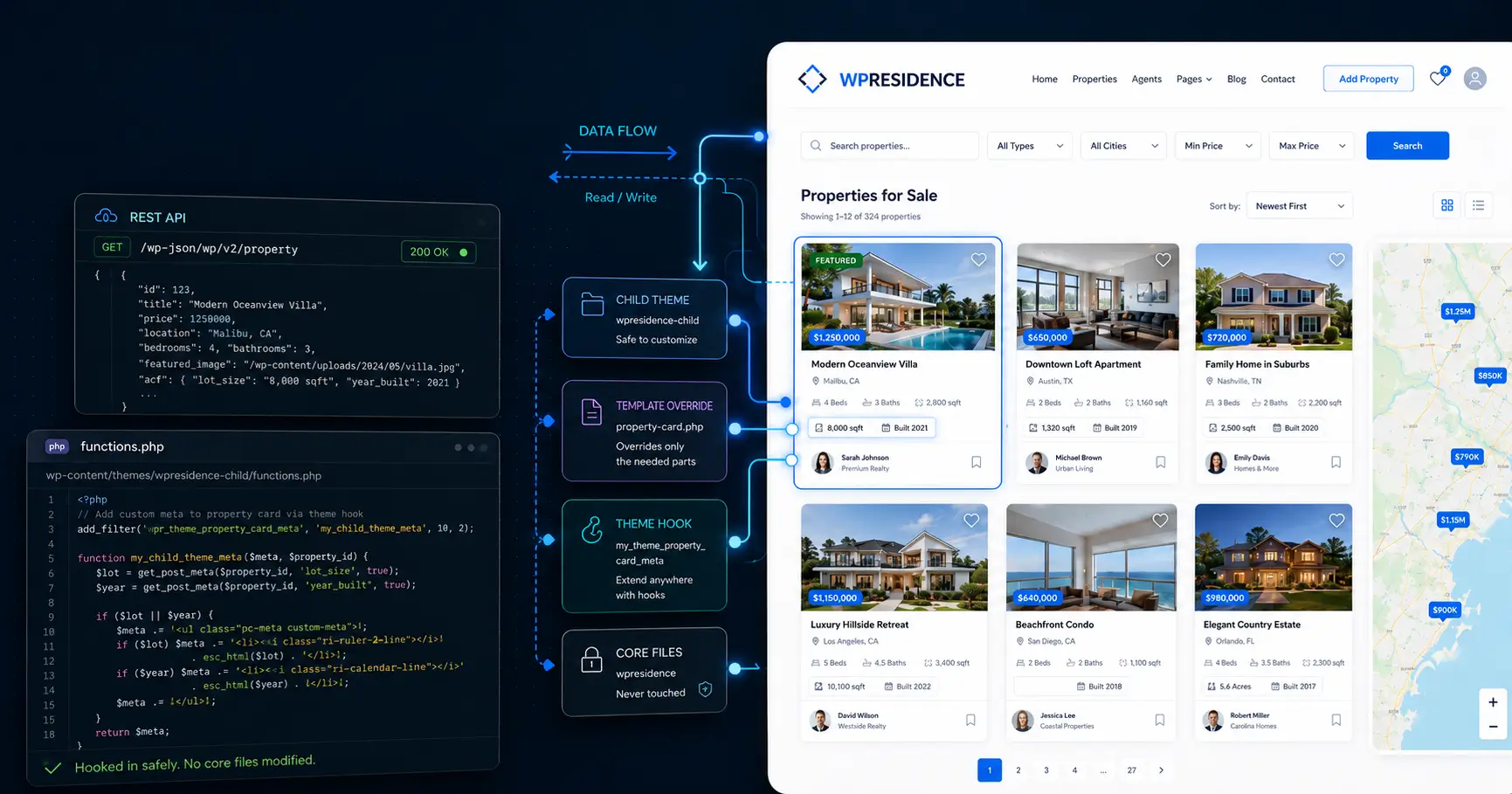
Planning to standardize client work on WPResidence? Here's what the real estate theme API, child themes, hooks, and developer docs actually give you.
Last updated: July 1, 2026
By Cris Bean
If you’re deciding whether to standardize client work on WPResidence, the real question is whether this real estate theme API gives you enough room to extend, script, and hand off without hitting a wall. It does. WPResidence ships with a documented REST-style API that exposes properties, agents, agencies, and developers to external apps, and those apps can both read and write to it. A public Postman collection lets you script property creation, updates, and sync jobs against documented endpoints. The safe way to extend the theme is through a starter child theme, template overrides, and stable documented hooks, so you never edit core files directly. The Custom Fields Builder adds property fields and search filters from the admin with no PHP or JavaScript. Three major updates in 2025 each added API improvements alongside new demos and features. One honest caveat: WPResidence is an options-and-child-theme framework, not a headless developer SDK.
We build and sell WPResidence, so you should know we have a stake in your decision. That said, this guide is built from honest source material, including the parts where our theme isn’t the right fit.
Yes. WPResidence has a documented real estate theme API. External apps can read and push property, agent, agency, and developer records through it, and the team ships a public Postman collection so you can start scripting without writing boilerplate. A ready-to-import Postman collection, documented up front, saves real setup time on the first integration.
The WPResidence REST API is built around the records a real estate site runs on: properties, agents, agencies, and developers (the builder and development-company profiles, not your dev team). It exposes those four entity types to external apps and dashboards, and the connection works both directions. Apps can read that data freely, and once write access is configured they can push it back in.
That bidirectional design is what makes the real estate theme API useful beyond simple display. A property portal can pull listings out for a separate front end, a custom dashboard can write updates back in, a third-party CRM can stay in sync with agent and lead records. For a real estate WordPress developer, the takeaway is that your listings aren't trapped inside the theme. They live in WordPress custom post types.
A public Postman collection ships with the WPResidence documentation, so instead of reading raw API docs, you import the collection and see the documented endpoints.
From there you script the jobs that matter: creating properties, updating listings, and running sync jobs against documented endpoints. Read calls work out of the box, so a junior can explore and test GET requests without reverse-engineering anything. Write access is gated, though: create and update calls need JWT authentication, which means installing a third-party JWT plugin and adding a secret key to wp-config before those endpoints accept your requests. It's a one-time setup, but budget for it on the first integration.
The safe extension surface has a few clear layers, and none of them touch WPResidence's core files. You get a starter child theme, template overrides, stable documented hooks, and the Custom Fields Builder for no-code field additions. Upgrades stay clean because your work lives outside the parent theme, and a junior developer can operate safely inside documented bounds.
Safe ways to extend WPResidence:
WPResidence ships with a ready starter child theme. The documentation shows which template files to copy in when you need to override them, and the WPResidence child theme is where all site-specific work belongs: custom CSS, template tweaks, and small function additions. Because it sits separate from the parent, you can update the theme without wiping your changes. Build one master child-theme starter, clone it per project, and every build inherits the same tested base (the child theme travels intact because it never lives inside the parent).
WPResidence keeps templates and logic separate, which is what makes overrides safe. When you need to change a template, copy that file from the core theme into your child theme and edit it there; the template hierarchy picks up your version automatically and leaves the original untouched.
The upgrade story is why this matters. Because you never edited core, a theme update can't overwrite your work. And when a release does change a template, the changelog calls it out, so you know exactly which overrides to diff-check after updating instead of finding a broken page in production.
For behavior changes that go past templates, WPResidence hooks give you documented action and filter extension points. These are the places where you extend what the theme does without touching core logic, and the documentation describes them as stable. Versioned changelogs call out new hooks added in each release, so after every upgrade you can scan the changelog for extension points you might now use in place of custom code.
Before you write a line of PHP, check the Custom Fields Builder. It adds property fields and search filters straight from the WordPress admin, with no PHP or JavaScript. Define a field like Energy Class or View Type, choose its input type, and mark it searchable. Fields you create here show up automatically in property submission forms and in the search interface. For most client sites, the first question isn't "how do I code this," it's "can the Custom Fields Builder do this." That's the first tool a real estate WordPress developer should reach for to extend a real estate theme without custom code.
WPResidence developer documentation covers the full path from first install to advanced API work, and it's kept current with each release. You also get a matching video series, versioned changelogs, a public Postman collection, and a private support ticket channel. For a developer, that means fewer billable hours lost to guesswork.
The documentation portal is organized around real project flows. You get guides for first install, demo import, header and footer setup, and every main option panel, each with screenshots and videos that match the current version rather than some release from three years ago.
A focused FAQ area lists fixes for common 500 errors, map display problems, and image processing issues, so you can often match symptoms to a title and find the answer in minutes. Search is where many themes fall apart under real data and client demands. WPResidence does better because it documents the odd cases. You still have to read the guides, though. The docs shorten edge-case debugging, they don't remove it.
WPResidence shipped three major updates in 2025, each adding new demos, features, and API improvements. Versioned changelogs call out new hooks, template changes, and compatibility notes, which is exactly what you need when you're diffing upgrades across many client sites.
Support and updates are two separate things, and it's worth being precise about that. The private ticket system usually replies in about 24 business hours, often faster in EU working time. For edge cases that are hard to explain over screenshots, the team will log into your site.
Note: Theme updates are lifetime for the licensed site. Author support through ThemeForest runs six months, extendable to twelve months for a fee. Your updates keep coming after that support window closes, you just can't open new tickets.
The workflow that holds up across dozens of client sites is straightforward: build one polished WPResidence starter, clone it per project (Duplicator and All-in-One WP Migration both handle the URL rewrites correctly), register a separate ThemeForest purchase code per production domain, and export your Theme Options config so every new site starts from the same baseline. The engine stays constant while the skin changes per client.
Start by building one master WPResidence starter. Import a demo, configure the child theme, tune the Theme Options, and treat that install as your golden base.
To spin up a new client project, clone that base with Duplicator or All-in-One WP Migration. Both tools rewrite URLs correctly and keep serialized data valid, so your settings survive the domain change. The Theme Options import and export panel handles the config half: export your baseline as one file and import it into any fresh site.
Two things travel with every clone. The WPResidence child theme carries your site-specific tweaks and shared functions; the Theme Options export carries the business-logic baseline. From that start you already have 100+ Studio templates, 50+ Elementor widgets, the Property Card Composer, and the Advanced Search Form Builder on day one. Honest note: the first master build takes real thought, and this is where many agencies stall. You might tweak your plan three times before it fits your clients and your margins.
Licensing is tied to the workflow, so handle both together.
The staging-to-live move is the same quick two-step you repeat on every project. Closely related subdomains or language versions under one brand are generally treated as a single project, so you register on the main domain rather than buying extra licenses. In a Multisite where subsites carry distinct domain mappings or brands, each of those needs its own license. A White Label panel is available if you want to present the whole system under your own brand inside the client's admin.
Note: WPResidence uses domain-based activation, so one license runs on one live domain at a time (from version 4.11). Deregister on staging before you register it on the live domain.
For most real estate client projects, the honest answer is: write very little. Hundreds of theme options, the Custom Fields Builder, the Advanced Search Form Builder, membership packages, and 50+ Elementor widgets cover the bulk of what clients ask for. Custom code enters only for unusual data rules. And for one narrow category of highly experimental business, WPResidence may not be the right foundation at all.
Before scoping any code, map the no-code surface, because it's wide. WPResidence gives you hundreds of theme options across layout, display, and behavior. The Custom Fields Builder adds property fields that flow into forms and search automatically, and the Advanced Search Form Builder handles unlimited field combinations, with up to 11 search layouts and 7 property-card styles.
On the content side you get more than 40 one-click demos, 50+ Elementor widgets, and 100+ Studio templates. Roles cover Agent, Agency, Developer, and Owner, each with its own dashboard plus a built-in CRM and lead view. For international work, WPML, Polylang, Weglot, and TranslatePress bring 32+ languages and RTL support. Audit a client's request list against this surface first. Most of it gets handled without custom code.
When you're committing years of client work to a theme, codebase quality matters as much as the feature list. WPResidence uses clean HTML5 output and proper enqueue calls, so scripts load the WordPress way instead of being jammed inline into layout files. It sticks to standard WordPress extension points throughout, with no custom registration magic to untangle later. It also clears Theme Check and Theme Sniffer on a standard setup, which is a baseline sanity check worth running on any theme before you build on it, not a headline feature.
Active maintenance shows in the three major 2025 updates and the versioned changelogs. On performance, a built-in cache layer is tuned for real-estate query patterns, with CSS and JS minify, lazy load, and a map pin read-from-file option.
On performance, WPResidence ships its own cache layer tuned for real-estate queries, along with CSS and JS minification, lazy loading, and a read-from-file option for map pins, so it holds up under large listing sets once you pair it with a CDN. Plan on PHP 8+ and 256 to 512MB of memory. Headline PageSpeed and load-time numbers vary by host and content, so treat them as something to measure on your own build; for a developer evaluation, what matters is that the theme hands you real levers to tune instead of a black box.
There's a point where WPResidence is the wrong tool, and it's worth stating plainly. Highly experimental business models may still need a fully custom, developer-driven stack. WPResidence is an options-and-child-theme framework, not a headless SDK or a bare developer-framework theme. It grows by turning repeated feature requests into settings and modules; it doesn't hand you a bespoke development platform.
Two concrete limits follow. Media gating, restricting extra photos, video, or virtual tours to paid members, isn't built into core; it needs a membership or content-restriction plugin. And custom one-off coding isn't part of the support offering, so bespoke logic is your team's job or a freelancer's. If your project lives in that territory, it's fair to look at how WPResidence compares to Houzez and decide whether a fully custom build serves you better.
WPResidence's automation story is REST-API scripting, not event-driven magic. You write scripts that call documented endpoints, or use the Postman collection directly, to create, update, and sync property records. For MLS data specifically, MLSImport runs the daily sync pipeline as a separate plugin. There are no webhooks or no-code automation tools in the picture, and that's the honest scope.
For IDX, MLSImport is the default integration for WPResidence, and it's worth a disclosure: MLSImport is our own plugin, so we're not neutral here. It's also the integration we know works cleanly with the theme, because we built them to fit together.
The plugin pulls RESO API and RESO-compliant MLS feeds into WordPress as native property posts. Field mapping is documented, so you map MLS fields to theme fields once and reuse that pattern later, and you can assign feeds by office code so each branch shows its own stock (and yes, some hookups still take a bit of trial and error). The daily sync runs on a schedule, keeping listings current without manual imports. Any other IDX solution is an alternative you can wire in, but MLSImport is the path we recommend and the one the documentation covers end to end. For current pricing and setup, see the MLSImport setup guide.
Multilingual and multi-currency are documented, API-connected integrations, not manual workarounds. WPResidence supports WPML, Polylang, Weglot, and TranslatePress, translating custom post types like properties, agents, and agencies along with your custom fields. RTL is built in, and the theme is ready for 32+ languages.
For multi-currency, you store one base price per property and let the theme convert it at display time. Plug in an API key and the exchange rates refresh daily on their own. Your visitors pick their currency from a front-end switcher, and if you're selling into markets like India, you can show lakh and crore formats.
A few more connections extend what the API alone can't reach. When you need complex tax, extra payment gateways, or invoice generation, WooCommerce integration covers it, though the theme handles PayPal and Stripe on its own without it. For feed-based property imports, WP All Import uses WordPress APIs rather than heavy custom SQL, and a HubSpot link is there if you want to push contacts into a CRM.
WPResidence has solid built-ins for monetization: listing packages, featured-placement quotas, price-hiding, and role-based dashboards. One honest limit to know up front: restricting extra photos, video, or virtual tours to paid members isn't built into core. That specific gating needs a membership or content-restriction plugin.
The built-in monetization architecture runs on packages. You can sell pay-per-listing, run recurring subscription-style plans, and set a featured-listing quota per plan. Each package defines total listings, featured slots, duration, and price, and the theme checks the active package whenever a user adds or features a property.
Packages tie to roles, so Agent, Agency, Developer, and Owner each get their own dashboard and plan options. Non-paying users can still submit if you create a free package with a small quota. Upgrades stay clean: listings belong to the user account, not the package, so existing properties stay visible and new quota rules apply going forward. Price-hiding, site-wide or per listing, is built straight into theme settings.
Here's the part competitor theme write-ups usually skip. The WPResidence core doesn't restrict photos, videos, or virtual tours by membership tier. There's no built-in "Plan A gets 5 photos" rule; every listing can use every media field.
To gate extra media behind a paywall, you add a membership or content-restriction plugin and apply conditional shortcodes or widget rules on the property templates. It's a genuine gap in the core theme, but a well-trodden one: the plugin route is documented and predictable, so it's a known cost rather than a surprise. One thing that is built in: social login. Facebook and Google sign-in work through API keys in Theme Options, no plugin required.
On payments, the built-ins cover the common cases. PayPal and Stripe are included out of the box, enough to run listing-fee billing and recurring packages without anything extra. Reach for WooCommerce only when you need additional gateways or complex tax and invoice rules; it extends the payment layer rather than replacing the theme's own tools.
Each niche real estate website type demands a different audience focus, data schema, and proof of authority.
WPResidence ships with a documented REST-style API and a public Postman collection for scripting property creation, updates, and sync jobs.
The safe extension path is a starter child theme, template overrides, and stable documented hooks, so core files are never edited directly.
Hundreds of theme options, the Custom Fields Builder, and 50+ Elementor widgets handle most client feature requests without custom code.
Three major WPResidence updates shipped in 2025, each adding new API improvements alongside demos and features.
WPResidence is an options-and-child-theme framework, not a headless developer platform, so highly experimental business models may still need a fully custom stack.
Yes. WPResidence exposes properties, agents, agencies, and developers through a documented real estate theme API, and external apps can both read and push that data (write calls require JWT authentication you set up once). A public Postman collection lets you script creation, updates, and sync jobs. The API is polled and scripted, so there are no webhooks or event-push triggers.
For most client work, no. The Custom Fields Builder, Advanced Search Form Builder, Elementor, membership packages, and hundreds of theme options handle the majority of requirements from the admin. PHP matters only for advanced integrations or unusual data rules, and the child theme, override guides, and documented hooks in WPResidence keep that scope small.
Yes, that's the intended workflow. The theme ships a starter child theme and template override guides, and the template hierarchy picks up your overrides automatically. Stable action and filter hooks change behavior without touching core logic. Versioned WPResidence changelogs flag new hooks and template changes each release, so upgrade diffs stay straightforward.
They're separate. Theme updates, including features, API improvements, and compatibility fixes, are lifetime for the licensed site. Author support through ThemeForest runs six months and extends to twelve for a fee. After it closes, you still receive WPResidence updates and keep the documentation, you just can't open new support tickets.
No. One Envato Regular License covers one production site, with domain-based activation since version 4.11. You can deregister from staging and register on live, but one code can't run two production sites at once. Subdomains or language versions under a single brand are usually treated as one project, though Multisite subsites with distinct domains or brands each need their own. Each client site needs its own WPResidence license.
Yes. One-click demo import takes minutes, and most non-developers spend the rest of the time on branding, first listings, and theme options, usually a focused day or weekend. Day-to-day work in WPResidence uses the Elementor editor, admin forms, and property submission. Code is only needed for very custom design changes or integration edge cases.
Not with the core theme alone. WPResidence has no built-in per-plan media limits. To restrict extra photos, video, or virtual tours to paid members, add a membership or content-restriction plugin and apply conditional rules at the template level. Price-hiding is built into theme settings; full page or listing locks need that plugin too.
Listings belong to the user account, not the package. When you upgrade a plan in WPResidence, existing published properties stay intact and new quota rules apply to future submissions. There's no migration step, just change the plan assignment in the admin. Free users can submit under a small free-package quota, so the upgrade path stays smooth.
Elementor alone is enough for new builds. WPResidence ships 50+ Elementor widgets for property listings, agent profiles, search forms, and maps, and WPBakery is included for older migrated sites. For most agency work, Elementor handles page design while the property templates, Property Card Composer, and 100+ Studio templates handle listing layouts.
Yes. WPResidence includes built-in Facebook and Google social login. Clients activate it with API keys in Theme Options, no plugin required, and the login form then shows both options beside the standard email and password fields. It helps consumer-facing rental and buyer portals, where less registration friction means more leads saving searches or claiming inquiries.
For an agency standardizing on one real estate theme, WPResidence earns the spot. A documented real estate theme API, a public Postman collection, stable hooks, a clean child-theme architecture, and three major 2025 updates all point to a base that's actively maintained and safe to build client work on for years. If your next project genuinely needs a headless or fully custom stack, this isn't it, and that's a fair call to make early.
You might also want to check out: