Agent & Agency Portal

Is WPResidence a good real estate agent portal on WordPress?

Need a real estate agent portal on WordPress? WPResidence handles profiles, listing management, lead routing, and role controls. See what's included.

wpresidence.net
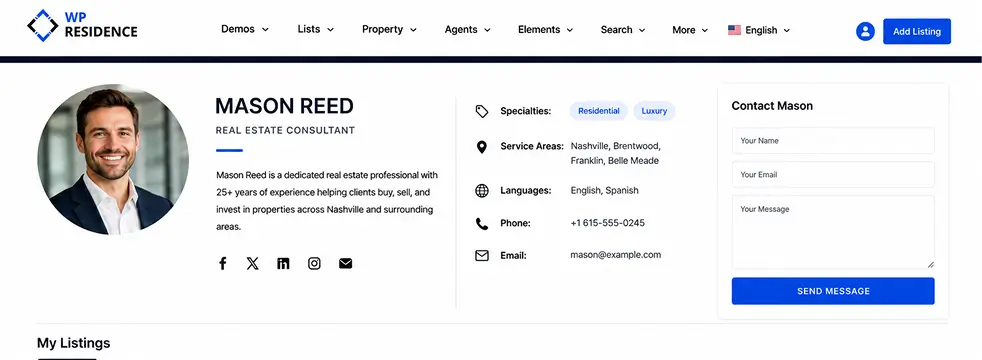
WPResidence agent profile page showing headshot, bio, specialties, contact form, and active property listings grid
5
account types included
$79
per domain, lifetime updates
5,000
listings, 200 agents on a VPS
32+
language files, RTL ready

Last updated: June 30, 2026

An agent who relies on a brokerage profile page or a Zillow listing controls none of it. Not the domain, not the lead data, not the SEO equity. The moment they switch firms, that page and the inquiries tied to it belong to whoever owns the platform, not to the agent.

WPResidence is a real estate agent portal WordPress theme that flips the arrangement: agencies and brokers build and own the whole portal. Each agent gets a public profile page, a front-end dashboard to manage their own listings, and automatic email routing for every inquiry on their properties. The same install runs a solo agent today and a firm with hundreds of agents later, with no theme swap.

As an agency website theme, it bundles profiles, listing management, lead routing, memberships, and role controls into one license that costs roughly $79 per domain. There’s no bulk or agency tier, so an agency building separate client sites pays that for each one. Here is exactly what that covers, feature by feature, so you can decide before you buy.

  1. Agent and Agency Profile Pages
  2. How Does the Front-End Dashboard Work?
  3. Roles and Permissions
  4. How Does Lead Routing Work?
  5. Memberships, Payments, and Listing Packages
  6. Verification, Approval, and Spam Controls
  7. Single-Agent to Multi-Agency Portal on One Install
  8. Multilingual Sites and Label Renaming
  9. Agent Reviews and Ratings
  10. MLS and IDX Integration
  11. Key Takeaways
  12. Frequently Asked Questions
Profile Pages

Agent and agency profile pages

5 account roles, auto profiles
Agent and agency profile pages
Profiles
Auto-generated public profile per account
Photo, bio, specialties, contact form
Listings grid below the bio
URLs stay stable on reassignment

Every Agent, Agency, or Developer account in WPResidence automatically generates a public profile page that lists that user's active and sold properties. You don't build these by hand: registering as an agent spins up a profile and links every property assigned to them.

Each profile stores a photo, bio, specialties and service areas, languages spoken, phone, email, social links, and a built-in contact form. The agent's listings render in a grid below the bio, so a single page works as both a "hire me" pitch and a live inventory feed, like a microsite without the overhead of WordPress Multisite.

Styling stays consistent across the team: profile pages are built with WPResidence Studio templates or Elementor, so the global header, footer, and typography hold the brand together while each agent differs by photo, bio, and specialties. Shortcodes and widgets render team grids, agent or agency directories, and blocks like "Listings by John Smith." You can preview the options across WPResidence's 49 one-click demo sites first.

When an agent leaves and you reassign their listings, the property URLs and content stay exactly the same, so there are no broken links and no lost rankings. The SEO equity stays with the site, not the departing agent.

WPResidence's own documentation describes the role system as stable from 5 to 500 agent accounts. There are five account types in total: three professional roles (Agent, Agency, and Developer), plus a Regular User role and the WordPress Admin. The Developer role is built for builders showing projects and units.

The agency account: grouping agents under one brand

Agency is a distinct account type, not just a folder of agents. It gets its own profile page showing the company logo, a description, office contact details, a team roster, and the combined inventory of every linked agent. A form on the agency page routes leads to the agency email and the linked agents, and one agency can run 5 or 50 agents under one umbrella, each keeping their own profile.

Co-listings and profile reassignment

The same property can be assigned to more than one agent and shows correctly on each agent's profile, which matters for co-listed deals. On multilingual sites, localized per-language profiles all draw from one global listings pool, so a property entered once isn't duplicated across languages.

Front-End Dashboard

How does the front-end dashboard work?

10-15 min to publish a full listing
How does the front-end dashboard work?
Dashboard
Manage listings without touching wp-admin
Drag-and-drop media and gallery uploader
Unlimited custom fields visual builder
Per-listing view and inquiry analytics

Agents and owners log into the front end of the site and manage their entire workflow (listings, profile, messages, invoices) from a dashboard built out of ordinary WordPress pages, without ever seeing wp-admin. Each tab is an optional template page: if you don't create the page, that tab doesn't appear.

The core tabs are My Profile, My Properties, Add or Submit Property, Favorites, Saved Searches, Messages, Invoices, and CRM, laid out as either a top bar or a side menu (agencies tend to favor the side menu, solo agents the top bar).

The Submit Property form carries most of the daily work. Admins control which fields show, whether each is required, and their order.

A drag-and-drop uploader handles photos, PDFs, floor plans, virtual tour links, and video URLs, and agents reorder the gallery and set the featured image without touching the Media Library. The form uses a tabbed layout (Details, Media, Location, Price) and saves drafts. The image limit is an admin setting, commonly 20 to 30 and configurable up to 40, with uploads restricted to JPG, PNG, and PDF.

The My Properties tab is the management table: agents edit, duplicate, or delete listings and flip a status to Sold, Featured, Expired, or Active in one click, with per-listing analytics showing views and inquiries. Guest submission is supported too, but a visitor must register right before saving, and the listing stays Pending until an admin approves it.

The Custom Fields Builder is the clearest reason this real estate front-end dashboard beats the competition. You add unlimited custom fields (text, number, date, dropdown) through a visual builder, and they flow into the submit form, the single-property template, the property cards, and advanced search at once.

You can even build different submission forms per property type, so a rental asks for deposit and minimum stay while a sale asks for year built and HOA fee. Among these three themes, WPResidence gives you the most control over submission logic: Houzez ties field behavior to its CRM, and RealHomes uses a fixed tabbed wizard. The full front-end submission comparison breaks down the differences.

You can test it before buying. WPResidence's demos include agent logins (for example, username agent, password 1234), so you can publish a sample listing yourself and time it. On the demo a full listing goes live in roughly 10 to 15 minutes, and the dashboard keeps "Add Property" and the edit controls a click or two from the front page, so non-technical agents aren't hunting for them.

Submitting and managing listings: the field-by-field flow

A realistic submission runs in a predictable order: title and price, then location, then features, then media. Location follows a strict State, then City, then Area hierarchy, with address auto-complete through Google Places or OpenStreetMap. Listings sort into seven default taxonomies: Category, Type, City, Area, State, Status, and Features, so buyers can filter precisely without an agent thinking about taxonomy design.

Disabling or restricting front-end submissions

Not every brokerage wants agents adding their own listings, so you can fully disable front-end submission by unpublishing the Submit Property page and turning off open registration. The result is a read-only catalog that office staff fill from wp-admin, while every other dashboard function (profile, messages, CRM) stays available for the agents who still need it. This is a supported configuration, not a hack.

Roles & Permissions

Roles and permissions: what agents can and cannot change

5 account types, one toggle
Roles and permissions what agents can and cannot change
Roles
User separation ownership toggle
Agents edit only their listings
Admins can lock specific fields
Approval gated by account type

The user separation toggle is the central permission control. With it on, each agent can see and edit only their own listings; with it off, the broker owns all listings and agents edit only what they're assigned. Get this setting right and most "who can touch what" worries disappear.

WPResidence has five account types:

Agents cannot see or edit other agents' listings. Agency accounts see and edit their whole team's inventory. Full admins can edit anything from wp-admin.

Approval runs by risk level. New Agent, Agency, and Developer accounts land as Pending until an admin publishes them, while Regular Users can be set to auto-approve. Admins can lock specific fields, such as the property slug or certain taxonomies, and theme options let you tick which dashboard menu items appear for each role.

Need a "Property Manager" who can edit all properties but not theme options or payment gateways? Clone the Agent capabilities with a standard WordPress role-editor plugin. The built-in labels (Agent, Agency, Developer) are fixed, though you can rename them in signup text and translation strings; genuinely new roles call for a role plugin.

One honest tradeoff: WPResidence keeps roles simple by design. RealHomes and Houzez expose finer-grained capability checkboxes and permission matrices, so if you need surgical control over dozens of individual capabilities out of the box, those themes give you more switches. WPResidence covers the common brokerage cases with sensible defaults and leans on a role plugin for the edge cases.

Lead Routing

How does lead routing work?

1-3% basic contact form conversion
How does lead routing work
Routing
Routes to assigned agent email
Logged in agent CRM inbox
Admin fallback when no agent
Optional CC to office manager

Every listing inquiry in WPResidence routes to the email of the agent assigned to that listing; if no agent is set, a site-wide fallback admin email fires instead. Routing errors cost agencies business, so here is the full path.

Built-in inquiry forms sit on every listing page, every agent profile, and every agency page, plus a Schedule-a-Tour form. The theme auto-injects the property title and link into each message, so the agent always knows which property the lead is about. The routing path runs like this:

  1. A listing inquiry goes to the assigned agent's email.
  2. The same lead is logged in that agent's CRM dashboard inbox.
  3. If no agent is assigned, it falls back to the site-wide admin email.
  4. An optional global CC or BCC copies an office manager or broker on every lead.

Agency-page forms route to the agency address and notify both the agency and its linked agents, and developer forms route to the developer. For listings imported through MLSImport, office-code mapping sends each one to the correct branch or agent. Distributing leads by rotation across a team is not a built-in feature; handle that through your CRM or a manual process.

Schedule-a-Tour adds a date and time picker; the request is stored and emailed with the chosen slot and the listing ID, and that's it. It is lead capture, not a scheduling engine: there is no live availability check and no double-booking prevention. If you need a real calendar with blocking, embed an external tool like Calendly, Amelia, or Bookly.

Forms drop into the sidebar, below the listing details, or inside the gallery lightbox without code, and WhatsApp and click-to-call buttons can sit beside them. Email templates are editable per role and per event (new lead, new listing, approved listing, expired membership), and subject-line tokens like city, type, and property ID let you build mail-filter rules.

WPResidence's own benchmark suggests a basic contact form converts around 1 to 3 percent of visitors, while several focused lead magnets (a home valuation, a market report, a buyer guide PDF) can reach 4 to 6 percent. Treat that as a vendor benchmark, not an independent study.

Built-in CRM and external integrations

The built-in WpEstate CRM stores every form submission as a lead, capturing name, email, phone, property context, and a status of New, Contacted, or Closed. Each agent sees only their own leads; the admin sees all and can export them. Because leads live in the database, they survive a bounced notification email.

Native HubSpot integration pushes form data through an API key, with a separate key per agent, and other CRMs (Salesforce, Zoho, Pipedrive, Google Sheets) connect through Contact Form 7, Gravity Forms, or WPForms plus Zapier. There's no per-user fee, against the $50 to $300 per user per month external CRMs typically charge.

Memberships & Payments

Memberships, payments, and listing packages

5-50 listings per package tier
Memberships, payments, and listing packages 2
Payments
Recurring, pay-per-listing, or mixed
Built-in PayPal and Stripe
WooCommerce optional, not required
Caps block listings until upgrade

WPResidence supports recurring membership packages, pay-per-listing, or a mix of both, plus one-time fees. Each plan specifies a price, how many listings it allows, how many days they stay active, and how many featured slots the account receives. When an account hits its cap, new published listings are blocked until it upgrades, and common tiers run from a 5-listing starter to a 50-listing premium plan.

Payments work out of the box with built-in PayPal and Stripe, and bank or wire transfer is supported offline. Here's the point nearly every source agrees on: WooCommerce is optional. You only need it for extra gateways, complex tax, or a different checkout, and it is not required for a functioning payments setup.

The My Invoices front-end page lists every purchase (memberships, paid listings, featured boosts) with IDs, amounts, and dates, and WooCommerce orders surface there too. You can also tie auto-publishing to packages: hold all new listings as Pending globally, then let paid tiers publish instantly.

Verification & Spam

Verification, approval, and spam controls

10-20 new entries a day, manageable

If you plan to open registration to the public, fake agents and junk listings are the first thing you'll worry about. WPResidence handles both with moderation at two levels, plus spam defenses on every front-end form.

New Agent, Agency, and Developer accounts stay Pending until an admin publishes them, and a global option can hold every new listing for review before it goes live. Email alerts fire on new signups and listings, and WPResidence's own documentation describes reviewing 10 to 20 new entries a day as manageable even on a 2,500-listing site.

The spam defenses stack up. WordPress nonces protect all front-end forms, Google reCAPTCHA plugs in through theme options, and a required Terms and Conditions checkbox, optional social login, and forced account creation on guest submissions raise the bar further. If you run paid or pay-per-listing models, each fake listing costs money to post, which is a natural deterrent, and per-listing analytics make abnormal spikes easy to spot.

One honest gap: there's no built-in "verified" badge. You can emulate one with a custom field or label plus a CSS icon after you review an agent's ID or license offline, storing those documents outside WordPress. It works, but it's a workaround, not a native feature.

Scaling

Single-agent to multi-agency portal on one install

5,000 listings, 200 active agents
Single-agent to multi-agency portal on one install
Scaling
One install, solo to agency
Toggle roles in theme settings
~2,500 listings load in 4s
No theme swap or migration

A single WPResidence install can run as a solo-agent brochure site today and grow into a multi-agency portal later, by toggling roles, dashboards, and payments in theme settings rather than migrating to a different theme. You start with only the Agent role, registration hidden, and payments off, then flip on the Agency and Developer roles, the front-end dashboards, memberships, and payment gateways as the business grows. Enabling a role auto-adds its menus; disabling it cleans them up.

If your agency is eyeing thousands of listings, the real question is whether the theme keeps up. The figures here all come from WPResidence's own demos and tests rather than independent benchmarks, so read them as a range tied to your hosting tier, not a guarantee.

On the vendor's demos with WP Rocket caching, roughly 2,500 listings load in about 4 seconds, and its documentation cites 5,000 listings with 200 active agents on a decent VPS. Its tests also put 3,000 to 5,000 active listings comfortably on 2 to 4 CPU cores with PHP 8 and page caching. The baseline is PHP 8 or newer, at least 512 MB of memory, and a VPS or managed host once listings hit the thousands.

For social proof, WPResidence's ThemeForest listing reports 30,000-plus customers and 1,600-plus five-star ratings, with three major releases shipped in 2025 and live production sites in Mallorca, Dubai, Sydney, and New York.

Multilingual

Multilingual sites and label renaming

32+ language files, RTL ready

If your inventory spans more than one language, this part is straightforward. The theme ships translation-ready, and you bring the translation plugin (WPML, Weglot, Polylang, or TranslatePress); it does not create languages itself.

Listings, taxonomies, and profiles become linked translations rather than duplicates, so you enter a property once and translate on top, with per-language URLs, menus, and search that returns only active-language listings. For a deeper walkthrough, see the guide to multilingual agent profiles.

Renaming labels is just as direct. Using Loco Translate or WPML String Translation, you can change "Property" to "Listing," "Agent" to "Broker," or "Price" to "Rent per month" in under an hour, with no file edits, and the change applies globally.

The theme includes RTL support for Arabic, Hebrew, and Cyrillic, ships 32-plus language files, and offers a multi-currency switcher with scheduled exchange-rate updates. Roles and ownership stay stable across every language.

Reviews & Ratings

Agent reviews and ratings: what is and is not built in

4.8 stars from 25 reviews (example)

WPResidence includes a native star-and-text review module for agent, agency, and developer profile pages; individual property listings do not have built-in star ratings.

On the professional side, the review module is native. Visitors leave a star score plus written text on an agent, agency, or developer profile, an admin moderates it before display, and the profile builds a visible history over time, something like "4.8 stars from 25 reviews." Those reviews tie to a user account and can power "Top rated agents" widgets and badge logic.

For individual properties, the picture is different: property-level feedback uses standard WordPress comments, not star ratings, and you'll need a separate rating plugin if you want per-listing stars. Agent, agency, and developer profiles carry the native star-and-text review module; individual listings do not. For comparison, RealHomes focuses its ratings on individual properties, while Houzez and MyHome also include professional ratings.

MLS & IDX

MLS and IDX integration

hourly MLS sync via RESO Web API
MLS and IDX integration
MLS/IDX
MLSImport via RESO Web API
Imported as native property posts
Office codes map to agents
REST API for external CRM sync

WPResidence is built around native WordPress listings but integrates with MLS and IDX feeds, and MLSImport is the default path (an in-house product, and this article is published on wpresidence.net). It uses the RESO Web API to pull MLS listings into WordPress as native property posts, each with its own indexable URL and the same templates and search as your manual listings, syncing hourly as a rule of thumb. Imported listings behave like any other property, gaining reviews, favorites, and saved-search support, and office codes map them to the correct agent or agency.

WPResidence also coexists with hosted IDX plugins such as iHomefinder, dsIDXpress, and Realtyna for board search, while your native listings stay branded and indexable. The tradeoff with iframe-style IDX is that those listings don't use your theme templates, don't get reviews, and don't earn SEO, because the data lives in a remote frame.

On data ownership, properties are a standard custom post type, while users and leads sit in normal WordPress tables, all exportable via CSV, XML, or REST. Switching hosts or themes keeps your content intact, with Elementor and Studio layouts the one exception that doesn't carry over. A REST API at the path /wp-json/wpresidence/v1/properties, with matching endpoints for agents, agencies, and developers, supports full create, read, update, and delete operations for external CRM sync.

The contrast at the start of this guide is the whole point. A brokerage intranet profile or a Zillow agent page hands you visibility but no ownership of the domain, the lead data, the agent profiles, or the SEO. WPResidence reverses that: for a real estate agent portal WordPress license at roughly $79 per site, the agency owns its portal, its agents' profiles, every lead, and the search equity it builds, a cost that holds its value against what a rented profile quietly takes each time an agent moves on.

At a glance

Key Takeaways

Each niche real estate website type demands a different audience focus, data schema, and proof of authority.

WPResidence includes five account types (Agent, Agency, Developer, Regular User, and Admin), with each professional role getting a public profile page and front-end dashboard.

Every listing inquiry routes automatically to the assigned agent's email, with a site-wide admin fallback if no agent is set and an optional CC to a broker.

The user separation toggle controls whether each agent owns only their own listings or whether a broker owns all and assigns them.

Agent and agency profiles include a native star-and-text review module, while individual property listings use WordPress comments rather than star ratings.

Each WPResidence license costs roughly $79 per domain with no bulk option, so agencies buy one license per client site.

Frequently Asked Questions

Can WPResidence handle agencies with multiple agents, each with their own listings and profile page?

Yes. Each Agent signup in WPResidence creates a public profile page with a photo, bio, contact form, and a live inventory feed of that agent's listings. An Agency account groups multiple agents under one brand and combines their listings on a single agency page. One install supports five or five hundred agents, and every profile draws from one central listings pool, so nothing is duplicated.

Can agents and owners manage listings, profiles, and invoices from the front end without WordPress admin access?

Yes. The WPResidence front-end dashboard is built from WordPress pages using a User Dashboard template. Agents log in to add, edit, or delete listings, update their profile, read messages, check invoices, and view per-listing view and inquiry analytics, all without touching wp-admin. The user separation setting walls front-end accounts off from the WordPress back end entirely.

Can I disable front-end listing submissions if my staff should be the only ones adding listings?

Yes. In WPResidence, unpublish the Submit Property template page and turn off open registration. The site becomes a staff-managed catalog filled from wp-admin, while any dashboard tabs your agents still need, such as profile, messages, and CRM, keep working. This is a supported configuration for brokerage-managed portals, not a workaround.

Between WPResidence, Houzez, and RealHomes, which has the most flexible front-end submission system?

WPResidence gives you the most control over submission logic of the three: Houzez ties its dashboard to its CRM, and RealHomes uses a fixed tabbed wizard. The theme lets admins control which fields appear, their order, and their requirement status per property type. It also supports guest submission and unlimited custom fields through a visual builder.

How flexible are the role and permissions settings for agents, brokers, and admins?

WPResidence builds in four front-end account types (Agent, Agency, Developer, and Regular User), plus the WordPress Admin role, for five in total. The user separation toggle controls whether agents own their own listings or a broker owns all of them. Admins can lock specific fields, choose which dashboard tabs each role sees, and require manual approval for Agent, Agency, and Developer accounts. A standard WordPress role-editor plugin extends this for a Property Manager pattern.

Can I require manual approval before agents or owners publish listings?

Yes, at two levels. New Agent, Agency, and Developer accounts in WPResidence land as Pending until the admin publishes them. A separate global setting holds every new listing for review before it goes live, even from existing verified accounts. Regular Users can be configured to auto-approve without either restriction, so you moderate exactly as tightly as your portal needs.

How does WPResidence route listing inquiries to the right agent?

Each listing form in WPResidence routes to the assigned agent's email and logs the lead in that agent's CRM inbox. If no agent is assigned, a site-wide fallback admin email fires instead. A global CC or BCC option copies an office manager or broker on every lead. Agency-page forms notify the agency address, and MLSImport listings route by office code to the correct branch or agent.

Does the WPResidence licensing model allow separate per-site licenses for each client?

Yes, and it is required. The roughly $79 Envato Regular License for WPResidence covers one live domain. There is no bulk, agency, or unlimited-site license option, so each client site needs its own license. The license includes lifetime theme updates and six months of author support from the date of purchase.

Does WPResidence include built-in star ratings for agents, or do I need a plugin?

Agent, agency, and developer profile pages in WPResidence include a native star-and-text review module, so no plugin is needed for professional reputation. Visitors leave a star score plus written text, and an admin moderates it before display. Individual property listings are different: they use WordPress comments for feedback, and a separate rating plugin is needed if you want per-listing star ratings.

Can WPResidence grow from a single-agent site to a multi-agency portal without switching themes?

Yes. One WPResidence install covers the full range. You start with a single Agent account, registration disabled, and payments off. As the business grows, you enable the Agency and Developer roles, front-end dashboards, memberships, and payment gateways from theme settings. There's no theme swap, no content migration, and no URL changes in that move.

Does WPResidence support multiple languages for listings, agent profiles, and taxonomies?

Yes, with a translation plugin. WPResidence pairs with WPML, Weglot, Polylang, or TranslatePress. Listings, taxonomies, and agent profiles become linked translations rather than duplicates, so a property is entered once and translated on top. The theme ships 32-plus language files, built-in RTL support for Arabic, Hebrew, and Cyrillic, and a multi-currency switcher with scheduled exchange-rate updates.