WordPress Real Estate Theme MLS IDX: How the Connection Works
By Cris Bean | Last updated: June 15, 2026
Are you trying to connect a WordPress real estate theme to MLS/IDX data and not sure where to start? The theme never ships with the listing data itself, because the MLS board owns and licenses that data separately and no theme can legally bundle it.
So you connect the data one of two ways. Native MLS import uses a plugin to pull listings into WordPress as real property posts on your own domain. Embedded (iframe) IDX displays listings from a vendor’s server through a shortcode or widget.
For the WPResidence theme, the recommended native-import path is MLSImport, which connects over the RESO Web API to 800+ RESO-compliant MLS boards across the USA and Canada (per MLSImport), at $49 per month after a 30-day free trial. You connect one MLS board per site (a second board means a second install). MLSImport is WPResidence’s own in-house plugin, so weigh that recommendation with the relationship in mind.
Native IDX keeps every listing in your WordPress database, so the theme’s search, maps, saved-search alerts, and lead forms all work across it, and sync runs on a scheduled, configurable cron job.
In This Article
- What MLS and IDX Integration Means for a Theme-Based Site
- Native MLS Import vs. Embedded IDX: The Core Trade-Off
- How Does the WPResidence and MLSImport Connection Work?
- Data Sync, Feed Freshness, and Stale-Listing Hygiene
- The Hybrid Strategy: MLS Feed and Manual Listings
- Data Portability and Migration
- Cost and Scale: What to Budget for MLS/IDX
- Key Takeaways
- Frequently Asked Questions
What MLS and IDX Integration Means for a Theme-Based Site
Before you choose a method, it helps to know what your theme already does on its own. WPResidence ships with a full property engine whether or not you ever add a feed.
That engine includes Property, Agent, Agency, and Developer custom post types, an advanced search builder, Google Maps and OpenStreetMap with clustering and radius search, a custom-fields builder, and front-end listing submission with agent dashboards. Per WPResidence, all of this runs with zero IDX from day one.
MLS data is licensed and controlled by the MLS board. No theme vendor can legally bundle live listings, so IDX access is always a separate subscription tied to a direct agreement with your board.
So you have two ways to bring that licensed data in. Native import pulls listings into WordPress as your own property posts; embedded IDX shows them inside a vendor-hosted widget.
One thing worth knowing upfront. Many boards require attribution text, listing timestamps, and a disclaimer such as “information deemed reliable but not guaranteed” on every display.
WPResidence’s native property templates let you add that language once in a template so it appears across all your MLS listings automatically. Some boards also restrict which IDX vendors or display types they approve, so check your board’s rules before you commit to an approach.
When a live feed makes sense
You don’t always need a feed. Boutique agencies, local specialists, and off-market or rental-focused sites with manageable inventory often run fine on manual listings alone using front-end listing submission.
IDX earns its cost when you want market-wide listing coverage, buyer portals with saved-search alerts, or an SEO footprint across every active listing in your market. Per WPResidence guidance, manual upkeep tends to become a bottleneck somewhere around 30 to 50 active listings.
Above that, a live feed recaptures the hours you’d spend on data entry and adds reach manual entry can’t match. And because the theme runs with or without a feed, you can launch lean today and add IDX later with no rebuild.
Native MLS Import vs. Embedded IDX: The Core Trade-Off
Your delivery method decides whether MLS listings feed your site’s SEO and lead tools, or sit isolated in a vendor-hosted widget. That single decision shapes seven things that matter, summarized below.
| Dimension | WPResidence + MLSImport (native import) | Iframe / shortcode IDX (e.g., iHomefinder, dsIDXpress, IDX Broker, Showcase IDX) |
|---|---|---|
| Where listings live | Your WordPress database as property posts | Vendor servers |
| SEO | Each listing is indexable on your domain with its own URL, title tag, and schema | Little or no indexable listing content; SEO equity stays with the vendor |
| Search and filters | Theme advanced search, AJAX filters, and custom fields work across all MLS and manual listings | Vendor’s own search widget only; does not interact with theme filters |
| Maps | Theme Google/OpenStreetMap pins and clustering for all listing types | Vendor map widget only |
| Design | Theme property templates; full layout control | Vendor’s fixed layout |
| Data ownership | Stays in your database if the feed stops or you switch vendors | Lost if feed access ends |
| Setup effort / cost | More setup, stronger hosting baseline; MLSImport around $49/mo | Faster to launch, lower initial effort; vendor pricing varies |
Of those seven rows, the search and filters line carries the most downstream weight, and it is the one most buyers underestimate. WPResidence’s advanced search builder, AJAX filters, map clustering, favorites, saved searches, and lead forms all operate on native WordPress property posts; they don’t reach into iframe widgets.
That gap is the friction point most teams hit first after launch. A site that imports half its inventory natively and serves the rest through an iframe ends up with a split experience: the theme’s tools work on one pool of listings, not the other. Buyers notice when a filter returns results for some homes but not others.
The SEO and design rows follow the same logic. Native posts live on your domain, so each is an indexable URL you control, while iframe listings render from the vendor’s server, leaving the search equity and layout with the vendor. This is why tools like iHomefinder, dsIDXpress, IDX Broker, Showcase IDX, and Realtyna can put listings on a page fast yet leave little behind that search engines credit to your site.
Iframe IDX isn’t useless. It’s acceptable when your board only offers embed displays, when you need a fast or budget-constrained launch, or when you want a supplementary search box on a mostly native site.
But acceptable isn’t equal. The SEO and search-integration ceiling is real, so choose the iframe path knowing where it caps out.
How Does the WPResidence and MLSImport Connection Work?
WPResidence doesn’t talk to the MLS directly. MLSImport is the intermediary. It pulls data over the RESO Web API and writes the results into WPResidence’s property custom post type, and the theme simply reads those posts.
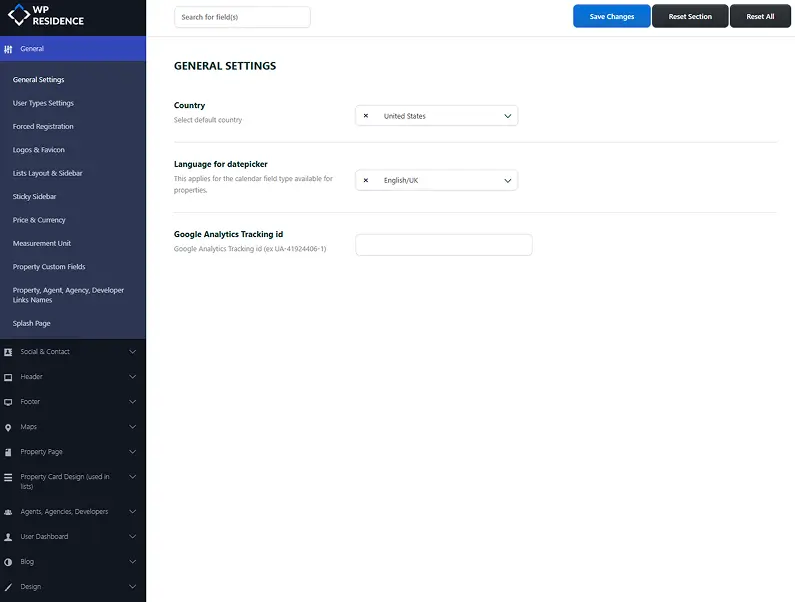
The theme gives you an MLS/IDX/RESO panel inside Theme Options that centralizes the integration settings, field mapping, and provider keys. Field mapping runs through a graphical interface, so non-developers can complete a standard setup without code.
The connection follows five steps:
- Install WPResidence on a host with real server-side cron and at least 512 MB of PHP memory.
- Install and activate the MLSImport plugin.
- In MLSImport, enter your board’s RESO Web API credentials to initiate the connection.
- Map the MLS fields to WPResidence’s property fields (price, beds, baths, status, address, latitude/longitude, city/area) using the theme’s field-mapping UI.
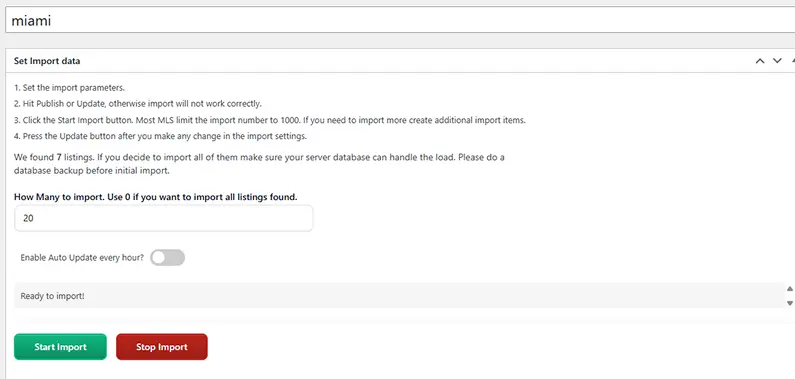
- Trigger the first full import; MLSImport then handles subsequent syncs automatically on the schedule you set.
For teams that need to go further, WPResidence exposes a real estate REST API under the wp-json route, with full create, read, update, and delete access for properties, agents, agencies, and developers, plus action and filter hooks around property save and status change. Most IDX builds are pure configuration and field mapping; custom code, often fewer than 100 lines, is reserved for unusual filters or MLS-to-CRM automations.
The RESO Web API and board coverage
RESO is the Real Estate Standards Organization. Its Web API standard gives boards uniform field names and data structures, which means one tool like MLSImport can connect to hundreds of boards without custom per-board development.
Per MLSImport, that network reaches 800+ RESO-compliant boards across the USA and Canada. It’s the number of boards the network can reach, not the number you connect to a single site at once.
You wire one MLS connection per site or plugin install. If you need two boards, you run two separate installs. Within one connection you can still create multiple import tasks and filter by agent or office ID.
You may see the older RETS protocol mentioned elsewhere; RESO retired it from official industry support at the end of 2024, so the RESO Web API is the current and future-proof path. Before you commit to native import, confirm your board is part of MLSImport’s network.
Hosting baseline and field mapping in practice
Real server-side cron matters once you’re live. WordPress pseudo-cron only fires when a visitor loads a page, so configure cron through your host’s panel or WP-CLI instead of the default scheduler. PHP memory of at least 512 MB keeps large imports from timing out.
Field mapping happens in that MLS/IDX/RESO panel through a drag-and-drop interface. You can map price, beds, baths, status, address, and latitude/longitude in one session, with no code for standard fields.
One experience note: run the first full import during off-peak hours, since it processes the whole board at once. After that, the scheduled syncs are lightweight delta updates that only touch what changed.
Data Sync, Feed Freshness, and Stale-Listing Hygiene
Keeping listings accurate decides how much manual work you carry. Scheduled cron syncs pull new listings, price changes, status updates, and removals automatically, so you’re not editing homes by hand.
Cadence is configurable, commonly hourly or a few times per day, with 15 to 60 minutes typical for active markets per MLSImport configuration. No single interval fits every site, because the right number depends on how fast your source data moves and what your host’s cron can handle. Confirm exact intervals with your board and provider.
Feed hygiene is the next piece. You can configure import rules to exclude stale statuses (sold, withdrawn, expired) at the point of import, or auto-unpublish them on the next sync cycle, so search and maps only ever show active homes. That handles a frequent concern, sold or expired listings lingering in search, without manual cleanup.
The same import-rule and field-mapping mechanism works across multi-language, multi-currency, and multi-country catalogs, so a multi-market site handles its feed the same way a single-market site does.
Protecting local edits from feed overwrites
An agent writes a custom neighborhood description and a hand-tuned SEO title for a listing, and the next sync brings a price change from the board.
Without per-field rules, that sync could blank the agent’s editorial content while updating the price. With per-field lock configuration, the price and status update from the feed while the SEO copy and extra photos stay exactly where the agent put them.
You can also lock core fields (price, status, address, latitude/longitude) against agent edits, which prevents someone from accidentally breaking the mapping. Treat this as a configuration decision, not a limitation: it protects the editorial investment you put into your best listings.
Saved-search alerts and the listing-freshness loop
A buyer saves a search filter, a new listing syncs in that matches it, and the system fires an automated email alert that brings the buyer back to your site.
That alert mechanism watches the WordPress property post type, so it only works on native imported and manual listings. A site that displays its listings through an iframe widget cannot deliver this loop through WPResidence’s tools, because the saved-search engine never sees the vendor-hosted listings.
The Hybrid Strategy: MLS Feed and Manual Listings
The setup most agencies land on is not feed-only or manual-only. It is both. The MLS feed supplies broad market inventory, and manual native listings cover the exclusives, pocket and off-market deals, and rentals the MLS doesn’t carry (which most agencies have a few of).
Because both use the same custom post type, one search form, one map, and one design template serve the whole catalog. There’s no second system to maintain.
That shared structure lets you put your own inventory front and center. Featured flags, custom taxonomies, and homepage carousels promote your personal listings above the raw feed volume, so the deals you earn commission on are the ones buyers see first.
Hybrid also buys you resilience. If the MLS feed has a short outage, your manual native listings keep the listing pages populated. Per WPResidence’s own guidance, a site running only on iframe IDX has nothing to show on its listing pages during that same outage, since the listings live on the vendor’s server.
Manual-only remains a real option too. Small and boutique agencies can run entirely on WPResidence’s built-in listing engine with no IDX at all. Per WPResidence guidance, manual upkeep eventually costs more time than an IDX subscription costs money once your active inventory grows.
It supports SEO continuity too. Evergreen manual pages, such as a neighborhood guide or a long-term rental, keep their URLs and content even when the MLS feed for that area goes quiet. Teams that lean only on the feed have no control over key inventory, while hybrid teams keep their own deals up front and let the feed fill the rest.
Data Portability and Migration
WPResidence stores all listing data in standard WordPress structures, which gives two guarantees. It can be imported from almost any source platform, and exported without vendor-specific tooling if you ever move on.
Importing listings into WPResidence with WP All Import
Start by exporting your old platform to CSV or XML, usually one row per listing with 20 to 40 fields. Then install the free WPResidence Add-On for WP All Import. It exposes the theme’s exact property fields and taxonomy structure, so your CSV or XML columns (price, beds, baths, latitude/longitude, city, area, gallery URLs) map accurately instead of by guesswork.
That add-on is the real differentiator: themes that lean on generic CSV importers force you to guess field names, while the WPResidence add-on hands you the correct ones. You can read the full process in the WPResidence property import guide.
Images migrate by mapping the image-URL columns; WP All Import downloads them into the Media Library as featured and gallery items. Import in batches of roughly 200 to 400 listings per run to avoid timeouts, and pass agent-to-property links through a shared agent_email or agent_id column. WP All Import Pro is optional, since the free version with the free add-on handles standard jobs, and blog posts and pages move separately through WordPress’s core XML importer.
Difficulty scales with your old platform: a clean CSV or XML export is moderate effort, database access without an export tool calls for a developer script, and a platform with no export at all leaves manual re-entry through the front-end forms.
Getting data out and switching platforms
The reverse direction matters too, because no buyer wants to feel trapped. WPResidence properties are a standard WordPress custom post type, agents and agencies are users with user meta, and location is a three-level taxonomy (State, City, Area).
That leaves three export paths: WP All Export to CSV or XML, the WordPress core exporter, or the REST API under wp-json for scripted, paginated migration. For large sites the REST API is the cleaner route: paginate at 100 listings per request and run daily exports while both platforms run in parallel to minimize downtime.
And if you’re only changing the IDX provider rather than the whole platform, your site content is untouched. You reconfigure the feed plugin and remap fields, and every property post, page, and design choice stays put.
URL preservation and 301 redirects
WPResidence follows standard WordPress permalinks, and the property slug is configurable (for example, setting it to a /listing/ path) through Settings, then Permalinks, plus the theme’s slug options. Where paths must change during a migration, use one-hop 301 redirects through a plugin such as Redirection or Rank Math, both of which import redirect mappings in bulk from a CSV.
Prioritize your top 100 to 300 traffic URLs first. Avoid redirect chains, and keep real estate redirects permanently in place rather than setting an expiry. You can see the recommended SEO-safe migration workflow for the full sequence.
Expect a mild, temporary ranking dip after launch. Per WPResidence migration documentation, rankings typically stabilize within four to eight weeks, so monitor Search Console weekly during that window. The honest framing is that a dip is manageable with proper execution, not that you can promise zero ranking loss.
Staging, cloning, and licensing
One technical caution: WPResidence stores theme options as serialized PHP data, so a plain text search-replace will corrupt those option values. Use serialization-aware tools instead, such as Duplicator, All-in-One WP Migration, WP Staging, or WP-CLI search-replace with the precise flag. There’s no DRM, so standard backup and restore tools work without interference.
Licensing is straightforward: you run one active domain at a time and can deregister and reregister freely in the WPResidence dashboard. Staging URLs are allowed, and the site keeps working unregistered, losing only one-click demo import and update prompts.
The recommended workflow runs in order: build on staging, back up, clone to live with a serialization-safe tool, switch the license in the dashboard, update domain-bound API keys (Google Maps, payment gateway, social login), then QA. Disable outgoing emails and use Stripe test keys on staging so nothing real fires during the build.
Cost and Scale: What to Budget for a WordPress Real Estate Theme MLS IDX Setup
The budget has three separate parts, and the theme is the smallest. Per WPResidence, a single-site license is roughly $79 one-time with lifetime updates, and the bundled premium plugins (WPBakery Page Builder, Slider Revolution, Ultimate Addons) are included with no separate licenses to buy.
The real recurring cost is the IDX/MLS data, and it’s entirely separate from the theme. MLSImport is $49 per month after a 30-day free trial. Other IDX vendors range from roughly $49 to $200 per month depending on the board and feature tier.
On top of the plugin, many MLS boards charge their own IDX access fee, so confirm that figure with your board before you settle a budget. You can compare the full picture against the WPResidence theme license details.
WPResidence also quotes five-year total-cost ranges and an estimate of around 80% lower development cost versus custom builds. Those are its own reported figures, so treat them as context, not independent market data.
Performance and hosting requirements
Your server needs real server-side cron, at least 512 MB of PHP memory, object and page caching, and image optimization with lazy loading. Upgrade when import jobs time out, map clustering slows, or search queries take more than a few seconds.
Per WPResidence, sites with proper hosting and caching handle 5,000 or more imported listings, and its agency use cases reach 5,000 to 20,000 in production. Shared hosting typically strains past 3,000 to 5,000 listings, and WPResidence reports that a roughly 2,500-property demo loads in about four seconds.
Read these as WPResidence estimates. The theme’s performance features (lazy loading, CSS and JS minification, and map-marker clustering) are what make those numbers reachable.
MLS board compliance requirements
Many MLS boards require IDX attribution text, listing timestamps, and disclaimer language such as “information deemed reliable but not guaranteed” on every listing display. WPResidence’s native property templates let you add that language once so it appears on every MLS listing automatically, instead of inserting it by hand listing by listing.
Some boards also restrict which IDX vendors or display types they approve, so verify compliance with your specific board before you choose an integration method.
For most agent and agency sites in early-to-mid growth, the combined monthly cost stays predictable, and both the theme and the hosting stack scale up as the catalog grows without rebuilding the integration.
Key Takeaways
- MLSImport connects one MLS board per WordPress install; covering a second board means a second install.
- MLSImport costs $49 per month after a 30-day free trial, separate from the WPResidence theme license and from any IDX access fee the MLS board charges.
- Only native-import listings join WPResidence’s advanced search, filters, map clustering, and saved-search alerts; iframe and shortcode IDX widgets stay invisible to those tools.
- WPResidence’s built-in listing engine supports launching with zero IDX and adding a live MLS feed later with no theme rebuild or redesign.
- All imported listings are stored as standard WordPress custom post types, exportable through WP All Export or the REST API regardless of which IDX provider you use.
Frequently Asked Questions
Does the WPResidence theme license include MLS or IDX listings?
No. The WPResidence license covers the software only. MLS data is controlled and licensed by each MLS board, so an IDX subscription such as MLSImport at $49 per month is always a separate, ongoing cost. No theme vendor can legally include live MLS listings out of the box, because board data access requires a direct agreement with that board.
Can I connect more than one MLS board to a single WPResidence site?
WPResidence supports one MLS connection per site or plugin install. If you need listings from two separate boards, that means two separate WordPress installs. Within a single connection you can create multiple import tasks and filter by agent ID or office ID to segment listings.
Will WPResidence’s advanced search work on listings from an iframe IDX plugin?
No. WPResidence’s advanced search, AJAX filters, map clustering, favorites, saved searches, and lead forms operate on native WordPress property posts only. Listings imported natively through MLSImport become real property posts the search can reach, but listings displayed through an iframe or shortcode live on the vendor’s server and stay invisible to the theme’s search and filtering tools.
How much does MLSImport cost?
MLSImport is $49 per month after a 30-day free trial. That’s separate from the WPResidence theme license and from any IDX access fee your MLS board may charge directly. Other IDX vendors such as iHomefinder, IDX Broker, and Showcase IDX typically range from roughly $49 to $200 per month depending on the board and feature tier. No IDX cost is included in the theme price.
How often does MLS data sync, and can I control the schedule?
MLSImport runs scheduled cron syncs that pull new listings, price changes, status updates, and removals automatically. The cadence is configurable; it is commonly hourly or a few times per day, and 15 to 60 minutes is typical for active markets. The right interval depends on how fast your source data changes and your host’s cron capabilities, so confirm the exact options with your provider and MLS board; WPResidence’s cron documentation covers the server-side setup.
Can WPResidence run with no IDX feed at all?
Yes. WPResidence includes its own property engine, with custom post types, an advanced search builder, maps, and front-end listing submission, so the site runs entirely on manual listings with no IDX subscription. IDX isn’t required from day one, and you can add a feed through MLSImport later. Per its own guidance, most small and boutique agencies run comfortably on manual listings until their active inventory grows enough that a live feed becomes the efficient choice.
What happens if I switch IDX providers or change the MLS feed later?
Switching providers means reconfiguring the feed plugin and remapping fields; the WPResidence theme, site design, and manual listing content are completely unaffected. All imported listings are stored as standard WordPress custom post types in your database, so if you end an MLSImport subscription those posts stay in place and can be exported through WP All Export or the REST API at any time. There’s no vendor lock-in.
Will my local MLS board connect to WPResidence?
Most US and Canadian agents can connect if their MLS is RESO-compliant and part of MLSImport’s network of 800+ boards. You confirm coverage with MLSImport first, then add your board’s RESO Web API credentials in the theme’s MLS/IDX/RESO panel. If your board isn’t covered, you can still display its listings through an iframe or shortcode IDX plugin, with the SEO and search tradeoffs that approach carries.
How many MLS listings can WPResidence handle?
Per WPResidence, a site on solid hosting with caching handles 5,000 or more imported listings, and its agency use cases reach 5,000 to 20,000 in production. The limit is your server, not the theme, so plan for real server-side cron, at least 512 MB of PHP memory, and page caching. Shared hosting typically strains past 3,000 to 5,000 listings, so larger catalogs want a VPS or managed plan.
Can I import my existing listings and images into WPResidence?
Yes. Export your current platform to CSV or XML, then map the columns with WP All Import and the free WPResidence Add-On, which exposes the theme’s exact property fields. Images migrate by mapping their URL columns, and WP All Import downloads them into the Media Library as featured and gallery items. Run imports in batches of roughly 200 to 400 listings to avoid timeouts. The free version handles standard jobs.
What happens to sold or expired listings from the MLS feed?
You control that with import rules. You can exclude stale statuses such as sold, withdrawn, or expired at the point of import, or set them to auto-unpublish on the next sync cycle, so search and maps only ever show active homes. Because the feed owns each listing’s status, those entries update or drop out on their own without manual cleanup.
Can I keep my existing URLs when I migrate to WPResidence?
Often yes. WPResidence follows standard WordPress permalinks, and the property slug is configurable, so you can match an old pattern such as a /listing/ path. Where a path must change, use one-hop 301 redirects through a plugin like Redirection or Rank Math, prioritizing your top 100 to 300 traffic URLs, and keep those redirects permanently in place.
Connecting MLS and IDX data to a WordPress real estate theme comes down to one decision: keep the listings in your own database where the theme’s search, SEO, and lead tools can use them, or rent display space on a vendor’s server. The native-import path costs a little more to set up and pays you back in ownership and reach.
You might also want to check out: