WPResidence already includes a Schedule a Tour form on every property page, so buyers can pick a day and a time slot without emailing you first. That request lands in the assigned agent’s Inbox in the front-end User Dashboard, and it is included in the $49 a year license. What it does not do is check a live calendar: it cannot tell a buyer that Saturday at 11 is taken, and it will not stop two people booking the same slot. That is the line between lead capture and a scheduling engine. A booking plugin such as BookingPress adds the engine underneath: real availability, two-way calendar sync, staff routing, automated reminders on email, SMS, WhatsApp and Telegram, and optional deposits. Below is what each layer does, what BookingPress costs, and how to tell which one your site actually needs.
Key Takeaways
- WPResidence ships a native Schedule a Tour form with day and time-slot selection, included in the $49 a year license.
- The native form is lead capture: no live availability check, no double-booking prevention.
- A booking plugin adds real availability, two-way calendar sync, per-agent routing, automated reminders and deposits.
- BookingPress has a usable free tier, but Google Calendar sync and WhatsApp or Telegram reminders are paid.
- Solo agent: the native form is enough. Multiple agents and several viewing types: add the plugin underneath it.
First, What WPResidence Already Does
Before you install anything, turn on the feature you already paid for.
Head over to WPResidence » Theme Options » Property page » Contact & Schedule Tour. Here you will find the Schedule a Tour settings. You can show a Classic “Schedule a Showing” button that expands inside the agent contact form, display Schedule a Tour as its own section under the form, or run both as tabs labelled Request Info and Schedule a Tour.
There is also a setting for the hours you are willing to offer, so the visitor picks a day and a time slot instead of typing “sometime Thursday?” into a message box. The request goes to the contact assigned to that listing (agent, agency, developer or owner) and lands in their Inbox in the front-end User Dashboard.
For most single-agent sites, that native form is the right starting point, full stop. It is included in the WPResidence license ($49 a year) (per wpresidence.net, checked July 2026), and it captures the lead with the day and time attached.
Here is the honest limit, and it is the reason this article exists: the native form is lead capture, not a scheduling engine. It does not check a live calendar, so it cannot tell a buyer that Saturday at 11 is already taken, and it will not stop two buyers from picking the same slot. Once you are running more than a handful of viewings a week, that is the wall you hit.
That is where a booking plugin comes in. We will use BookingPress as the example throughout, since it drops into any WordPress theme with a shortcode.
1. Capture the Booking While the Buyer Is Still on the Listing Page
Buyer interest has a short shelf life. Someone browsing listings at 10pm is ready to act at 10pm, and by the time you reply the next morning they have already messaged two other agents.
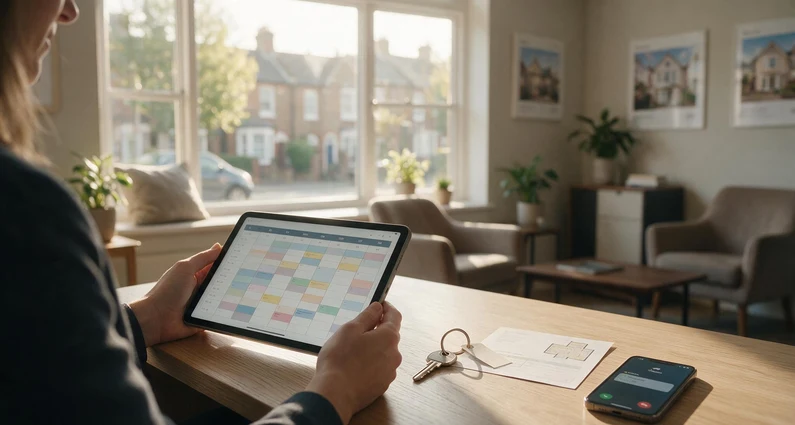
A booking form on the listing page closes that window. The visitor picks a date, picks a free slot, and gets a confirmation before they leave the page. No callback, no email tennis.
BookingPress ships its form as a shortcode, so you can paste it into a property page, a sidebar widget, or a global “Book a Tour” page. The form’s colours, fonts and layout are styled from the plugin settings, which matters more than it sounds: a booking widget that clashes with your theme reads as a third-party bolt-on, and people hesitate before typing into it.
2. Show Real Availability, Not Just a Request
This is the single biggest upgrade over any contact form, native ones included.
With a booking engine, the time slots a visitor sees are the slots that are genuinely open right now. Taken slots do not render. Blocked time does not render. The buyer cannot request something you cannot deliver, so you never send the “sorry, that one’s gone” email.
BookingPress two-way syncs with Google Calendar, Outlook Calendar and Apple Calendar (iCal). A booking made on your site appears in the agent’s personal calendar automatically, and when that agent blocks out a dentist appointment on their phone, the slot disappears from the booking form. Calendar sync sits in the paid tiers, not the free one.
3. Stop Double Bookings Across a Multi-Agent Team
One agent with one calendar can hold it in their head. Four agents sharing a Saturday cannot.
BookingPress gives each staff member their own account, their own availability, and their own calendar view of what is coming. Agents can view, edit and delete their own appointments without you handing out admin access to the whole site. There is also a commission feature that calculates each staff member’s earnings per booking, which is useful if your agents work on split.
The practical result: two buyers cannot be booked into the same viewing, and nobody has to be the human bottleneck who checks.
4. Cut No-Shows With Reminders on the Channel Buyers Read
A viewing only counts if someone turns up. Buyers comparing six properties forget which one they said yes to, and a forgotten Saturday tour is an hour you cannot sell twice.
Automated reminders fix most of that, and BookingPress sends them across more channels than the usual email-only setup: email, SMS (through 30 SMS gateways), WhatsApp and Telegram. Confirmations, reminders and follow-ups all run on their own.
Note: WhatsApp and Telegram notifications are premium add-ons, not part of the free version. If reaching buyers on WhatsApp is the reason you are installing this, budget for a paid plan.
5. Send Each Request to the Right Agent and the Right Visit Type
“Book an appointment” is not one thing. A 20-minute video walkthrough, a 45-minute in-person viewing and a seller valuation need different durations, different prep, and often a different person.
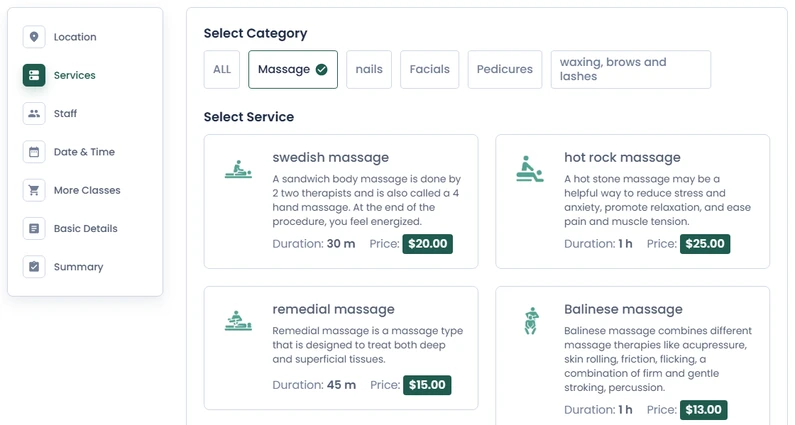
BookingPress models these as separate services, each with its own duration, its own price and its own assigned staff. The buyer picks what they actually want, the calendar reserves the right amount of time, and the request routes to the agent who handles it.
That is the difference between a calendar full of appointments and a calendar full of appointments you can plan a day around.
6. Take a Deposit When the Appointment Is Worth Protecting
Not every real estate appointment should be free, and the ones that should not be are usually the ones people no-show.
BookingPress supports 17+ payment gateways (Stripe, PayPal, Authorize.net, Mollie, Skrill and 2Checkout among them, per its features page) plus WooCommerce, and it supports deposit payments, so a client can secure a slot by paying part of the amount up front.
For a straight property viewing you will probably leave payments off. For a paid consultation, a valuation appointment or a photography slot, a small deposit filters the calendar down to people who intend to show up.
7. Get the Admin Hours Back
Every hour spent rearranging appointments is an hour not spent in front of a buyer.
Once bookings, confirmations, reminders and payments run themselves, the admin surface shrinks to one screen. The BookingPress dashboard keeps clients, appointments and payments in one place, with a calendar view of what is booked and reports on how the bookings are trending.
You stop being the scheduling layer. That is the whole point.
What BookingPress Costs
There is a free version, and it is genuinely usable: unlimited appointments, unlimited websites, PayPal, and a fully customizable form. Note that you will not find it by searching the plugin installer in wp-admin: BookingPress is not listed in the WordPress.org plugin directory, so the free build is downloaded from the developer’s own site and installed as a zip. What the free tier does not give you is calendar sync, WhatsApp or Telegram notifications, or the wider add-on library, and calendar sync is the feature that turns a form into a booking engine.
Paid plans, per the BookingPress pricing page (checked July 2026):
- Standard $89 per year or $229 lifetime, 1 site
- Professional $139 per year or $379 lifetime, up to 3 sites
- Enterprise $249 per year or $599 lifetime, up to 20 sites
For a solo agent, start free and upgrade when double bookings start costing you Saturdays. For an agency running several agents, Professional is the sensible entry point.
Which Setup You Actually Need
If you are a single agent doing a few viewings a week, the built-in WPResidence Schedule a Tour form is enough, and it costs you nothing on top of the $49 a year theme license. Turn it on, set your hours, and watch the Inbox.
The moment you are coordinating multiple agents, juggling viewing types, or losing slots to double bookings and no-shows, add a booking plugin underneath it. The native form keeps capturing leads on the listing page, and the plugin handles the calendar behind it.
Frequently Asked Questions
Does WPResidence need a booking plugin for property viewings?
Not always. WPResidence includes a Schedule a Tour form that captures the buyer’s preferred day and time slot and routes it to the assigned agent, which is enough for a solo agent running a few viewings a week. A booking plugin becomes worth paying for when you need live availability, conflict blocking across several agents, or automated reminders.
Can BookingPress work on any WordPress real estate theme?
Yes. BookingPress outputs its booking form as a shortcode, so you can drop it into a property page, a sidebar widget, or a dedicated Book a Tour page on a WPResidence site or on any other theme. Form colours, fonts and layout are styled from the plugin settings so it matches your design.
Is the free version of BookingPress enough for a real estate site?
It depends on what you need. The free tier covers unlimited appointments, unlimited sites and PayPal payments, but Google Calendar sync and WhatsApp or Telegram reminders sit in the paid plans, and calendar sync is what turns a form into a real booking engine. On a WPResidence site the native Schedule a Tour form already handles basic request capture, so the free plugin adds less than you would expect.
Where do I turn on the Schedule a Tour form?
In the WPResidence Theme Options panel, open Property page and then Contact & Schedule Tour. You can show it as a Classic button inside the agent contact form, as its own section beneath the form, or as a tab next to Request Info. You set the hours visitors are allowed to pick from on the same screen.
Will a booking plugin stop no-shows?
It reduces them. Automated confirmations and reminders go out on their own across email, SMS, WhatsApp and Telegram, and for paid appointments a deposit filters out people who were never going to turn up. Neither a booking plugin nor the native WPResidence form can force anyone to attend.
You may also want to check out: