
How customizable is a real estate WordPress theme?
By Cris Bean | Last updated: June 15, 2026
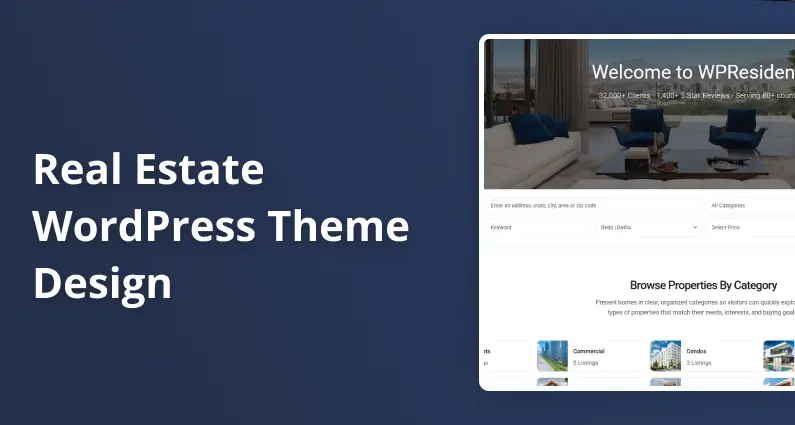
A real estate WordPress theme is far more customizable than most buyers expect, and WPResidence is a clear example of how far real estate WordPress theme design can be pushed. An agency can take a demo to a fully on-brand client site in about a working day, no code required. Most visual branding (logos, colors, fonts, property cards, hero media, and a white-label admin) needs no coding at all, and the theme ships with around 450 design and setup options, 50 one-click demos, 212 Elementor real estate widgets, and a visual Studio template builder.
Because the theme runs on a Bootstrap 5 CSS-variable architecture, one global color change flows through every listing card, agent profile, MLS-imported listing, and user-submitted listing at the same time. Strict pixel-perfect brand manuals or proprietary motion effects may still need a developer, but structural layout and responsive behavior are handled for you.
WPResidence costs $49 a year for one site and is rated 4.85 out of 5 from 1,644 reviews, per its ThemeForest listing (May 2026; check the listing for the current figure).
From demo import to on-brand site
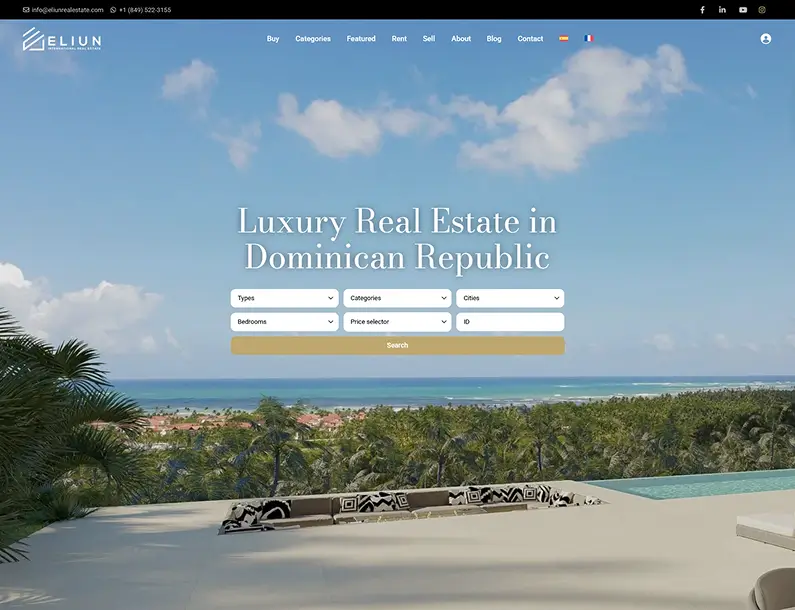
One-click demo import delivers a full site in roughly 5 to 10 minutes on a blank WordPress install: pages, menus, widget areas, sample listings, agents, cities, and media. With 50 one-click demos (49+) to start from, the way to avoid a demo look is simple. Pick a different demo per client, swap the logo, colors, fonts, and images, and the shared starting point becomes invisible to anyone not looking for it. Avoiding a cookie-cutter result is deliberate work, not something the theme does automatically.
The one-click import workflow
The import brings in a complete site, not a screenshot: full pages, menus, Elementor or WPBakery widget areas, sample listings that follow the real data model, agent profiles, city entries, and media. A blank install reaches review-ready in roughly 5 to 10 minutes.
And because demos load directly into the page builder, every section is drag-and-drop editable the moment the import finishes, nothing frozen.
For agencies, the Theme Options import and export tools are the real workflow win: keep separate luxury, rental, and commercial brand presets and load the right one per client in seconds. Clone a base starter install with Duplicator or All-in-One WP Migration, then restyle. One license can move from staging to live by deregistering on the test URL and registering on the production domain.
Using demo content as client approval placeholders
Demo listings, agents, and city entries follow the same data model as live content. That means clients can review and approve navigation, search behavior, and card layouts before a single real listing is entered.
After sign-off, you swap text, images, and listings while the approved structure stays intact. So there’s no rebuild, because the layout the client already accepted doesn’t move.
One caveat: run a pre-launch checklist before go-live. People rush, miss a stray demo listing, or leave an old hero image, and a short checklist catches those leftovers before a client does. You can also skip the demo and build from a blank install; a demo start is faster for most projects, but it’s optional.
Headers, menus, and property cards: the anti-cookie-cutter toolkit
A theme reused across many client sites can produce recognizable repetition, and that’s a fair concern. Three layers of control prevent it: the header and menu system, the Studio Header and Footer Builders, and the Property Card Composer. Each is no-code. Property card design alone can make two sites on the same base feel like different products.
Six-plus header types and per-page media
WPResidence gives you more than half a dozen header types you switch from Theme Options with no code: classic horizontal, centered logo, two-row, sidebar or vertical, transparent-over-hero, and similar variants. Each works with or without a top bar, so the combinations multiply fast.
And menus align left, center, or right, support an optional top-bar menu, and handle mega-menus with columns, so one client runs a simple line of links while another uses a wide “Buy / Rent / Neighborhoods” dropdown.
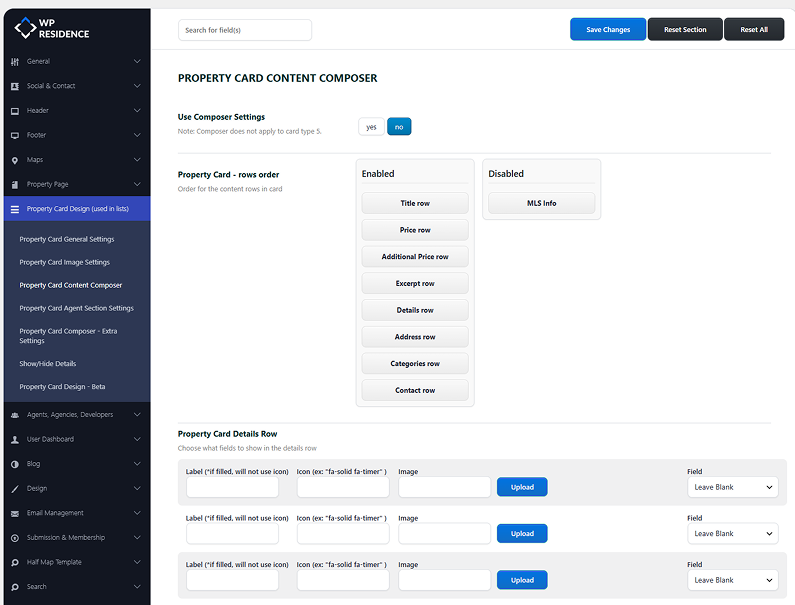
The per-page header media control is the quiet differentiator. For each page you set a Google Map, a slider, a featured image, or nothing. A full-width map on the search page, a big image on the home page, and a slim header on content pages make two same-base sites feel genuinely different. For headers beyond the presets, the Studio Header and Footer Builders let you design navigation, CTA, and logo zones visually in Elementor, then assign them per page.
Property Card Composer: nine designs, drag-and-drop
The Property Card Composer is a drag-and-drop, no-code interface for designing how listings render in grid, list, and half-map views. You start from built-in templates, drag fields into the order you want, and hide anything a client doesn’t need.
You control which fields appear (price, beds, baths, area, address, agent info), which badges show (New, Sold, Featured, Exclusive), the image behavior (a static thumbnail or a mini-slider), the aspect ratio, and whether a favorite button sits on the card.
The composer ships with 9 card designs, with layouts for grid, list, and half-map views, set globally or overridden per page. The same listing data reads differently in each: compact with small thumbnails on a rentals site, a tall photo grid with bold prices on a luxury one.
Can you match brand colors, logos, and fonts without writing code?
Yes. The roughly 450 design and setup options cover logo, color, and typography from the dashboard, and a global CSS-variable system means a change in one place flows everywhere. Because color and typography tokens drive every component, a single global change updates native listings, MLS-imported listings, agent profiles, and user-submitted listings in one operation. That cascade is what separates WPResidence from basic “you can change the colors” coverage.
The control extends to wording, not just visuals. You can rename menu labels and section titles without code (“Agents” to “Our Team”, “Properties” to “Listings”), change button text to any custom string, and edit URL slugs. That’s brand voice control, handled without code: Theme Options panels cover most labels, and template-level strings go through a translation plugin.
Logo system: every slot covered
The logo handling is detailed. You upload separate logos for the header, footer, mobile header or menu, a light-background version, a dark-background version, a favicon, and retina logos.
The payoff: separate light and dark variants keep your mark readable across a transparent hero header (over a dark image), a light content-area header, and a dark footer, with no conditional CSS. That covers most agency use cases out of the box.
Color system and global design tokens
The around 450 design and setup options include unlimited color pickers. You define primary, secondary, and accent colors plus background, button, link, and hover states, then map them across headers, menus, property cards, buttons, and CTAs.
Under the hood, those colors run on Bootstrap 5 CSS variables, which cascade automatically to every component that references them. Change the primary color in the options panel, and every listing card accent, menu hover state, and CTA button updates at the same time. So you’re tuning a token, not hunting down one-off edits across templates.
Typography and uploading licensed font files
The Font Management panel lets you pick Google Fonts or upload your own licensed font files, with control over size, line-height, letter-spacing, and weight per heading level (H1 to H6), body text, and menus.
Here’s the detail that matters for corporate work. An agency managing a client with a proprietary typeface, a font licensed to the brand and not publicly available, can upload those files directly to the panel. The font then cascades to all listing cards, agent profiles, and imported MLS listings through the CSS-variable system, with no theme file editing. That’s the difference between a brand-compliant deployment and a “close enough” one.
Design flexibility vs locked templates: what Bootstrap 5, Studio, and child themes make possible
WPResidence is not a locked template. It’s a component system built on Bootstrap 5 CSS variables, a visual template builder (Studio), Elementor and WPBakery page-builder support, and child-theme infrastructure. Most agencies complete full rebrands without touching code, and custom code becomes relevant only at the edges described in the third subsection below.
Bootstrap 5 and CSS variables: the restyling foundation
Bootstrap 5 supplies the spacing, grid, and component layer, while CSS custom properties replace hard-coded values. Change one variable and it cascades to every component that references it, which is why a full visual reskin needs relatively little custom CSS. As a practitioner’s rough guide, many developers reskin a full site with roughly 100 to 300 lines of custom CSS, though treat that as a rule of thumb, not a guaranteed ceiling.
Child-theme support keeps that work safe across updates. PHP and template overrides placed in a child theme aren’t touched when the parent theme updates. All pluggable functions use function_exists wrappers, so any function you override in a child theme takes priority without conflict, and template overrides survive parent updates the same way.
WPResidence Studio: per-category template auto-assignment
WPResidence Studio is a visual template builder on top of Elementor. You build reusable templates for properties, agents, agencies, developers, and taxonomy or archive layouts, then configure auto-assignment so a template applies automatically to every listing (or agent, or archive page) matching a category or taxonomy you specify.
The example makes it concrete. Build a media-heavy “Luxury Homes” detail template and auto-apply it to every listing tagged Luxury. Build a compact single-column “Rentals” template and auto-apply it to all rental listings. The theme handles the switch in the background based on the rules you set.
This is the primary mechanism that stops two WPResidence sites from looking alike, and it lets luxury, rentals, and commercial each carry distinct layouts in one install (run a luxury site and a rentals site off the same license and they can look like two different agencies built them, which, for the client, they effectively did). Elementor and WPBakery are both supported, and demos load into whichever builder you activate. The widget set is deep and real-estate-specific: more than 110 named Elementor widgets, and 170+ once you count layout blocks and sub-variants.
When a developer genuinely adds value
A developer adds genuine value in a few specific cases:
- Strict pixel-perfect brand manuals with exact spacing and kerning rules.
- A custom icon or illustration system replacing theme defaults throughout.
- Editorial, art-directed luxury pages with full-bleed typographic sections.
- Unusual motion or hover micro-interactions outside the widget library.
- External API integrations such as CRM connections or third-party data feeds beyond what MLSImport handles.
Even in those cases, the theme still handles all grid, spacing, and responsive behavior, so the custom work stays thin and focused.
How far can you customize the homepage hero and search form?
The Splash Page and the Advanced Search Form builder give you full control over media type, overlay color, field labels, and search logic, all from the admin panel. The Splash Page handles the hero media; the Advanced Search Form builder handles the search that sits on top of it. Both are visual, and the homepage is where most first impressions are made.
Splash Page: full-screen media and overlay controls
The Splash Page supports three hero media types. A full-screen image, static or swapped per page. A background video, self-hosted MP4 or YouTube embed, with autoplay, loop, and mute options. Or a slider.
The overlay control is an RGBA color picker with a 0 to 1 opacity range, and the opacity is what makes it useful. A dark overlay at 0.5 to 0.7 turns a busy listing photo or cityscape into a clean, readable backdrop for the search form without replacing the image.
Column alignment and content-zone padding in pixels are configurable too, and demo hero patterns give you starting points to copy. On the performance side, lazy loading and a lighter mobile image variant keep media-rich heroes fast on phones.
Branded search fields, labels, and tabbed search
The Advanced Search Form is placed as an Elementor widget directly over the hero media, not as a separate block below it. RGBA field backgrounds let the search boxes sit cleanly over a busy image, say a 70% opaque dark background behind the inputs on a full-screen photo, with white labels for readability.
But every field label and placeholder is editable without code: “Bedrooms” to “Beds”, “For Rent” to “To Let”, and button text to anything. Tabbed search lets you build separate For Sale and For Rent tabs with distinct field sets per status, including per-status price labels, so a “/month” suffix appears only on the Rent tab.
Per-page and per-landing-page search configurations can be cloned and tweaked, which is handy for a rentals-only search on a city rental landing page. Search UX options include half-map plus list or grid views, AJAX radius and geolocation search, and multi-level location hierarchies.
Will visitors or clients ever see “WPResidence” on your site?
On a properly configured site, visitors see nothing that references the theme name. The White Label panel removes WPResidence from the WordPress admin, and the front end carries no forced credit. Two distinct environments need covering: the front end that clients and visitors see, and the WordPress admin that owners and agents see. Both are addressed below, along with a note on where the limit sits.
Admin and login branding
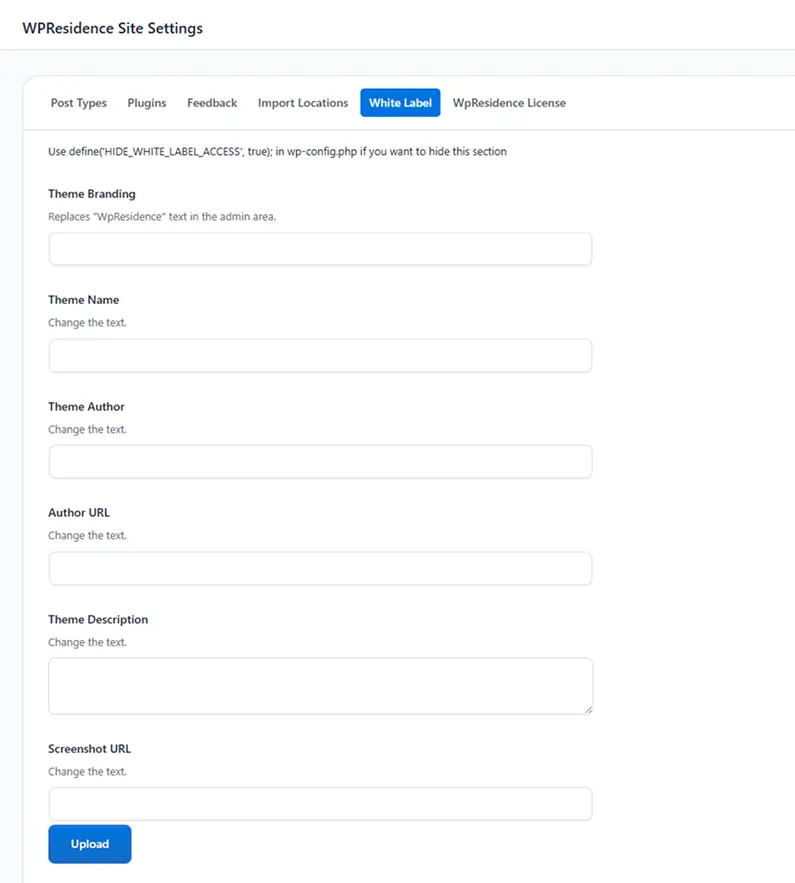
The White Label panel changes the theme name, author name, author URL, description, and the screenshot displayed under Appearance and Themes, plus a custom backend admin logo. The theme then presents itself as an in-house product, so clients or agents browsing Appearance see no theme-marketplace reference.
On the login screen, you upload a custom logo to replace WordPress branding, and you can override the WordPress admin color scheme to match your palette.
The login page can also redirect into a branded front-end dashboard instead of wp-admin, so agents who only manage listings never see the standard WordPress interface. None of this requires custom CSS; it’s all panel or wp-config settings.
Front-end dashboards: agents without wp-admin
The theme includes front-end dashboards for four user roles: Regular User, Agent, Agency, and Developer. The available pages cover My Profile, My Properties, Add Property, Favorites, Invoices, Messages, and CRM.
These pages render inside your site’s header, footer, and theme styles, so agents submit and manage listings through a branded interface and never touch wp-admin. You drop a dashboard section simply by not creating its template page.
Listings imported through MLSImport appear in the front-end dashboard as native WordPress posts, so the branded experience extends to external MLS data. There’s no iframe gap and no unbranded third-party interface for an agent to run into. A disclosure: MLSImport is WPResidence’s own IDX plugin, recommended here as the in-house default rather than a neutral cross-vendor pick, so weigh that when you compare IDX options.
HIDE_WHITE_LABEL_ACCESS: locking down the panel
A wp-config constant locks the white-label configuration from non-admin users. Adding the HIDE_WHITE_LABEL_ACCESS flag set to true hides both the White Label panel and the Themes screen from any user without administrator rights.
Without it, a client with an admin login could stumble onto the White Label section and undo your rebranding. Combine it with a role or menu restriction plugin to hide Posts, Plugins, and Tools for a clean handoff.
And white-label settings are stored in the WordPress database, not in theme files, so they survive every theme update. One caveat: a power user inspecting page source or rare admin screens may still spot a hint. The realistic goal is that day-to-day operation feels like your own platform, not literal perfection.
Agent-first personal branding
Each property is assigned to an Agent, Agency, or Developer profile, and the owner controls which contact is visible per listing. That single choice decides whose name, photo, phone, and contact form appear on the page, even on a busy multi-agent site.
An Agent profile is its own page: headshot, bio, phone, email, social links, a WhatsApp field, and custom fields like Languages or Neighborhood Focus. It also carries an auto-generated list of that agent’s listings, an optional map of those listings, and agent ratings and reviews that sit right next to the contact form.
Brokerage compliance information stays present but secondary. The brokerage logo and license lines go in the footer, top bar, or a small block, while contact-form emails route to the agent’s profile email, with an optional copy to an office inbox.
This pays off when an agent switches brokerages: you edit the profile and compliance fields, and that’s the extent of it. The domain, SEO equity, listings, and client relationships stay with the agent. Single-agent demos also exist where the agent’s photo and name lead the hero before any agency reference.
Per-niche templates, modern aesthetic, and RTL localization
A single WPResidence install handles multiple real estate niches with visually distinct experiences per niche, and it adapts to both Western and right-to-left markets without layout rebuilds. The two subsections below cover how.
One install, three niches: luxury, rentals, and commercial
Studio auto-assignment is what makes one install serve three audiences. Luxury buyers, renters, and commercial tenants each see cards and detail pages designed for their segment, because Studio assigns a different template per category or taxonomy: media-heavy for luxury, compact for rentals, data-dense for commercial.
The Features and Amenities taxonomy covers tag-style attributes like Waterfront, Pet Friendly, or LEED Certified, while the Custom Fields Builder adds niche fields such as HOA Fee, Concierge Level, or Distance to Campus without code. You can hide unused statuses, locations, or fields to keep a single-niche or single-city site lean.
Modern US and Western-European aesthetics come out of the box: Bootstrap 5, large photos, clean grids, and search-focused layouts, with the recent Nashville demo as a current US-style reference.
RTL, multi-language, and multi-currency support
WPResidence works with WPML and Polylang, supports RTL layouts (RTL demos are included), and offers multi-currency display configurable per site. For agencies, the key point is that branding (logos, fonts, templates) stays consistent across every language version.
One piece of practical advice: plan the language structure from day one. Retrofitting a multi-language setup later is more work than building it in at the start.
The same consistency extends to external data. Because MLSImport brings listings in via the RESO API as native WordPress posts, those listings inherit all templates, colors, and currency display settings. No iframe or unbranded third-party surface breaks the experience.
WPResidence’s design layer is wide enough for most agencies to take a demo to on-brand without code, and deep enough for a developer to build something genuinely distinct when a project calls for it. That’s the shape of real estate WordPress theme design here: no-code for the common case, low-code at the edges.
For a practical next step, review the 50 demos, then map demo to niche to branding variables for your first client project.
Key Takeaways
- WPResidence ships with around 450 design options, covering logos, colors, fonts, hero media, property cards, and white-label, most without writing code.
- The Bootstrap 5 CSS-variable architecture means a single global color change updates every listing card, agent profile, imported MLS listing, and user-submitted listing simultaneously.
- Nearly 50 one-click demos (49+) are starting points, not locked designs; pick a different demo per client and the shared origin disappears.
- The White Label panel renames the theme, brands the login screen, and routes agents to a front-end dashboard, and the settings survive every theme update.
- WPResidence Studio auto-assigns different property templates per category, so luxury, rentals, and commercial listings each carry a distinct layout in a single install.
Frequently Asked Questions
Will using WPResidence across many clients make all my sites look the same?
Not if you use the anti-clone toolkit on purpose. Pick a different demo per client, apply unique colors, fonts, and logos, choose different header types and Property Card Composer designs, and vary Studio templates per project. WPResidence also lets you export and import Theme Options, so agencies keep distinct brand packs per niche and load them in seconds. No two sites need share a recognizable visual signature.
Can I fully match my brand colors, logos, and fonts with theme options alone, or do I need a designer?
For most projects, yes. The roughly 450 design options in WPResidence cover unlimited color pickers, multiple logo slots (header, footer, mobile, favicon, retina, plus separate light and dark versions), and a Font Management panel with Google Fonts and licensed font file upload. A global CSS-variable system pushes every change to all components. An independent designer adds the most value when a project involves strict pixel-spacing rules, a proprietary typeface, or art-directed page layouts.
How long does it take to rebrand a demo into an on-brand site?
A visual rebrand (new colors, fonts, logo, hero image, and card adjustments) is a day’s work for most projects. Branding setup, including custom typography, spacing, label rewording, and white-label configuration, typically adds two to six hours on top of the demo import in WPResidence. Projects with a strict corporate brand manual or bespoke layouts take longer, but a presentable on-brand site rarely runs past two days.
Will visitors or clients ever see the name “WPResidence” on my site?
Not on a properly configured site. The front end carries no forced “Powered by” credit, and the footer is fully editable. The White Label panel removes the theme name from the WordPress admin entirely. A technically sophisticated user examining page source or admin menus may still find hints, so the realistic goal with WPResidence is that day-to-day operation feels like a proprietary platform rather than an off-the-shelf theme.
Do white-label and branding changes survive theme updates?
Yes. White-label settings (theme name, logo, login branding) live in the WordPress database, not in theme files, so a theme update that replaces template files does not overwrite them. The same applies to color, font, and typography settings stored in WPResidence Theme Options. Customizations placed in a child theme survive parent theme updates by definition, which is the recommended home for any template or PHP overrides.
How are custom or licensed fonts handled for strict brand guidelines?
The Font Management panel in WPResidence accepts uploaded font files directly, with no theme file editing. Controls cover size, line-height, letter-spacing, and weight per heading level (H1 to H6), body text, and menus. Agencies managing corporate clients with a proprietary typeface can upload those files to the panel, and the font then cascades to all listing cards, agent profiles, and imported MLS listings through the CSS-variable system.
Can luxury, rentals, and commercial listings each get their own design in one install?
Yes. WPResidence Studio lets you build a separate property template for each category (a media-heavy layout for luxury, a compact one for rentals, a data-dense layout for commercial) and auto-assign each by taxonomy. The Custom Fields Builder and Amenities taxonomy let each niche expose only the attributes relevant to its audience. One WordPress install supports three or more visually distinct listing experiences without extra plugins.
Can I use demo content as placeholders during client approval?
Yes. In WPResidence, demo listings, agents, and city entries follow the same data model as live content, so clients can approve navigation structure, search flow, and card layouts before any real listings exist. After approval, swap text, images, and listings while the approved structure stays intact. Run a pre-launch checklist before go-live to confirm no demo media or sample listings reach production.
Can I change the site’s design later without rebuilding everything?
Yes. Because structure and design live in templates, you can redesign property pages, headers, or archives while all listings and leads stay intact. WPResidence Studio lets you clone and swap templates safely, so testing a new look stays low-risk. Many teams treat this as a visual refresh every few years rather than a full rebuild.
Will heavy branding customization slow the site down?
Usually not. WPResidence runs on a Bootstrap 5 base with a clean CSS structure, so most branding reuses existing tokens instead of piling on new stylesheets. Keep custom CSS focused and avoid loading many extra fonts or scripts, and page speed stays close to the demo baseline. Built-in caching and properly sized images handle the rest, even on design-heavy sites.
Can I keep branding consistent across multiple languages and an RTL layout?
Yes. WPResidence works with WPML and Polylang and supports RTL layouts, with multi-currency display where you need it. Your logos, fonts, and page templates stay the same across every language version, so the brand feels stable no matter where visitors come from. It helps to plan the language structure from the start, since retrofitting multi-language is more work than building it in.
Do I need to write code to give each client a unique design?
No. You pick header layouts, adjust menus, and style property cards from Theme Options and the Property Card Composer, then shape pages with Elementor or WPBakery. Custom CSS or a child theme is only needed for unusual, one-off requests. Non-developer team members can deliver fresh, client-specific looks on the same WPResidence theme base.







