
Paid listings and memberships for a WordPress real estate theme
By the WPResidence Team
Last updated: June 15, 2026
WPResidence ships a native, built-in real estate theme membership and pay-per-listing engine. You can charge agents or property owners for listing slots without installing a separate subscription plugin, and you can switch between models with a Theme Options setting rather than a rebuild.
Three monetization modes run side by side: free submissions, pay-per-listing, and membership packages. Payments process through native Stripe, PayPal, and bank transfer. WooCommerce is an optional add-on, useful only when you need regional gateways, VAT, or invoice automation.
This guide walks through package setup, gateway configuration, recurring billing, listing expiry, and a like-for-like three-year cost comparison between a self-hosted WPResidence portal and SaaS real estate platforms.
In This Article
- Three ways to monetize listings in WPResidence
- What does a real estate membership package contain?
- Featured and premium listings as an upsell layer
- Which payment gateways does WPResidence support?
- Recurring subscriptions and billing automation
- Multi-currency, taxes, and cross-border payments
- User roles and the front-end submission dashboard
- Listing expiration and renewal reminders
- How does WPResidence TCO compare to SaaS platforms?
- Plugin compatibility and avoiding fake conflicts
- When to run WPResidence without monetization
Three ways to monetize listings in WPResidence
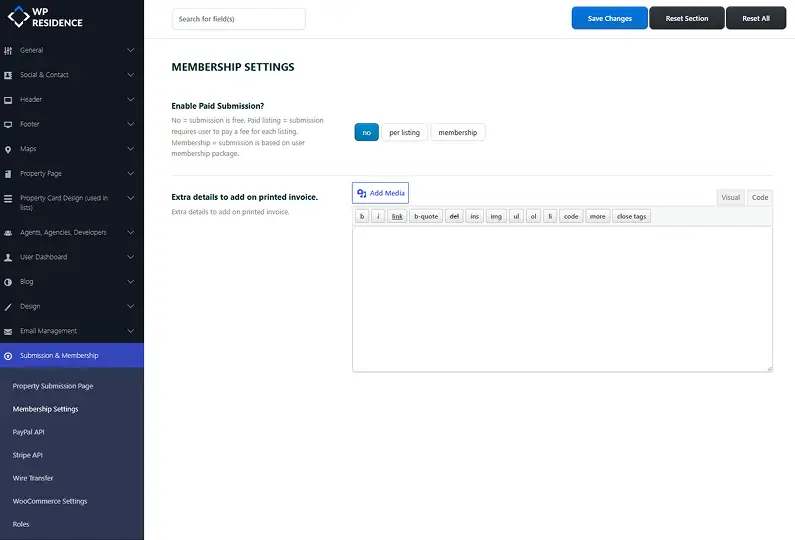
WPResidence gives you three switchable monetization modes, picked in Theme Options rather than by installing plugins: free submissions, pay-per-listing, and membership packages. All three can run on the same site at once. You will find the toggle in Theme Options, where you switch the active model without touching any code.
Free submissions are the default. A free package is auto-assigned at registration (a common setup is one listing, zero featured), so a new agent gets basic exposure with zero friction. Treat the free tier as top-of-funnel: it fills the site with inventory and gives users a reason to upgrade later.
Pay-per-listing charges a fee at submission and an optional fee to feature a listing. Membership packages sell a quota of listings and featured slots for a set price and duration. Because they coexist, you can offer free standard listings plus a paid featured upgrade on the same site, the freemium model most portals settle into.
Pay-per-listing: charge at submission and for featured upgrades
Pay-per-listing uses two price fields: Price per Submission and Price to Make Listing Featured, a flat fee to submit plus an optional fee to feature. The listing stays pending until the payment is logged, and you can also require manual admin approval after the payment clears. Each transaction is recorded as an invoice entry visible to both the user and the admin.
This is the cleanest fit for an FSBO workflow. The owner registers, fills in the property, pays, and the listing moves to pending or live depending on your approval setting. No subscription, just a one-off charge per property.
Membership packages with listing quotas
Membership packages are quota-based. WPResidence tracks each user’s remaining listing and featured slots, and when a user hits the cap the front-end submission form and the “make featured” toggle are blocked with an upgrade prompt.
Switching the whole site from free to pay-per-listing or membership is a settings change, not a rebuild. Existing listings and accounts are preserved, so you can start free and migrate to memberships once you have traction.
What does a real estate membership package contain?
Every package defines exactly four core fields: price, duration in days, total listing count, and featured-listing count. That is the whole anatomy of a plan. You will set these fields in Theme Options when you create or edit a package.
You can create an unlimited number of packages, but we recommend keeping 3 to 6 active tiers per role. Too many options creates choice overload and drags down conversions. Here is an illustrative tier scaffold you can adapt, not a set of shipped defaults:
- Starter: 3 to 5 listings / 1 featured / 30 days
- Pro: 20 listings / 5 featured / 90 days
- Agency: up to 100 listings / up to 10 featured
- Flash trial: 1 listing / 7 days, free
Upgrades and downgrades are handled gracefully: the listing count and featured-slot limits update immediately, and existing listings persist. On a downgrade, the agent may need to un-feature listings above the new cap.
Role-targeted plans for agents, agencies, and developers
You can target package sets at specific user roles. An Agency might see a plan offering 50 listings a month, a solo Agent a 10-listing plan, and a Developer a third set for project listings. The role is selected at registration, so each user only sees the packages that apply to them, and a Regular User, Agent, Agency, and Developer can each land on a different plan grid.
Auto-generating a pricing comparison page
You do not have to build the pricing page by hand. A built-in membership pricing shortcode (also an Elementor widget) generates the grid straight from your package database, and clicking “Select” sends the visitor to checkout. The grid stays in sync with your packages automatically.
Featured and premium listings as an upsell layer
Featured status is a yes/no flag that sits on top of any submission model. It works whether your base model is free, pay-per-listing, or membership, the simplest extra revenue lever you have.
One distinction trips people up, so let’s clear it now. Featured is not the same thing as a listing’s status taxonomy. Active, Open House, Hot Offer, Sold, and Price Reduced are status labels that describe the state of the deal. Featured is a separate flag that controls promotion and placement. They are different systems, and conflating them leads to misconfiguration.
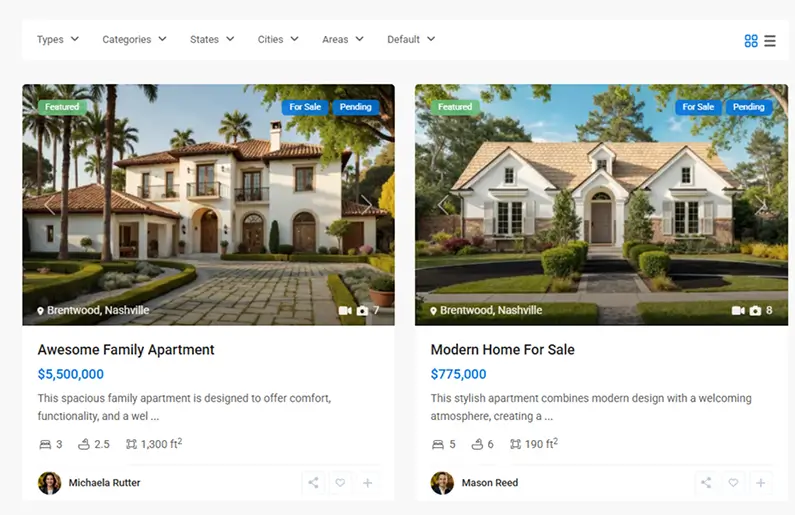
A featured listing gets a ribbon or badge on its card, floats to the top of search results and city pages, and feeds homepage sliders and grids through Featured Property shortcodes and Elementor widgets. An agent gets featured status one of two ways: if they have a remaining featured slot, they toggle it themselves from the front-end dashboard at no extra charge; if they are out of slots, they pay the one-off featured fee.
Featured status can be time-based and auto-expire after 7, 30, or 90 days. That expiry is your primary renewal trigger: when the badge drops off, the agent comes back to pay again. Meanwhile, Open House, Hot Offer, and Luxury or Sold labels remain separate status items you can surface on homepage widgets independently of the featured flag.
Which payment gateways does WPResidence support?
Three gateways are built in, and WooCommerce adds a fourth path for regional methods. The built-in trio (Stripe, PayPal, and bank transfer) covers most portals without a single extra plugin. WooCommerce becomes useful only when you need local payment methods, VAT calculation, or formal invoices. All four paths can run at the same time.

| Gateway | Connection method | Recurring? | Best for |
|---|---|---|---|
| Stripe | Publishable + secret keys in Theme Options, test/live toggle | Yes (native) | Card payments and self-serve subscriptions |
| PayPal | Business email or API credentials, sandbox/live toggle | Yes (native) | Buyers who prefer PayPal balances |
| Bank transfer | Manual wire details in settings; admin marks paid | No | High-value, offline, or invoice-first deals |
| WooCommerce | Enable WooCommerce; theme auto-creates products from packages | One-time by default | Regional gateways, VAT, and order emails |
Native gateways: Stripe, PayPal, and bank transfer
Stripe and PayPal activate by pasting API keys into Theme Options, where you will find the payment settings with Stripe, PayPal, and bank transfer all configured together. Stripe needs a publishable key and a secret key; PayPal takes a business email or API credentials. Each has a separate sandbox and live toggle, so you can test before going live, and SCA compliance is handled at the gateway level. No plugin required. Running your site over HTTPS is sound practice for any live checkout.
Bank transfer is the manual option. You enter your wire details in settings, and orders stay pending until you mark them paid. It is never automated, and it can never support recurring billing.
Adding regional gateways with WooCommerce
When your portal serves markets that require local methods or you need VAT automation and formal invoices, enable the WooCommerce integration. WooCommerce auto-creates a product from each membership package, checkout runs through WooCommerce, and any WooCommerce-compatible gateway becomes available. Gateway examples include Authorize.Net, Mollie, PayU, and Adyen, plus local methods like iDEAL and SOFORT.
In this mode, WooCommerce owns taxes and VAT, order emails, coupons, and refunds, while WPResidence only reads the WooCommerce order status to activate or extend a user’s package. For recurring billing through a WooCommerce gateway you would also need the WooCommerce Subscriptions plugin, so native Stripe and PayPal stay the simpler path.
Note: A refund processed in WooCommerce does not automatically strip a user’s active package. You will need to manually adjust their listing limits after processing the refund.
Recurring subscriptions and billing automation
Recurring billing through Stripe and PayPal is genuinely hands-off. You mark a package recurring, set the interval (7, 30, 90, or 365 days), and the user opts into auto-renew at checkout. You write no renewal scripts or cron jobs. When a payment succeeds, WPResidence extends the user’s access.
For most portals, we recommend starting with native Stripe: it handles recurring billing, covers most buyers, and needs nothing extra. Note that two separate clocks are at work here. Billing runs on the gateway’s own server-side schedule (Stripe or PayPal), so renewals fire reliably with no cron of your own. Listing expiry, by contrast, runs on WordPress cron, which is a different mechanism with its own reliability caveat covered in the expiration section below.
Stripe subscribers can self-cancel from the front-end dashboard with no admin intervention, a real churn-management win. PayPal recurring plans are managed through PayPal’s own tools, so cancellation happens there. Bank transfer stays manual and offline; you mark each invoice paid by hand, so it can never be recurring.
What happens when a recurring payment fails
If a recurring payment fails (an expired card or insufficient funds), WPResidence can downgrade the user to the free tier and limit their listing visibility until the payment is resolved. The user’s data is preserved; only their active listings may be hidden in the meantime. Spell this out in your terms of service and add a failed-payment notification email so users are not surprised.
Multi-currency, taxes, and cross-border payments
A built-in currency switcher handles display conversion, while the gateway charges in its own configured currency. You set one base currency and add display currencies such as USD, EUR, GBP, JPY, and CAD. Live exchange-rate conversion updates automatically, a header dropdown lets visitors switch manually, and geo-detection shows their local currency on arrival. You store a single base price per property, so there is no per-currency manual entry.
Here is the distinction that catches people out: display currency is not charge currency. The switcher changes what the visitor sees, but Stripe or PayPal still charges in the gateway’s own configured base currency. A visitor browsing in EUR on a USD-configured gateway gets charged in USD at checkout.
For VAT and country-specific tax calculation, WooCommerce supplies the tax engine; the native checkout does not calculate VAT on its own. RTL layout and locale-appropriate number and date formats are supported, which matters for Arabic and Hebrew market portals. The currency choice is stored in a cookie named “my_custom_curr,” and your caching plugin must exclude that cookie or the currency will not persist. If the switcher is not sticking, that cache exclusion is almost always the fix.
User roles and the front-end submission dashboard
Four real-estate-specific roles ship with the theme, so you do not need a role-editor plugin. The roles are Regular User, Agent, Agency, and Developer (plus Admin). The role is chosen at registration via a dropdown, and a “user separation” option keeps each role’s workflow distinct.
Each role gets a front-end dashboard with My Properties, Add Property, Favorites, Saved Searches, Invoices, My Membership, and My Leads. The My Membership tab shows the user’s current package and remaining slots. Agents and agency admins never have to enter wp-admin. Agencies get an extra “My Agents” area to manage sub-agents, a genuine advantage for multi-agent offices.
Moderation controls are built in: manual approval for new accounts and for new or edited listings, Google reCAPTCHA, WordPress nonces, and Terms and GDPR checkboxes. Guest submissions auto-create an account and always route to pending review. Image caps are configurable per plan (free users might be capped at 5 images while paid users get 25), an effective upgrade lever. A light CRM captures property inquiries and agent contacts in the My Leads tab.
When you feed MLS data into the same portal, MLSImport for MLS data feeds drops those listings into the same dashboard, so agents manage everything in one place.
Listing expiration and renewal reminders
Listings expire automatically on WordPress cron, data is preserved, and renewals are prompted by email. You set a global listing lifetime in days at the theme level, and per-package durations override it, so free listings can run shorter than paid ones.
When a listing expires, its status changes to Expired or Unpublished: hidden from public search and archive pages but kept fully intact in the database and visible in the owner’s dashboard, with every field, photo, and custom value preserved. The renewal flow sends email reminders before expiry plus dashboard notices; the owner clicks to renew, which triggers the payment or package flow.
Common timeframes are 7, 14, 30, 90, and 180 days. A sensible default is 30 days for pay-per-listing and 90 days for premium membership tiers. One caveat worth taking seriously: the expiry check runs on WordPress cron, which is triggered by site visits rather than a true system clock. On a busy portal that fires often enough to be invisible, but on a brand-new or low-traffic site, WP cron can lag, and a listing that should expire will keep showing until the next visit triggers the job. Because expiry is the mechanic your renewals depend on, set up a real server cron (a system cron job calling wp-cron.php on a schedule) once traffic is thin or you need expiry to be exact. Admins can also override per user: grant bonus listings, add featured slots, or extend an expiry date by hand from the listing expiration settings.
There is an SEO upside too: because expired, dead offers are hidden from public search, they do not clutter your indexable content.
How does WPResidence TCO compare to SaaS platforms?
Compared on the same three-year timeline, with the same IDX feed and self-managed maintenance, a self-hosted WPResidence portal costs far less than a full-service SaaS platform. A realistic full portal runs roughly $2,900 to $5,000 over three years; a comparable SaaS such as Real Geeks runs in the region of $12,000 to $15,000 across the same period. The gap comes down to the license model: WPResidence costs $49 a year and the site keeps working if you stop renewing, while SaaS is a recurring subscription that never stops.
A WPResidence license costs $49 a year for one site, $99 for three and $249 for ten, each with a year of updates and support; the site keeps working if you do not renew. SaaS pricing is the moving part of this comparison. As of early 2026, Real Geeks lists around $399 a month plus roughly $500 setup, and Placester sits around $84 to $154 a month (about $300 at the broker tier). Both vendors restructure their plans periodically and tie pricing to agent count, so treat these as ballpark figures and verify current rates before you decide.
One fair caveat in the other direction: SaaS bundles hosting, backups, and support that become separate line items (or your own time) on a self-hosted build, so part of the headline saving is work you take on yourself. Even after accounting for that, the yearly license plus hosting and an IDX feed lands well under a multi-year SaaS subscription on a like-for-like basis. That is what makes WPResidence the more economical path for a multi-role portal that needs billing, role-targeted plans, and MLS integration without stacking plugins, provided you are comfortable owning updates and backups.
First-year and three-to-five-year cost scenarios
Two scenarios make the math concrete. The lean DIY path strips out IDX and developer help: a $49 yearly license, $120 to $600 a year for hosting, and $10 to $20 a year for a domain, for a three-year total of roughly $540 to $2,000. The full portal path adds an IDX feed via MLSImport (a 30-day trial, then about $504 a year on the annual plan, roughly $1,512 over three years) plus a one-off developer setup of $500 to $2,000. With mid-range hosting, that puts the full portal at roughly $2,900 to $5,000 over three years, still a fraction of the $12,000-plus a comparable SaaS subscription costs across the same period.
In the interest of transparency: MLSImport is our recommended, in-house IDX solution for WPResidence portals, not a neutral third party. Other IDX providers are available as alternatives if you prefer.
Ongoing optional costs to budget for
Beyond the $49 yearly license, the other recurring costs are optional and external. Budget hosting at $10 to $50 a month ($120 to $600 a year), and IDX/MLS at $40 to $150 a month depending on feed volume (MLSImport is the named example). Multilingual support through WPML or Polylang runs about $70 to $90 a year. A maintenance retainer ranges from $50 to $500 a month (a mid-range broker around $200 to $400), and a hands-off security and maintenance package lands at $500 to $1,000 a year.
Google Maps can carry usage-based costs above its free tier, and OpenStreetMap is a free alternative. Stripe and PayPal keep a per-transaction percentage on every charge. The WPResidence Core plugin and the bundled WPBakery and slider are included at no extra cost.
Plugin compatibility and avoiding fake conflicts
No hard plugin conflicts are documented; nearly all friction is caching or firewall misconfiguration that a setting will fix. WPResidence reports powering over 30,000 live real estate sites, which speaks to a large, well-exercised plugin-compatibility surface.
Caching is the most common culprit, and the fix is a short exclusion list. Exclude logged-in users from the cache and exclude the key cookies (specifically “my_custom_curr” for currency and “my_measure_unit” for units). Dashboards, submission forms, and checkout pages must also stay uncached, or users see stale data. For firewalls and WAFs, whitelist the theme’s custom AJAX endpoints (login, saved searches, favorites, paid submission) plus the PayPal IPN URL and the Stripe webhook URL, or payment activation will lag or fail.
On multilingual, WPResidence is WPML-ready and ships a wpml-config.xml file; Weglot, TranslatePress, and Polylang also work. Exclude payment and return URLs from auto-translation and enable the language cookie so AJAX behaves. SEO plugins like Yoast and Rank Math treat the Property post type as a normal custom post type; just avoid double-loading analytics (the theme’s own box versus Google Site Kit).
One firm rule on membership plugins: use MemberPress or Paid Memberships Pro only for entirely separate gated content (courses, reports, a blog paywall) with the native membership disabled. Overlap on roles, login, and billing is the one scenario that creates real conflicts. Never run two Stripe or PayPal layers, or two subscription systems, on the same checkout flow.
When to run WPResidence without monetization
Every monetization module can be turned off, and WPResidence works equally well as a free single-agency display site. Front-end submission, membership packages, pay-per-listing, and the inquiry modules can all be disabled in Theme Options, turning the site into a standard display and marketing site for a solo agent or a brokerage that manages listings internally.
In that mode, an admin adds listings, visitors browse for free, and no payment infrastructure is needed. It suits a brokerage that feeds MLS listings through MLSImport and has no interest in collecting agent fees, or a white-label build for a client who manages listings in-house. The license does not change when monetization is off: the Regular License covers this use case too.
Frequently Asked Questions
Does WPResidence include a built-in membership system, or do I need a separate plugin?
Yes, WPResidence ships a native engine, and no MemberPress, Paid Memberships Pro, or WooCommerce is needed to charge for listings. The built-in system handles quotas, invoices, expiry, and checkout on its own. Only add an external membership plugin if you want entirely separate gated content, such as a course or a blog paywall, and disable the native membership in that case.
Do I need WooCommerce to accept payments for listing submissions?
No, you don’t. Stripe and PayPal connect natively via API keys in Theme Options, and bank transfer works offline. WooCommerce is an optional extension in WPResidence that adds regional gateways like Authorize.Net, Mollie, PayU, and Adyen, plus VAT calculation and formal order emails. Most portals never need it, since the built-in trio already covers card, PayPal, and wire payments.
What billing intervals does the recurring subscription system support?
The recurring system supports 7, 30, 90, and 365-day intervals through native Stripe and PayPal billing in WPResidence. The gateway handles the schedule, and the theme extends the user’s access on each successful renewal. Bank transfer cannot be put on a recurring schedule, and WooCommerce gateways are one-time by default unless you add the WooCommerce Subscriptions plugin.
What happens if a recurring Stripe or PayPal payment fails?
If the card expires or funds run short, the user can be downgraded to the free tier in WPResidence, and their active listing visibility drops until the payment is resolved. Their listing data and photos are preserved the whole time. Communicating this policy in your terms of service and confirmation emails ahead of time is strongly recommended, so the downgrade never feels like a surprise.
Can I switch between free, pay-per-listing, and membership models without rebuilding the site?
The short answer is yes. Switching the monetization model in WPResidence is a Theme Options settings change, not a rebuild. Existing listings, user accounts, and package data are all preserved. You can start with free submissions, add pay-per-listing later, and migrate to membership packages when you’re ready, or run all three models at once on the same site.
Do expired listings lose their data or hurt SEO?
Your data stays safe. Expired listings are hidden from public search and archives but remain fully intact in the WPResidence database and visible to the owner in the front-end dashboard. All fields, photos, and custom data stay ready for renewal. Hiding expired, dead offers also helps SEO by keeping them out of public search results.
Can agents upgrade or downgrade their membership plan without losing their listings?
Yes, and nothing gets deleted. Plan changes in WPResidence take effect immediately, and listing count and featured-slot limits update to the new tier. On a downgrade, existing listings are preserved, but the agent may need to un-feature listings that sit above the new featured-slot cap. A plan change never removes listing data.
Does the currency switcher change which currency my payment gateway charges in?
No, and this trips a lot of people up. The WPResidence currency switcher changes what the visitor sees (the display currency), but Stripe and PayPal charge in the currency configured in your gateway account. A visitor browsing in EUR on a USD-configured gateway is charged in USD at checkout. State this on your pricing page so international buyers know which currency hits their card.
Does charging agents for paid listings require an Extended License?
No, the Regular License is enough. Charging agents or property owners for listing submissions or membership packages is permitted under the WPResidence Regular License, as long as the general public can browse listings for free. An Extended License is only required if every visitor must pay to access content, which is rare for a real estate portal.
How long does it take to get payments live after buying the theme?
In our experience, activating Stripe or PayPal in WPResidence takes anywhere from under 30 minutes (if your keys are ready) to a few hours (if you’re creating gateway accounts from scratch): paste your API keys, toggle from sandbox to live, and run a test payment. Bank transfer is immediate since it is manual. Adding WooCommerce gateways takes longer, depending on each gateway’s own merchant onboarding.
Can I offer different membership plans to agents, agencies, and developers?
Yes. WPResidence lets you target package sets at specific user roles, so an Agency can see a 50-listing plan, a solo Agent a 10-listing plan, and a Developer a separate set for project listings. The role is chosen at registration, and each user only sees the packages that apply to them. You can create an unlimited number of packages, though 3 to 6 active tiers per role keeps conversions healthy.
What’s the difference between a featured listing and a Sold or Open House status?
They are two separate systems. Featured is a yes/no promotion flag that floats a listing to the top of search results and homepage sliders and can carry a one-off fee or use a membership slot. Active, Open House, Hot Offer, Sold, and Price Reduced are status labels that describe the state of the deal. Conflating the two leads to misconfiguration, so treat promotion (featured) and deal state (status) as independent.
Can agents manage their listings without access to the WordPress admin?
Yes. Each role (Regular User, Agent, Agency, and Developer) gets a front-end dashboard with My Properties, Add Property, Favorites, Saved Searches, Invoices, My Membership, and My Leads, so agents never enter wp-admin. Agencies also get a My Agents area to manage sub-agents. Listings imported through MLSImport appear in the same dashboard, so agents manage native and MLS listings in one place.
Does refunding an order in WooCommerce automatically cancel the user’s package?
No. A refund processed in WooCommerce does not automatically strip a user’s active package or listing limits in WPResidence, so after you process the refund you adjust the user’s listing and featured-slot limits by hand. This only applies to the optional WooCommerce path. Native Stripe and PayPal handle their own subscription cancellations, and Stripe subscribers can self-cancel from the front-end dashboard.
How do I make sure listings expire on time on a low-traffic site?
Listing expiry runs on WordPress cron, which is triggered by site visits rather than a true system clock. On a busy portal it fires often enough to be invisible, but on a new or low-traffic site it can lag and leave a listing live past its date. Set up a real server cron job that calls wp-cron.php on a schedule so expiry stays exact. Admins can also extend or override any listing’s expiry by hand.
Can I run WPResidence as a free display site with no payments?
Yes. Every monetization module (front-end submission, membership packages, pay-per-listing, and the inquiry modules) can be turned off in Theme Options, turning the site into a standard display and marketing site. An admin adds the listings, visitors browse for free, and no payment infrastructure is needed. It suits a brokerage that manages listings internally or feeds them through MLSImport, and the Regular License covers this use case too.
If you’re layering MLS or IDX listings on top of your paid-submission setup, MLSImport is the feed plugin we point WPResidence portals toward.
You might also want to check out:







