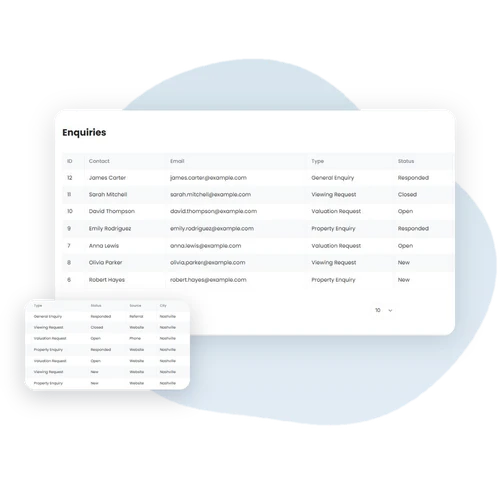
WPEstate CRM comes with WPResidence and captures every property, agent and schedule-a-tour enquiry as a contact, with the buyer’s search preferences filled in from the listing. Switch on ready-made rules to send a welcome email, alert the agent by SMS, create a call task and re-engage quiet leads after 30 days. Agents see which listings each buyer viewed and email them matching properties.
When a visitor writes from a property page, an agent page, the schedule-a-tour form or the footer form, the CRM creates or updates their contact and saves the message as an enquiry.
If they wrote from a listing, the contact’s search preferences are filled in from that listing: property type, city, bedrooms, bathrooms, and a price and size range.
Deals
Move Deals Through Your Pipeline
Drag each deal across six stages: New, Viewing Scheduled, Offer Made, Negotiation, Closed Won and Closed Lost. Every deal keeps its value, probability, next action and expected close date.
Admins can rename the stages and change their colors, and agents can switch to a list view when they prefer a table.
Contacts
One Timeline for Every Client
Each contact keeps their lifecycle stage, tags, tasks, notes, calls, meetings and matched properties on one timeline.
Agents open a single page and see the full history before they call a client back.
Property Matching
Send Each Buyer the Right Listings
Click Run Matching on a contact to find the published listings that fit their property type, status, location, price, bedrooms, bathrooms and size.
Then click Email Results to Contact to send the list to the buyer in one step.
Viewed Listings
Know What Each Contact Looked At
Every contact has a Viewed Listings tab with the properties they opened on your site, when they opened them and the price.
If a contact views the same listing more than twice in 24 hours, a ready-made rule can create an urgent follow-up task for the agent.
Automations
27 Ready-Made Rules
Choose from 15 event-based and 12 time-based rules and switch on the ones you need. For example: create a follow-up task for each new lead, text the agent when a lead comes in, flag contacts with no activity for 7 days, or match buyers when a new listing is published.
Automations are managed by the site admin.
Stats
See How Your Team Performs
Six charts show contacts by lifecycle stage, pipeline value per stage, new contacts over time, activity by type, deals won and lost, and task completion.
Summary cards show total contacts, new leads, open deals, overdue tasks and weekly activity.
Team Access
Everyone Sees What Is Theirs
Agents see only their own contacts, deals and tasks. Agencies and developers also see the records of their agents, and the site admin sees everything.
Automations and settings stay with the admin.
Integrations
Email, SMS, Webhooks and HubSpot
The CRM emails agents about new and assigned contacts and deal updates, and sends a daily task list and a weekly digest. It can text agents through Twilio and send 13 CRM events, such as new contact, deal won and task completed, to any app by webhook.
New and updated contacts and deals can also be sent to HubSpot. Contacts can be imported from CSV, and contacts, deals and tasks can be exported.
Contact Form Webhook
Send Every Form to Any CRM
Paste one webhook URL in Theme Options → Advanced Settings → Webhook URL. The agent, property, schedule-a-tour, agency and developer contact forms then send the visitor’s name, email, phone, message, page link and tour details to that address.
Switch each form type on or off and connect Zapier, Make or your own CRM. Forms built with the Elementor Contact Form Builder can each have their own webhook URL and also send any extra fields you add.
Manage All Your Leads and Contacts with WPEstate CRM
WPEstate CRM turns your WPResidence site into the place where your team handles every lead: enquiries from your contact forms, contacts with their full history, deals on a drag-and-drop pipeline, tasks, property matching, viewed listings, automations and stats.
Agents, agencies and developers work from their own front-end dashboard, and the site admin sees everything. When you need another tool, connect it by webhook, Twilio SMS or HubSpot.