WordPress vs SaaS

WordPress vs Wix for Real Estate

"WordPress vs Wix for real estate agents: compare data ownership, total cost, SEO, and flexibility before you build your next property site."

wpresidence.net
Side-by-side comparison of WPResidence WordPress admin panel and a SaaS real estate website builder interface
$79
one-time theme, lifetime updates
450+
theme options
170+
Elementor real estate widgets
43%
of the web runs WordPress

Last updated: June 30, 2026

By Cris Bean

The wordpress vs wix real estate decision is not one-size-fits-all, but for most agents and agencies who want long-term control over listing data, SEO upside from fully indexed property pages, and lower long-term costs you control directly, a self-hosted WordPress site built on WPResidence delivers better economics and fewer constraints than Wix, Squarespace, or a specialized SaaS platform like Placester. The trade-off is worth naming up front: the self-hosted path asks more of you on day one. You handle hosting, setup, and security yourself, and the learning curve is steeper than a SaaS signup wizard. There is also a genuine exception. A non-technical solo agent who wants zero maintenance, plans no MLS integration, and just needs a clean presence online is often better served by a SaaS platform or a site builder. The sections below break this decision down dimension by dimension: data ownership, five-year cost, design control, SEO, setup, support, and lock-in.

Full disclosure: WPResidence is the theme our team builds and sells. Every comparison in this guide applies the same critical lens to us as to the alternatives.

  1. Where Wix, Squarespace, and Placester fit
  2. Data ownership: what you actually keep
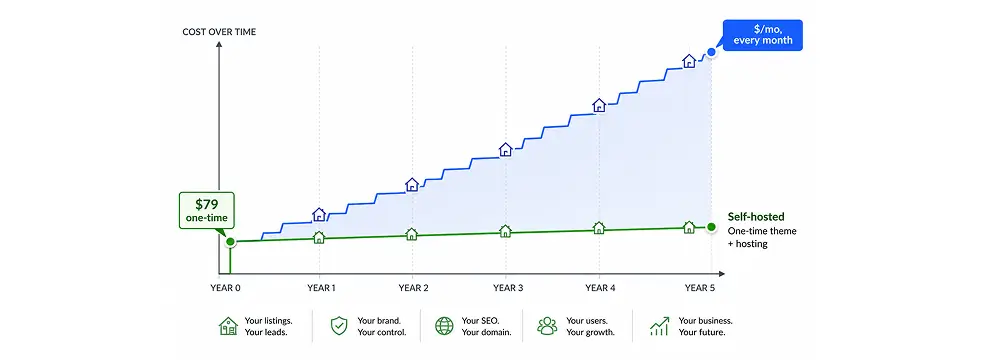
  3. How does the long-term cost compare?
  4. Design flexibility and control
  5. SEO and indexable listing pages
  6. Setup and learning curve
  7. Support: dedicated team vs help-desk scripts
  8. How future-proof is a self-hosted WordPress site?
  9. WordPress vs Wix for real estate: quick-reference comparison
  10. When a SaaS platform or site builder is the better choice
  11. Key Takeaways
  12. Frequently Asked Questions
Platform Types

Where Wix, Squarespace, and Placester fit

3 hosted platforms vs WordPress
Where Wix, Squarespace, and Placester fit
Platforms
Wix, Squarespace are general builders
No native MLS or IDX
Placester is real-estate SaaS
All rent, not own

Wix and Squarespace are general-purpose hosted website builders, used for everything from portfolios to small online shops. Neither is built specifically for real estate, so there is no native MLS or IDX. To show live listings, you bolt on a third-party listings widget or an embedded feed from another service.

Placester is different in kind: a real-estate-specific SaaS platform, purpose-built for agents and brokerages, so it speaks the domain natively. It is still a closed, subscription-hosted platform, though, with the same ownership and exit trade-offs that come with renting your site rather than owning it.

This guide compares the self-hosted WordPress model against that whole hosted-platform category. The trade-offs in the sections below apply across all of them, whichever one you are weighing against WordPress.

Data Ownership

Data ownership: what you actually keep

100% you own DB, files, exports

Real estate website ownership comes down to one question: who controls the database? On a self-hosted WordPress site, you own the database, the files, and the full export path. On a SaaS platform, the vendor owns the infrastructure, and what you can take with you is bounded by their export tools. That single difference shapes almost everything else in this comparison.

On a WPResidence site, your property posts, your agent leads, and your uploaded media live in your own MySQL database, on hosting you control. You get full SQL access and full file-system access. You can export through WordPress's built-in tools, through WP All Export, or through a custom script if you want to move data somewhere specific.

SaaS platforms work the other way around. The database belongs to the vendor. Many offer only a limited CSV or API export, and those exports can skip lead history, custom fields, or media links. You get a copy of some of your data. You do not get the working site.

MLS listings change the picture too. MLSImport, which is WPResidence's own IDX plugin, imports MLS data as native WordPress posts via MLSImport, not as rows trapped inside an external iframe feed. Each imported listing is a real post you can edit, rewrite, or hide. It is yours to manage like any other content on the site.

Settings move with you as well. The Theme Options Import and Export feature copies a full site configuration to a staging environment or a fresh client site in a few minutes, something rare in closed SaaS platforms.

The exit scenario is where ownership stops being abstract. Here is the blunt version: on a SaaS platform, you rent software on the vendor's servers, not the full site. If a vendor changes pricing, closes your account, or shuts down, live-site access can stop fast. You keep some exported data, but not a running website.

WordPress is open source, and that license protects your right to copy, move, and rebuild your site anywhere. Property data in WPResidence sits in standard WordPress custom post types and taxonomies, so other tools can read it even if you switch themes later.

One honest constraint: theme-data coupling

Here is the part most WPResidence reviews leave out. WPResidence couples theme and data tightly, so changing themes later means real migration work. Your property data is stored in the theme's own custom post types. You control that data, and you can export it. But if you later move to a different theme, re-mapping those fields to another theme's structure is a genuine technical job, not a one-click switch. A plugin-first architecture like WPCasa keeps that data more portable between themes. We are telling you this plainly because the data-ownership case is stronger when you know exactly where the edges are.

5-Year Cost

How does the long-term cost compare?

$1.5-4k five-year self-hosted total
How does the long-term cost compare?
Cost
$79 one-time, no platform fee
Hosting and MLSImport unbundled
Five-year self-hosted ~$1.5-4k
Per-domain license, agency savings

The $79 one-time theme purchase is not the full picture on either side. When you run the numbers over three to five years, though, self-hosted consistently comes out cheaper than most SaaS subscriptions, and the gap widens for agencies running more than one site.

Start with the line items. WPResidence is $79 one-time on ThemeForest with lifetime free updates, per its ThemeForest listing as of this writing in mid-2026; check the listing for current pricing. If you need live MLS data, MLSImport, WPResidence's own IDX plugin, is $49 per month after a 30-day free trial, per its pricing page as of mid-2026. Hosting is separate, and you pay it directly to a host you choose.

Put those two line items together and a two-year WPResidence-plus-MLSImport stack runs about $1,255 ($79 once plus $49 per month across 24 months). That is an illustrative calculation based on those two numbers alone, not a vendor stat, and it excludes hosting.

To be precise, self-hosted is not zero recurring cost. You still pay hosting every month, and if you run live MLS listings, MLSImport is $49 per month. The difference is that these are unbundled costs you control and can shop separately, not a single platform subscription that climbs as you add listings, agents, or features.

Now the SaaS side. We are going to keep two separate scenarios separate on purpose, because they rest on different assumptions and merging them would invent a number neither source supports.

Run the numbers at $49 per month and a single site costs $1,764 to $2,940 over three to five years. That figure is illustrative, not a vendor quote.

A second, broader analysis looks at SaaS plans in the $48 to $149 per month range and totals roughly $2,900 to over $9,000 across five years. The same analysis puts a five-year self-hosted WPResidence setup, including hosting, domain, plugins, and occasional developer time, at around $1,500 to $4,000, with five years of quality hosting alone often landing in the $500 to $1,500 range.

Two scenarios, two sets of assumptions, one consistent direction: the recurring platform fee is what compounds against you over time.

Agency economics: per-site cost at scale

At agency scale the arithmetic shifts again, because the licensing model is per domain. An Envato Regular license covers one live client domain per purchase (about $79). Run the comparison at agency volume: a brokerage running 10 SaaS agent sites at $50 each pays about $6,000 every year in platform fees alone.

On a self-hosted model, consolidating several client sites on one dedicated server can push the real hosting cost under $20 per site per month. Reusing Theme Options exports and saved Elementor Studio templates across repeat builds also saves billable hours, which means stronger margins than rebuilding from a SaaS wizard each time.

All price figures in this section are illustrative and subject to change. Verify current pricing with each vendor before making a decision.

Design Control

Design flexibility and control

450+ theme options, 170+ widgets

A self-hosted WPResidence site can be designed at the field level, with different layouts per property category. Most SaaS platforms apply one main layout to every listing and limit or block code access entirely. That is the practical gap between the two models when it comes to design.

WPResidence ships with 450+ theme options covering layouts, colors, labels, search configuration, and monetization. It also includes 170+ Elementor real estate widgets that read live property data such as price, address, map, and contact details. Those widgets work with Elementor's free version, so Elementor Pro is not required, and the theme is also compatible with WPBakery and Gutenberg.

The piece that most comparisons skip is per-category template assignment. With Elementor Studio templates, you can build one property layout and assign it to a specific property category, luxury versus rentals versus land versus commercial, from a dropdown in the admin. No PHP. One template then serves thousands of listings without you touching a single page by hand.

The Custom Fields Builder goes a level deeper. You can add text, number, dropdown, checkbox, and date fields, assign them per property category, and auto-hide empty fields on the front end. Those same fields wire directly into the Advanced Search Builder as filters, whether you want a dropdown, a slider, a checkbox, an autocomplete, or an exact range. None of it needs SQL or PHP.

For storytelling on the listing itself, per-listing rich content fields cover Walk Score, a Yelp nearby-places widget, video from YouTube, Vimeo, or TikTok, and a 360-degree or Matterport virtual-tour embed. On most SaaS platforms, you get the template the vendor gives you, and that is where customization ends.

49 one-click demos as a starting point

WPResidence ships 49 ready-made demos as of version 5.4. Each one imports a full configured site, menus, pages, widgets, and sample listings, in a single click. A freelancer can import a demo, rebrand it, and hand off a working MVP in one to two days.

SEO & Indexing

SEO and indexable listing pages

800+ MLS markets, hourly sync
SEO and indexable listing pages
SEO
Listings are crawlable WP posts
Built-in property schema markup
Hourly sync via RESO API
City and neighborhood SEO pages

MLS listings imported as native WordPress posts are crawlable and indexable by Google. Every address, description, and feature becomes a rankable page on your own domain. Listings served through a SaaS iframe or external feed are typically credited to the feed's source, not your domain, so they do less to build your own site's search presence. Exactly how search engines handle embedded feeds varies, but this is one of the larger long-term SEO differences between the two models.

Here is the mechanism. When MLSImport, WPResidence's own IDX plugin, syncs MLS data through the RESO Web API (the real-estate industry's standard data feed), hourly, across 800+ MLS markets and boards in the US and Canada, each listing lands as a standard WordPress post with a public URL. The address, the feature list, and the agent notes are all part of your site for a crawler to read. SaaS platforms typically serve listings inside an iframe or an external feed frame, and the content inside that frame is generally not attributed to your own domain by search engines.

In one production deployment, MLSImport brought in roughly 8,000 listings in a few hours, an example of the ceiling, not a typical day.

By one comparison of the two models, the gap can mean hundreds or thousands more indexed pages a year for a self-hosted setup compared with an iframe-based one. Treat it as a range, not a guarantee, since the actual figure depends on your inventory and how often it turns over.

WPResidence also emits built-in property schema markup, structured data for price, address, and availability, without a separate schema plugin. That is what makes a listing eligible for Google's rich results. On top of that, custom Elementor templates let you build city and neighborhood pages for local SEO with real content sitting above the listings grid, which is where area-level queries get won. The theme works with leading SEO plugins for meta titles, custom descriptions, and XML sitemaps.

If you are moving to WPResidence from a SaaS platform, protect your rankings during the switch: preserve your permalink slugs, set 301 redirects for any URLs that change (the Redirection plugin is one option), submit a fresh sitemap to Google Search Console, and watch for crawl errors in the weeks after launch. We cover this again in the FAQ, because it is the question that worries migrating agents most.

Setup & Curve

Setup and learning curve

~30 min to a functional draft

WPResidence is not the fastest option on day one. By the second or third build, though, exported settings and saved templates cut setup time substantially, which is exactly where agencies and freelancers see the payoff.

The setup wizard runs the moment you activate the theme. It walks you through your logo, colors, map provider, search configuration, and payments, and a functional draft is achievable in roughly 30 minutes. From there, one-click demo import loads a full site, menus, pages, sample listings, and widgets, so an MVP comes together in one to two days. There are 49 demos to start from.

Now the honest part. WPResidence has a steeper day-one curve than simpler alternatives. A freelancer's first build typically runs around 25 to 40 hours. Building the equivalent custom fields, search, and templates from generic WordPress tools instead adds roughly 30 to 80 hours per project, in our experience on a first build. Neither of those numbers belongs in a footnote, so we are putting them in the body where they matter.

The curve flattens with reuse. By the second or third project, exported theme options and saved Elementor Studio templates bring per-project setup down to a few hours. If you build sites repeatedly, that is the number that defines your real cost, not the first-build figure.

If you are a non-technical solo agent who wants to launch in under a day without managing settings, SaaS deserves honest consideration. We address that buyer directly further down.

What non-technical agents need to know

WPResidence is built for agents with working WordPress familiarity, or for those with a freelancer or agency relationship. It is not designed for someone who has never opened a WordPress dashboard. The setup wizard lowers the barrier, but domain setup, hosting management, DNS, plugin updates, and security hygiene stay your responsibility. Self-hosting transfers the maintenance and security burden that a SaaS platform handles for you onto the site owner. That is an accurate description of the model, not a caveat to skim past. If you cannot handle routine WordPress maintenance and cannot outsource it, weigh that honestly before you commit.

Support

Support: dedicated team vs help-desk scripts

~24h weekday first response
Support: dedicated team vs help-desk scripts
Support
Staffed by theme developers
~24h weekday first response
Six months included per license
Direct site login for issues

WPResidence support is staffed by the theme's own developers, with roughly a 24-hour first response on weekdays. That is a different model from the tiered, script-driven support typical of SaaS platforms, and the difference cuts both ways.

Each license includes six months of ticket support, extendable through Envato. The hours are Monday to Friday, 9:00 to 17:00 Europe time (UTC+1), running on a Freshdesk ticketing system, with a first response of roughly 24 hours on weekdays. For complex issues, the support team can log in to your site directly. Development teams also get API documentation and Postman collections to work against.

The structural contrast is the point. Comparing the two support models, SaaS support tends to be broader but less predictable: tiered call-center scripts, with the vendor controlling the roadmap, the staffing, and the pricing. Theme support covers one product and one stack, which tends to produce more practical answers for specific implementation questions. Neither is universally better. They are built for different things.

Two limits are worth stating plainly. The support window is weekday-only, on Europe time, so teams in North American or Asia-Pacific time zones will see a real lag before the first response lands. And the included scope ends after six months unless you renew. When that period ends, your site keeps running exactly as before; only the ticket channel closes.

Future-Proofing

How future-proof is a self-hosted WordPress site?

43% of the web runs WordPress

By commonly cited figures, WordPress powers around 43% of all websites. Hosts, plugins, and developers exist in abundance regardless of what any single vendor decides to do. That breadth is the structural argument for self-hosting, and WPResidence's update record is the evidence that the theme is actively maintained rather than coasting.

The risk on the other side is concentration. A proprietary SaaS platform can change terms, add fees, or close with little warning, and you have no independent ecosystem to fall back on. With WordPress, if one provider disappoints you, thousands of others can take its place.

The update history is concrete and checkable in the changelog rather than promised in marketing copy:

As of this writing in mid-2026, the ThemeForest listing reports 32,000+ sales and a 4.85 out of 5 rating from more than 1,600 reviews; those are live marketplace figures, so check the listing for the current numbers. On performance, WPResidence includes built-in Core Caching and image lazy-loading. WPResidence's own performance testing shows roughly 2,500 properties loading in about four seconds on a dedicated server with caching enabled, and PageSpeed Insights scores of 90 to 95+ are achievable with appropriate hosting. By common industry estimates, well over half of property browsing, often cited at 50 to 70%, happens on phones, so the Bootstrap 5 base (in place since v5.0.4 in December 2024) matters: mobile-first fluid grids, off-canvas menus, swipeable sliders, and responsive images come standard.

Can you switch away later without losing your SEO?

If you move to a different theme or platform down the road, protecting your SEO is real technical work: keep your permalink slugs intact, set 301 redirects for any URLs that change (the Redirection plugin is one option), submit a fresh XML sitemap to Google Search Console, and keep an eye on Search Console for crawl errors after launch. The difference is that this is work you control. A SaaS-to-WordPress move is a technical task instead of a debate with a vendor, and the same holds in reverse. You can read more on migrating a WPResidence site without losing SEO when you reach that stage.

At a glance

WordPress vs Wix for real estate: quick-reference comparison

Each niche real estate website type demands a different audience focus, data schema, and proof of authority.

The table below distills the key trade-offs into a single reference. No row is a knockout. Each dimension involves a real trade-off, and choosing the best real estate website platform for your situation depends on which trade-offs matter most.

Dimension WPResidence (self-hosted WordPress) Typical SaaS / site builder
Data ownership Site owner owns the DB, files, and full exports Vendor owns infrastructure; limited CSV/API export
Monthly platform cost $79 one-time theme; no platform subscription. Hosting is monthly, plus MLSImport $49/mo only if you need live IDX. Typically $29 to $149/mo (illustrative; verify current pricing)
Long-term cost (5 yrs, illustrative) ~$1,500 to $4,000 incl. hosting, plugins, dev time ~$2,900 to $9,000+
Design control Per-category templates; 450+ options; 170+ Elementor widgets One main template for all listings; limited or no code access
MLS / IDX MLSImport (WPResidence's own plugin): native WP posts, hourly sync, $49/mo Varies; often iframe-based (generally not attributed to your own domain)
SEO Every listing = crawlable WP post + built-in property schema Iframe feeds limit indexability on your domain
Learning curve Steeper day one; faster from the second build onward Fast initial setup; limited customization ceiling
Support Dedicated theme team; 6 months incl.; ~24h weekday response Tiered help desk; vendor controls roadmap and staffing
Maintenance burden Site owner responsible (hosting, backups, updates, security) Vendor handles infrastructure
Lock-in risk Low: open-source, portable data; migration is technical work you control Higher: vendor controls terms, pricing, and exit path
Best fit Agents and agencies wanting control, SEO depth, multi-site economics Non-technical solo agent wanting zero maintenance

SaaS price ranges above are illustrative, based on published research scenarios. Verify current pricing with each platform before making a decision.

When SaaS Wins

When a SaaS platform or site builder is the better choice

<1 day SaaS launch for solo agents

Self-hosted WordPress is not the right answer for every agent. There is a specific, genuine buyer who is better served by Wix, Squarespace, or a dedicated SaaS platform, and this section names them directly.

That buyer is the non-technical solo agent who wants to launch in under a day, has no plans for MLS integration or a custom property search, and does not want to think about hosting accounts, plugin updates, or security patches. If that is you, a SaaS platform is the better choice. The maintenance burden of self-hosting is a real operational cost for you, not a footnote in a comparison table.

The maintenance point deserves to be stated without softening. On a self-hosted WordPress site, you manage hosting renewals, automated backups, security monitoring, plugin compatibility updates, and theme updates. A SaaS platform absorbs all of it. That is a real advantage of the SaaS model, and for some buyers it is large enough to be the deciding factor on its own.

Simplicity can also just win on the merits. If what you actually need is a professional one-page bio site with a contact form and a small gallery of featured listings, not an IDX portal and not a neighborhood content strategy, a SaaS platform or site builder delivers that in hours with no WordPress overhead. Buying more capability than you will use is its own kind of cost.

Team capacity matters too. A brokerage or an individual agent without a developer and without a trusted agency or freelancer relationship should start on SaaS until reliable technical support for the self-hosted path is in place.

There is also a use case where WPResidence is simply the wrong tool. WPResidence is a listing and lead-generation theme, not a booking engine. If your primary need is per-day pricing, booking calendars, and iCal sync for short-term vacation rentals, WPResidence requires adding a dedicated booking plugin to fill that gap, and a SaaS platform built specifically for vacation rentals may be the simpler path for that niche.

At a glance

Key Takeaways

Each niche real estate website type demands a different audience focus, data schema, and proof of authority.

A WPResidence license is $79 one-time on ThemeForest as of mid-2026, with lifetime free updates and no recurring theme-license fee (you still pay hosting, plus MLSImport if you use IDX).

MLS listings imported via MLSImport, WPResidence's own IDX plugin, land as native WordPress posts that are crawlable and indexable, unlike SaaS iframe feeds.

One illustrative scenario puts a $49/month SaaS plan at $1,764 to $2,940 for a single site over three to five years; verify current pricing before comparing.

Running a self-hosted real estate website transfers the maintenance and security burden, backups, updates, and plugin management, from the vendor to the site owner.

A non-technical solo agent who wants zero-maintenance publishing and no MLS integration is genuinely better served by a SaaS platform than by self-hosted WordPress.

Frequently Asked Questions

Does WPResidence require any ongoing subscription fees like SaaS real estate platforms?

The theme itself is $79 one-time on ThemeForest with lifetime free updates and no ongoing platform fee. Hosting is a separate cost you pay directly to your chosen host. If your site uses MLS integration, MLSImport, WPResidence's own IDX plugin, is $49 per month after a 30-day free trial. Ticket support is included for six months per license and is extendable through Envato.

Can an agent lose a SaaS real estate website if subscription payments stop?

Yes. On a SaaS platform, if the subscription lapses, access to the live site typically stops. What you keep depends entirely on the platform's export tools, usually a CSV of listing data rather than a full working site. On a self-hosted WordPress site running WPResidence, the site keeps working as long as the hosting account is paid, and no third-party vendor can cut off your access.

What if I am not technical enough to manage a self-hosted real estate site?

Self-hosting means managing a hosting account, plugin updates, backups, and basic security hygiene. An agent with no technical background and no developer relationship is a genuine fit for a SaaS platform; that is an accurate description of who each model serves, not a hedge. WPResidence targets agents with basic WordPress familiarity or an agency partner. If routine maintenance cannot be handled or outsourced, a SaaS platform is the more practical starting point.

Does a WPResidence site keep working if I change hosting providers?

Yes. Because a WPResidence site runs on standard WordPress files and a MySQL database, moving to a new host is a controlled technical task: export the database, copy the files, update the wp-config.php credentials, and switch DNS. No vendor permission is required and no data is lost. The same portability applies if you change domain registrars or CDN providers later.

Who is the right buyer for WPResidence instead of a SaaS platform?

WPResidence fits real estate agencies managing multiple client sites, freelancers building client portals at scale, and agents who want fully indexed MLS listings for long-term SEO. It suits teams with basic WordPress familiarity or a trusted agency partner. It is not the right first choice for a non-technical solo agent who wants zero-maintenance publishing and has no need for custom property search or IDX integration.

Can WPResidence handle large MLS-driven sites without performance problems?

WPResidence includes built-in Core Caching and image lazy-loading. WPResidence's own performance testing shows roughly 2,500 properties loading in about four seconds on a dedicated server with caching enabled, and PageSpeed Insights scores of 90 to 95+ are achievable. For very large inventories, dedicated or managed WordPress hosting is recommended over shared plans. MLSImport syncs through the RESO Web API on an hourly schedule.

How do I keep SEO safe when migrating from a SaaS platform to WPResidence?

Keep all property page URLs, slugs and permalink structure, identical to the previous site wherever possible. Because WPResidence stores listings as standard WordPress posts with custom permalink slugs, you can usually match your existing URL structure exactly. Use a 301-redirect plugin, such as Redirection, for any URLs that must change. Submit a fresh XML sitemap to Google Search Console immediately after launch. Then monitor Search Console for crawl errors in the weeks after launch, and avoid restructuring URLs again during that window.

If you are narrowing in on the WordPress versus Wix for real estate decision and want to dig into a specific part, these guides cover the next most common questions: how WPResidence handles MLS and IDX integration, the WPResidence demo import and site setup guide, and WPResidence vs other real estate themes: a comparison.