
How WPResidence captures leads: built-in contact forms, agent routing, the WPEstate CRM, HubSpot sync and webhooks to other CRMs.
Last updated: September 28, 2026
By Cris Bean
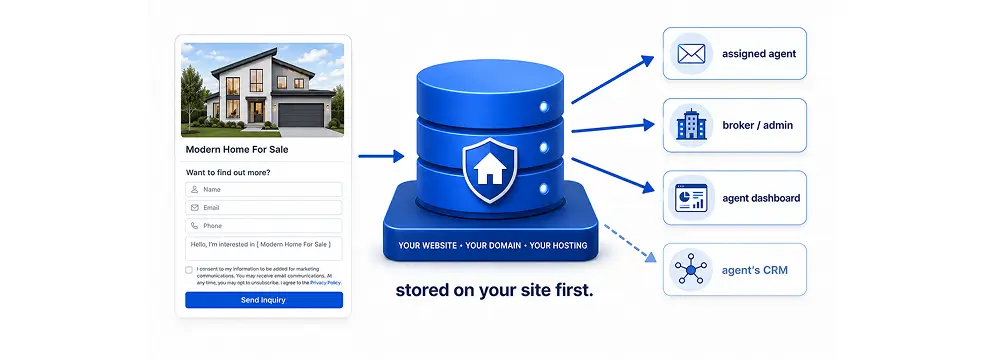
WPResidence is a real estate WordPress theme with built-in contact forms on property, agent, agency and developer pages, plus a schedule tour form. Each message goes by email to the listing’s agent and is saved as a contact and a lead in the built-in WPEstate CRM. From there, leads can sync to HubSpot or go to other CRMs through a webhook to Zapier or Make. Leads stay in your own WordPress database, on your hosting.
WPResidence has six contact forms built in:
Visitors pick a day from the next 10 days, a time slot from the list you set in Theme Options, and an in-person or video chat tour. The request goes to the listing's agent like any other inquiry. For a plain day field and time list, turn on "Use Classic tour schedule?" in Theme Options.
The Contact Form Builder widget adds forms with your own fields, a GDPR agreement checkbox, CC and BCC addresses and a webhook URL for each form. See how to create a custom contact form. You can also add a "What are you looking to do?" dropdown to the contact forms from Theme Options.
The forms send over AJAX, so the visitor stays on the page after sending, and each form carries a WordPress nonce that blocks forged requests.
Agent contact bars show a click-to-call link and a WhatsApp button that uses the agent's mobile number. The WhatsApp message opens with the property title and link already filled in.
Saving favorite properties requires a login by default ("Login is mandatory to save favorite properties?"), so each saved favorite comes from a registered user.
Each property is assigned to an agent. When a visitor sends the property contact form or the schedule tour form, the email goes to that agent. If the listing belongs to an agency or developer, the email goes to them, and secondary agents on the listing get a copy. See agent and agency pages for how agents are set up.
In Theme Options, "Duplicate Email" sends a copy of every contact email to one address, such as a broker or office inbox. About contact forms lists the form settings.
With "Enable Direct Message?" on, logged-in visitors can also send the agent a private message. These messages arrive in the agent's inbox in the front-end user dashboard.
Listings imported with MLSImport can be assigned to your agents, so their inquiries route the same way. For round-robin or regional assignment, connect HubSpot and use its assignment rules. For brokerages with several offices, see multi-office real estate websites.
The WPEstate CRM is included with WPResidence. Each contact form message creates a contact and a lead in the CRM. Contacts are matched by email, so a returning visitor adds a new lead to the same contact.
The contact holds the name, email, phone, assigned agent, source page, tags and private notes. Budget, location and bedroom preferences are filled in from the property the visitor asked about. The lead holds the message, the property link and its status.
Contacts move through six lifecycle stages: New Lead, Contacted, Appointment Set, Active Client, Under Contract and Closed. Deals move from New through Viewing Scheduled, Offer Made and Negotiation to Closed Won or Closed Lost.
Agents and agencies work their leads from the front-end dashboard. Each agent sees their own records, each agency sees its team's records, and the admin sees all of them. In user roles and management you choose who can register as an agent, agency or developer.
The CRM ships with 27 ready-made automation rules, such as assigning new leads to an agent and reminding an agent about a tour. Contacts, leads, enquiries, deals and tasks import and export as CSV.
The HubSpot integration is part of the WPEstate CRM. In the CRM settings, open the HubSpot tab, turn on "Enable HubSpot Integration" and paste your HubSpot private app token (it starts with pat-). HubSpot integration in the WPResidence CRM walks through the setup.
Each inquiry creates a HubSpot contact with the name, email and phone, a deal, and a ticket with the message and the page it came from. When a contact or deal changes in the WPEstate CRM, the change syncs to HubSpot, including the deal stage.
With "Enable for All Users" on, agents, agencies and developers can add their own HubSpot token in their dashboard profile. Inquiries on their listings then go to their own HubSpot account, and agents who belong to an agency use the agency's token. The site's CRM keeps every lead in both cases.
For CRMs other than HubSpot, WPResidence sends leads out through webhooks. Point a webhook at Zapier or Make, and they pass each lead on to Salesforce, Follow Up Boss, Zoho, Pipedrive or another CRM they support.
Webhook URL settings explained covers the setup.
Follow Up Boss and LionDesk give each account a lead-capture email address. Put that address in "Duplicate Email" in Theme Options, and every contact email reaches the CRM.
The WPResidence REST API gives external apps access to properties, agents, agencies, developers, messages, tour requests and saved searches. It uses JWT login through the JWT Authentication for WP-API plugin. More tools are in developer API tools and automation.
Visitors can save a search. When new listings match it, WPResidence emails them on the schedule you choose in Theme Options: daily or weekly. The alerts run on WordPress cron.
In Theme Options you edit the subject and text of the site's emails, including the saved search alert ("Matching Submissions"), new user, password reset, listing and membership emails. The WPEstate CRM adds its own emails for new and assigned contacts, deal stages, won deals, due tasks and matching properties. See email management.
For newsletters and drip sequences, connect Mailchimp, ActiveCampaign or MailPoet with their WordPress plugins, or send leads to them through the webhook and Zapier.
WPResidence has a consent checkbox for its forms: "Use GDPR / Agree with Terms Checkbox?" in Theme Options, with your own label text and a link to your terms page. The Contact Form Builder has its own GDPR agreement checkbox. See GDPR compliance.
For maps, you can use OpenStreetMap instead of Google Maps, with Mapbox tiles as an option. A GDPR-compliant business also needs legal review of its privacy policy and processes.
For EU-only data, host WordPress on an EU server, and if you use HubSpot, choose its EU data center. List every service that receives personal data, such as HubSpot, Zapier or Mailchimp, in your privacy policy.
Leads, contacts and listings live in your own WordPress database on your hosting. Contacts, leads, enquiries, deals and tasks export as CSV from the CRM. Listings imported with MLSImport are WordPress posts, so they stay in your database if you change providers. More in site ownership and control.
MLSImport (sold separately) connects to your MLS through the RESO Web API and imports each listing as a WordPress property post on your domain. It syncs every hour.
Imported listings use the same property templates, search, contact forms, schedule tour form, agent routing and WPEstate CRM as listings you add by hand, and you can assign them to your agents. See MLS import in WPResidence.
WPResidence caches its own queries, and you can turn this off with the "Disable Theme Cache" option in Theme Options. The Google Maps cache renews every 3 hours.
With a page cache plugin such as WP Rocket, LiteSpeed Cache or SG Optimizer, bypass the cache for logged-in users, the user dashboard and checkout pages, so favorites, saved searches and dashboard data stay current. Speed and hosting are covered in WPResidence performance and hosting.
WPResidence counts page views for each listing and shows them in the user dashboard and in the page views statistics on the property page. The WPEstate CRM dashboard shows statistics for the last 30 days, and each contact keeps its lead source and source page.
For traffic, tag the contact buttons and forms as GA4 events or Google Tag Manager triggers, and use call-tracking numbers to count phone leads apart from form leads. Compare page views with inquiries to find listings that get attention and few messages.
To test the HubSpot sync before launch, install WPResidence on a staging site and connect a free HubSpot account.
The main points of this page.
Property, schedule tour, agent, agency, developer, contact page and footer forms are built in, plus the Contact Form Builder for Elementor.
Each inquiry emails the listing's agent, or its agency or developer, and "Duplicate Email" copies every message to one office address.
Every form message becomes a contact and a lead, with six lifecycle stages, deals, tasks, notes and CSV export.
Each inquiry creates a HubSpot contact, deal and ticket, and each agent or agency can use their own HubSpot token.
Webhooks send leads to Zapier or Make, and from there to Salesforce, Follow Up Boss, Zoho or Pipedrive.
MLSImport listings are WordPress posts, so their inquiries use the same forms, agent routing and CRM.
Yes. The property page has an agent contact form and a schedule tour form, and agent, agency and developer profiles, the contact page and the footer have their own forms. The Contact Form Builder for Elementor adds forms with your own fields.
Yes. Every form message is saved in the WPEstate CRM, and the HubSpot integration or a webhook sends the same lead to your other CRM.
The agent assigned to the property. If an agency or developer owns the listing, they receive it, and secondary agents get a copy. The "Duplicate Email" address in Theme Options gets a copy of every contact email.
Both give you a lead-capture email address. Put it in "Duplicate Email" in Theme Options, and every contact email reaches the CRM. For field-by-field mapping, send leads through the webhook to Zapier.
Contacts move through New Lead, Contacted, Appointment Set, Active Client, Under Contract and Closed. Deals run from New through Viewing Scheduled, Offer Made and Negotiation to Closed Won or Closed Lost.
Yes. With "Enable for All Users" on in the CRM's HubSpot settings, each agent, agency and developer can add a HubSpot token in their dashboard profile. Inquiries on their listings go to their own HubSpot account, and agents in an agency use the agency's token.
Add your Zapier or Make webhook address in Theme Options under "Webhook URL" and choose which forms send to it. Each Contact Form Builder form also has its own webhook URL, and the WPEstate CRM has webhooks for contact, lead and deal events.
MLS/IDX support comes through MLSImport, sold separately. It connects to your MLS through the RESO Web API and imports listings as WordPress property posts that use the theme's forms, agent routing and CRM.
A GDPR / terms checkbox for the forms with your own text and terms link, a GDPR agreement checkbox in the Contact Form Builder, OpenStreetMap as a map option, and CSV export of CRM records. For EU data residency, choose EU hosting and HubSpot's EU data center.
On the same day. Import one of the 50 demos, check the agent emails and the "Duplicate Email" address in Theme Options, and the forms send leads to your agents and the CRM right away.