
How hosting, images and caching decide the speed of a WPResidence site, with the server settings, speed options and hosting tiers to use.
By Cris Bean
Last updated: September 28, 2026
Real estate WordPress site speed comes down to hosting and images. With a good host and compressed photos, a WPResidence site with a large catalog passes Core Web Vitals; with a weak host or 4 MB photos, any theme loads slowly. When a listing site feels slow, the host or the photos are the usual cause, and both cost less to fix than a rebuild.
This guide follows the order you would apply the fixes: why listing sites get slow, the theme’s speed settings, expected PageSpeed scores, server settings, hosting by listing volume, images, caching, SEO and cost.
We build and sell WPResidence.
Three things slow a real estate site more than a brochure site.
First, a large catalog means many database queries per page, because every listing grid, filter and category page is built from the database. Second, property photos are big, with originals often 2 to 5 MB each. Third, map search pages send many requests at once.
When a WPResidence site is slow, the usual cause is underpowered hosting or uncompressed images. The clearest sign is Time to First Byte (TTFB): on weak shared hosting, Lighthouse scores can swing 10 to 20 points between two runs a minute apart, because the server response is the bottleneck.
Real estate themes, including WPResidence, Houzez and RealHomes, are often called heavy. Their speed depends mostly on hosting and setup. The next sections cover the theme's own speed settings and what to add on top.
The theme's speed options are on/off switches in Theme Options, under Advanced Settings » Theme Speed Settings and in the map settings.
The theme cache stores the results of the heavy database queries behind property lists, category pages and widgets, so they aren't rebuilt on every page view. It is on by default; the switch is called "Disable Theme Cache", and the theme recommends keeping the cache on for a live site. Cached results refresh on their own after a few hours, so if a price change must show at once, clear the cache. See enable or disable the WPResidence cache.
The theme cache works alongside a page cache plugin such as WP Rocket: the theme caches database queries, and the plugin caches the finished page.
Map pages are among the heaviest on a listing site. With "Use file reading for maps pins?" on, the theme writes the markers to a file instead of querying the database on every map load; see how read from file works. You can also set the maximum number of pins on the map, group nearby pins with the pin cluster, and cache Google Maps data, which renews every 3 hours.
Each image in a card slider is another file to load, repeated on every card of a listing page. In Theme Options you can turn off the slider in property cards, so each card shows one image, or set how many images the slider shows.
Theme Speed Settings also has switches to minify CSS and JavaScript files, turn on browser caching and use the theme's own AJAX handler for searches. Minification works together with a cache plugin and doesn't replace one.
Typical scores at each tuning step.
Mobile and desktop scores differ a lot, and that is normal: mobile Lighthouse simulates a slower connection and CPU, so desktop always scores higher. The goal is green Core Web Vitals on both, rather than a perfect 100.
These are the typical ranges as you add each step to a WPResidence site:
| Stage | What was done | Mobile PSI | Desktop PSI |
|---|---|---|---|
| Default | Shared hosting, no tuning | 50 to 70 | Much higher |
| Theme cache only | Theme cache on | 70 to 85 | High |
| Theme cache + page cache | Theme cache plus a page cache plugin | 85 to 95 | Very high |
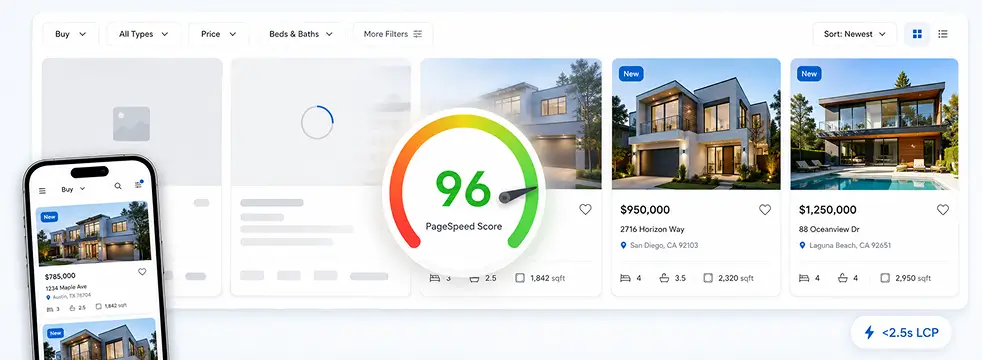
| Full stack | Above + image compression/WebP + CDN | 90 to 98 | 99 to 100 |
Desktop scores run higher than mobile at every step; the table shows only the full-stack desktop range, because earlier desktop numbers vary by host and page type. Your results depend on your host, images and plugins.
At the full-stack step, the Core Web Vitals targets are LCP under 2.5 seconds, CLS under 0.1 and INP in the “good” range.
Time to First Byte is the variable part. On slow shared hosting, Lighthouse can swing 10 to 20 points from one run to the next, and theme settings can’t make up for a server that is slow to respond. If your scores bounce between runs, fix the host first, then tune the theme.
Hand this list to your host, or check it before you sign up. These are the PHP values the WPResidence help documentation recommends:
Memory and execution time are the two limits people underestimate. Set too low, they cause failed demo imports, timeouts when saving a property and maps that load halfway, and they can stop an MLS import partway through. Some cheap shared plans cap them below these values. See the recommended PHP values.
Any host that meets these values works. If your host won't raise the PHP limits, move to one that will.
Hosting needs grow with your listing count, how often you import and your traffic. A WordPress site moves to a new host with a files-and-database export, without a rebuild.
For brochure sites with a few dozen to a few hundred listings, and solo agents without steady traffic. Shared hosting slows down first under many visitors at once, often past 20 to 30 at the same time. Budget: under $15 a month. It works for a launch with the theme cache on, but a growing catalog will outgrow it.
For agencies and teams with a few hundred to a few thousand listings, regular MLS imports and steady traffic. Managed plans usually give 2 to 4 vCPU, 4 to 8 GB of RAM, server-level caching and a WordPress control panel. Budget: $15 to $30 a month for a small plan, $25 to $40 for busier sites. MLS imports run more reliably here than on shared hosting.
For portals with thousands of MLS listings, frequent full syncs or 20,000 or more visits a month. Budget: about $40 to $80 a month and up. You get dedicated resources, Redis object caching, Varnish or Nginx FastCGI and scaling on demand.
Upgrade at around 1,000 listings or a steady 10,000 or more visits a month. MLS import timeouts usually show the need before page speed does. Upgrading adds resources, and your theme settings move with the site.
WPResidence doesn't compress images itself, so pair it with an image optimization plugin from day one.
Smush, EWWW Image Optimizer and ShortPixel all work with the theme's galleries and sliders. Compression plus WebP conversion usually cuts image weight by about 50 to 80 percent, depending on your originals. Turn on lossy JPEG compression, run the plugin's bulk tool on your existing library, then turn on automatic optimization for new uploads.
Upload originals at 1,600 to 2,000px wide. The theme creates smaller copies for cards and galleries, so visitors mostly load those rather than the originals. Aim for each full listing photo under about 200 KB after compression.
15 to 25 optimized photos per listing is enough for a buyer to judge a home. One listing with 50 uncompressed 4 MB originals slows every page it appears on. Membership packages can limit the number of images per listing.
WPResidence has fields for floor plans, video and virtual tours. Compress floor plans like any other image. For video, use a YouTube, Vimeo or TikTok link rather than uploading the file, and for 3D tours such as Matterport, paste the provider's embed code into the virtual tour field.
A CDN serves your images and other static files from servers near the visitor and takes that load off your host. Cloudflare's free plan is a good start; for large libraries, BunnyCDN or an S3-style offload keeps costs low.
Caching on a real estate site has layers: the theme cache handles the heavy real estate database queries, and a page cache plugin stores the finished page. Neither replaces the other.
A page cache plugin stores the rendered HTML and serves it to later visitors without running PHP, which cuts the time to build a page from hundreds of milliseconds to a fraction of that. WP Rocket and LiteSpeed Cache both work with WPResidence; see LiteSpeed Cache settings for WPResidence.
An object cache (Redis or Memcached, which many hosts switch on from the control panel) adds another layer, and server-level Varnish or Nginx FastCGI adds one more. A strong setup is a managed host with server caching, a page cache plugin and a Redis object cache.
Add these to the "never cache" settings of your cache plugin:
Firewalls such as Wordfence sometimes flag the theme's AJAX calls for saved searches, favorites and submission. Run the firewall in learning mode for 24 hours after launch, then allow the flagged requests.
Properties are standard WordPress posts, so any backup plugin works. Hundreds of listings with 10 to 20 photos each add up to several GB, so run daily database backups and nightly file backups at quiet hours.
Yes, in part. Core Web Vitals (LCP, CLS and INP, the metrics Google uses to score page experience) are a ranking signal. Good scores don't guarantee rankings, but poor ones can hold a page back, which matters most in competitive local markets.
Indexability matters more than speed. MLSImport, our MLS plugin, imports MLS listings as WordPress posts, each with its own URL on your domain, so search engines can index every listing. With iframe-based IDX, the listing content sits inside a frame from the provider's site and counts for the provider. See real estate website SEO.
For phone visitors, aim for the first screen to load in under 3 seconds on 4G, the search bar visible without scrolling on a 375px-wide screen, and the main buttons within easy reach of the thumb.
The WPResidence license costs $49 a year for one website, with a year of updates and support, and the site keeps working if you don't renew. Slider Revolution is included, and a full portal needs no other paid plugins.
If you show MLS listings, add the data feed: MLSImport costs $49 a month for one MLS, and other IDX services charge monthly too. So the fair comparison is license plus hosting plus MLS data on WordPress, against a hosted platform's monthly subscription.
On that basis, we estimate a self-hosted WPResidence site (theme, hosting and usual add-ons) at about $300 to $800 in the first year on shared hosting, and $1,500 to $4,000 over five years. Hosted real estate platforms charge about $50 to $200 or more a month: about $2,900 over five years at $48 a month and $9,000 or more at $150. A custom-built portal starts at $20,000 to $50,000 or more for the first build.
On WordPress, your recurring costs are hosting and data you choose, while the license stays at $49 a year; a hosted platform bills every month.
Tiny brochure sites. A solo agent who wants to show four listings and a contact form doesn't need a full real estate portal. A simpler theme, or a builder such as Squarespace or Wix, fits better.
Unusual enterprise workflows. Agencies with custom enterprise CRM integrations, several brands on complex setups or heavy back-end changes beyond what hooks and filters allow may get more from a custom build.
Teams that don't use WordPress. If your developers work in React or a headless setup and want to avoid WordPress, WPResidence isn't the tool: it is a WordPress theme.
If none of these describe you and you are building a listing-heavy site on WordPress, WPResidence fits. For speed, the order is: the right host, the theme's speed settings, a page cache plugin, an image optimizer and a CDN.
Related guides: WPResidence security and updates, owning vs renting your website and WPResidence pricing.
The main points of this page.
With image compression, a page cache plugin and a CDN, a WPResidence site typically reaches 90 to 98 mobile PageSpeed.
When a WPResidence site is slow, the cause is usually underpowered hosting or uncompressed images.
The theme cache, map pins from a file, pin limits and card sliders are switches in Theme Options, with no code.
memory_limit 256MB or higher, max_execution_time 300 or higher, upload and post size 64MB or higher.
15 to 25 compressed photos per listing, each under about 200 KB, served through a CDN.
We estimate $1,500 to $4,000 self-hosted, against $2,900 to $9,000+ for a hosted real estate platform.
Usually, on a solid shared or managed plan. The steps that move a new install into the green are the theme cache, a page cache plugin, image compression with WebP and a CDN. Tuning can't make up for a host with a slow TTFB, so choose the host first.
Usually the hosting and the images. Run Lighthouse twice a minute apart: if the scores differ a lot, the server response is unstable, and no theme setting will fix it. Look for plugin conflicts only when the site is still slow on a host with a steady TTFB.
The WPResidence help documentation recommends memory_limit 256MB or higher, max_execution_time 300 seconds or higher, and upload_max_filesize and post_max_size of 64MB or higher. Some cheap shared plans set lower limits, which can stop demo and MLS imports, so check before you sign up.
Plan to upgrade at around 1,000 listings or a steady 10,000 or more visits a month, with the theme cache and map pins from a file turned on. Failing MLS imports usually show the limit before page speed does, so watch the import logs.
Yes, because they do different jobs. The theme cache stores heavy real estate database queries, while a page cache plugin stores the finished page and serves it without running PHP. Use both.
No. Use an image optimization plugin such as Smush, EWWW Image Optimizer or ShortPixel for compression and WebP conversion; all three work with the theme's galleries and sliders.
15 to 25 optimized photos per listing. If agents submit listings, limit the number of images per listing in your membership packages, since one listing with 50 full-size originals slows every page it appears on.
Firewalls such as Wordfence may flag the theme's AJAX calls for saved searches, favorites and submission; run the firewall in learning mode for 24 hours, then allow those requests. Any backup plugin works, but photo libraries run to several GB, so schedule backups at quiet hours.