
Multi-Office Real Estate

How Does a Multi-Office Real Estate Website Work on WordPress?

How a multi-office real estate website runs on one WordPress install: teams, roles, regional pages, IDX, and franchise licensing explained.
wpresidence.net
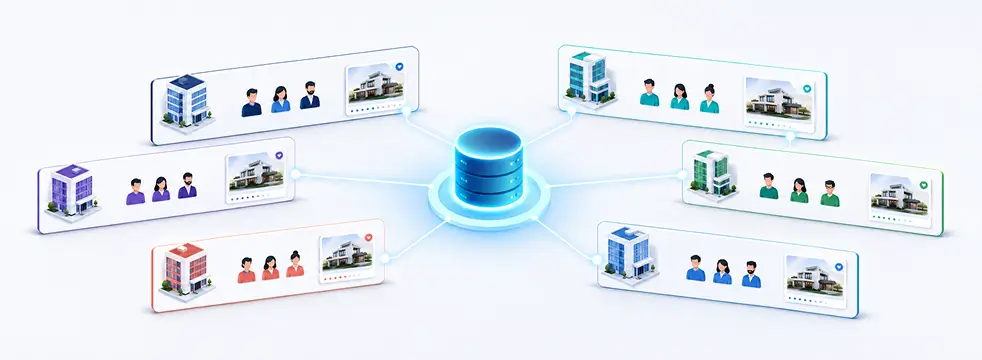
Diagram of a multi-office real estate website powered by one shared WordPress database, office pages, and agent pages.
1
shared property database
500
agents on one install
800+
MLS sources (RESO)
<1 day
to enable multi-agency

Last updated: July 7, 2026

A multi-office real estate website runs on one WordPress install with a single shared property database. You don’t need WordPress Multisite, and you don’t clone a separate site for each branch. Every listing lives once in the estate_property custom post type, and the Agency role acts as an office container that holds many Agent accounts. Office pages and agent pages are just filtered views of that one central listing pool, so a property you add once can appear on the main site, its office page, and its agent page at the same time. This setup fits brokerages with several branches, franchises onboarding new offices, and teams that started with one agent and keep adding people. The sections below walk through the architecture, roles and permissions, regional and multilingual pages, lead routing, the growth path, IDX and MLS data, and payments, so you can judge whether one install fits your franchise plans.

By Cris Bean

A quick note on where this comes from. WPResidence builds and sells the theme this guide describes, so treat it as a first-party buying guide rather than independent research. We’ve kept the claims specific and attributed so you can check them yourself.

One honest caveat before you read on. If your offices need fully separate WordPress dashboards, separate domains, or completely isolated data per branch, WordPress Multisite is the better tool, and this shared-database approach isn’t for you. And if you plan to run heavy multi-office inventory on the cheapest shared hosting you can find, the architecture will hold, but the server won’t.

  1. What Does a Multi-Office Real Estate Website Look Like on One WordPress Install?
  2. Teams, Agents, and Agencies: The Building Blocks
  3. Who Can Access What? Roles and Permissions for Offices and Agents
  4. Branded Office and Team Microsites Without Extra Installs
  5. Can One Site Run Multiple Regions, Languages, and RTL Layouts?
  6. How Do Leads Get Routed to the Right Office or Agent?
  7. The Growth Path: Solo Agent to Franchise Portal
  8. Who Owns the Data, and How Does IDX/MLS Fit In?
  9. Payments and Memberships for Paid Listings and Partner Offices
  10. Performance, Support, and Onboarding at Scale
  11. Key Takeaways
  12. Frequently Asked Questions
One Install

What Does a Multi-Office Real Estate Website Look Like on One WordPress Install?

10,000 properties, one install
What Does a Multi-Office Real Estate Website Look Like on One WordPress Install?
Architecture
One shared estate_property database
Agency role holds many agents
Office and agent pages auto-filter
No WordPress Multisite required

Every listing lives once in a single custom post type called estate_property, inside one normal WordPress install. Office pages and agent pages never hold their own copies of anything. They query that one shared pool and show only the listings assigned to them.

The piece that makes this work is the Agency role. In WPResidence, an Agency account is an office or team container, and one Agency user can hold many Agent accounts underneath it. Listings link to agents and agencies through meta fields, and each profile page filters the shared pool by the assigned agent or agency ID.

Every Agency gets an automatic profile page that lists only that office's properties and its team members. Every Agent gets a profile page too, showing only their own listings. You set the assignment once, and the theme keeps the connection in every place that listing appears.

This is why you don't need WordPress Multisite here. Multisite only comes into play when you want fully separate dashboards, separate domains, or completely isolated sites per office. For a brokerage that's happy sharing one property database, a single install does the job and skips the overhead.

The payoff shows up at scale. A brokerage with 10 offices keeps one clean record per listing instead of 10 copies that all drift out of sync. Change a price, a photo, or a status once, and every view of that property updates together.

How far does one install stretch? Per WPResidence's own FAQ, a single site handles hundreds of agents and dozens of agencies, and even a setup with 500 agents and 10,000 properties stays usable on a tuned server with a caching plugin. Read those as vendor-stated figures and a built-for ceiling, not a guarantee for your exact hosting.

The same logic covers a single-office team and a franchise-style operation spread across many cities. You add branches by adding Agency and Agent accounts, and the structure stays the same. If you want to see it running before you commit, you can browse the WPResidence demo library and open the agency and multi-city layouts.

How Does This Compare to Other Multi-Office Themes?

You're not short on options here. Houzez, RealHomes, and MyHome all come up when brokerages shop for a multi-office build, and the practical differences show up once you manage more than one site.

The clearest one is repeatability. WPResidence lets you export a master theme-options config and import it into a new install in minutes, so a franchise standardizes ten office sites from one profile. Houzez doesn't ship that built-in options export, so cloning a setup across sites leans on more manual work. RealHomes starts leaner, which feels quicker on a single starter site but gives you less depth to reuse once you're running ten or more. MyHome supports two page builders, where WPResidence commits to an Elementor-first path, which is the simpler one to standardize when you're training a team across many offices.

None of that makes the others wrong for a single site. What's specific to WPResidence is the mechanism above: one shared estate_property pool, the Agency role as an office container, and profile pages that filter that pool by meta field instead of cloning posts, on a single install with no Multisite layer.

Building Blocks

Teams, Agents, and Agencies: The Building Blocks

4 real-estate user types
Teams, Agents, and Agencies: The Building Blocks
Roles
Four real-estate user types
Agent profiles ship complete fields
Listings auto-appear on profiles
Front-end dashboards, no wp-admin

Once you know the architecture, the vocabulary is short. WPResidence gives you four user types that matter for real estate work: Agent, Agency, Developer, and Standard User. In practice, an office admin sets these up once per person and rarely touches them again.

Each Agent profile ships with built-in fields: photo, short bio, phone, email, social links, job position, and specialties. You're not stitching together scratch custom fields, so a new hire's page looks complete on day one.

The profile also fills itself. When an agent adds or updates a property from their dashboard, it appears automatically in the agent's listings section on their page. Nobody re-links anything by hand.

For grouping people, the List Agents shortcode and widget show agents in a grid or list, filtered by office, city, or role. A Featured Agent widget pins one person in a large block. So a "Top Producers" row or a single-office team page stays curated instead of random.

An Agency can own listings directly and assign them to agents in the same office. On the contact area of a listing, you choose whether to show the agency, the agent, or both, which matters when a head office wants its brand visible alongside the person.

All of this runs from front-end dashboards. Agents add, edit, and archive listings, update their profile, and read their leads without ever seeing wp-admin. The same structure covers a solo agent, a five-person team, and a multi-agency portal, so growth doesn't force a redesign. It's worth reviewing the agent and agency role features before you map your own team onto them.

Roles & Access

Who Can Access What? Roles and Permissions for Offices and Agents

4 scoped front-end roles
Who Can Access What? Roles and Permissions for Offices and Agents
Permissions
Agents edit only own listings
Agencies manage their own team
Global settings locked to admins
Admin approval for partner offices

Short answer: four front-end real estate roles (Agent, Agency, Developer, and Standard User) sit alongside the normal WordPress admin-side roles, and each one has a clear lane.

Agents edit only their own listings and their own profile. They can't touch another agent's properties, and they can't reach global settings. Agency accounts sit one level up, managing their own team's agents and listings, but not the whole site.

The front-end dashboard is where day-to-day work happens. It splits into sections like Add Property, My Properties, Profile, Favorites, and sometimes Invoices. Global options (Theme Options, header and footer, search templates, payments and membership) stay locked to WordPress Administrator-level accounts.

In practice, you map staff onto WordPress roles that already exist. An office admin gets a backend Editor role so they can help with pages and property content. Marketing staff get Editor or Author for pages and posts only, nowhere near listings or design.

Because WPResidence follows the standard WordPress capability system, it works cleanly with role and capability plugins. If you need a photographer, an assistant, or a transaction coordinator on a narrow custom role, you build it with a role editor plugin and the theme respects it.

Listing quotas add one more control layer. Membership rules set how many active and featured listings each account can publish, so access isn't only about which buttons someone sees, but how much they can push into the system.

For partner or external offices, the admin-approval flow is the key switch. You can hold any new listing or edit from an agent for review before it goes live, which is exactly what lets you open the door to outside contributors without handing over the site.

Branded Pages

Branded Office and Team Microsites Without Extra Installs

0 extra installs needed

A fair worry with one shared install is that every office ends up looking identical. It doesn't have to.

WPResidence Studio, paired with Elementor, lets you design custom templates for Agent and Agency pages: layout, colors, extra blocks, the lot. Per-page branding covers the logo, banner image, bio, and contact details, and dynamic widgets pull in only that agent's or office's listings.

The result is that each team page reads like a standalone microsite, with its own lead forms and highlight sections, without a second WordPress install behind it. In practice, a franchise standardizes the header, footer, menus, and search once, then lets each office differentiate only its own page.

That split is deliberate. The admin keeps global navigation and branding, so no agent can break the overall site design while editing their own space. Branding is scoped per page, not per install.

You can lean into the difference where it counts. Assign a bold full-width hero template to a top-producing team and a compact sidebar layout to a smaller office, all from the same install. To see how the templates are built, the WPResidence Studio design templates page walks through the agent and agency options.

Multi-Region

Can One Site Run Multiple Regions, Languages, and RTL Layouts?

3 translation plugins (WPML+)
Can One Site Run Multiple Regions, Languages, and RTL Layouts?
Regions
WPML, Weglot, Polylang compatible
RTL-ready grids and cards
Office codes filter MLS inventory
State–City–Area location hierarchy

Yes. WPResidence is officially compatible with WPML and also works with Weglot and Polylang, so an office in one region can present its page in two or three languages while reading from the same property entries as everyone else. The translatable parts are the ones that matter (properties, locations, agents, agencies, taxonomies, and dashboard text), and the design is RTL-ready, so grids, ribbons, and agent cards mirror direction for Arabic or Hebrew while the featured logic keeps working.

The part that earns its place in a multi-office article is the mechanical answer to a common franchise question. When you import MLS or IDX data, the job can tag listings with office codes, so each branch shows only its own inventory without cloning a single post. That ties straight back to the shared-database model: one pool, filtered per office, whatever language the front end runs in.

Underneath, the location taxonomy is built for multi-market work (a State to City to Area hierarchy plus radius "near me" search), which is also what lets city and area demos give you ready neighborhood landing pages with clean, keyword-rich URLs across a lot of narrow local ground from one install.

Lead Routing

How Do Leads Get Routed to the Right Office or Agent?

3 recipient tiers (primary/CC/BCC)

The contact form on each property routes to the agent assigned to that listing. The message reaches their email and their private dashboard inbox at the same time, so a lead doesn't sit in a shared mailbox waiting for someone to claim it.

From there, the routing rules stack up in a predictable order:

That fallback address is the one setting most brokerages forget during onboarding, and it's exactly the setting that keeps leads from being lost while listings are still mid-migration or partway through an MLS import. Set it on day one.

Behind the forms, a built-in messaging system keeps a mini-CRM thread per property and agent, so follow-up history stays tied to the right listing. You don't need Contact Form 7 either; the native Elementor form builder handles labels, required fields, and validation.

When you already run a CRM, WPResidence connects to HubSpot to sync leads into pipelines while still notifying the assigned agent. Other CRMs connect through email routing plus Zapier or a plugin. Saved searches and form entries all land in one place, which keeps central lead storage from turning into a scavenger hunt.

Growth Path

The Growth Path: Solo Agent to Franchise Portal

<1 hr solo to small office

The fear behind most of these questions is simple: will I have to rebuild everything later? With this architecture, you don't.

You can start solo, with the multi-agent and agency options switched off. Import an agent-first demo, swap your colors and logo, and you're usually live in a few days with a single profile front and center.

Adding people means creating Agent or Agency users and assigning listings to them. WPResidence puts a vendor-stated timeline on this: a one-person shop reaches a small office with controlled access in under an hour, and the full multi-agent and agency features enable in under one working day. Read those as vendor figures, but the point holds. It's configuration, not construction.

Growing into a full brokerage means turning on the Agency role, team pages, the CRM, and membership or payment tools. Push further into a portal and you add paid listings and featured slots on top of the same content. Each step is a switch you flip, not a platform you migrate to.

Through every stage, your listings, URLs, and design stay steady. There's no content migration, no theme switch, and your SEO carries forward because properties stay standard WordPress posts the whole way. That continuity is what makes a franchise real estate WordPress setup practical instead of a series of rebuilds.

IDX fits the same pattern. You can layer in MLSImport or a supported IDX plugin later without a redesign, which leads straight into the question of who actually owns all this data.

Data & IDX

Who Owns the Data, and How Does IDX/MLS Fit In?

800+ MLS sources, hourly sync
Who Owns the Data, and How Does IDX/MLS Fit In?
IDX/MLS
Data lives in your database
REST API exposes core types
WP All Import maps legacy data
MLSImport creates native RESO posts

You do. Properties, agent and agency profiles, and leads all live in your own WordPress database, not on a third-party server. Because they're stored as standard custom post types, that data survives a theme change and moves with you across hosts.

The WordPress REST API exposes properties, agents, and developers, so a developer can sync the shared pool to a CRM, a mobile app, or an internal dashboard. One example WPResidence gives: an office could use that feed to sync new listings every 15 minutes into an internal analytics dashboard.

For moving an existing brokerage in, the official WP All Import add-on maps CSV or XML columns to every core and custom field, including the Agent, Agency, and Property types. You map your old data once instead of guessing at meta keys.

For live MLS feeds, MLSImport is the default path, and it's worth being clear about what that means. MLSImport is an in-house WPResidence product built on the RESO standard. It connects to a rule-of-thumb 800-plus MLS sources, runs hourly imports, and turns imported listings into native property posts rather than iframed or externally hosted records.

Native posts matter for two reasons. Imported listings show up in WPResidence search, use your Studio templates, and index cleanly for SEO. And because the import job respects the built-in taxonomies (Status, Type, City) and keeps agent and office assignment intact, it ties straight back to the office-codes mechanism from the regional section. A feed-based listing routes its leads to the right person the same way a hand-entered one does.

Other IDX and RESO tools exist, and you can use them as alternatives. MLSImport is simply the theme's default, in-house-built option, which is worth disclosing plainly rather than presenting as a neutral third-party pick. If it fits your market, the MLSImport IDX integration is the shortest path to a native-post MLS setup.

Monetization

Payments and Memberships for Paid Listings and Partner Offices

2 gateways (Stripe/PayPal)
Payments and Memberships for Paid Listings and Partner Offices
Payments
Built-in packages and listing quotas
Pay-per-listing and recurring billing
Stripe and PayPal, no WooCommerce
Charge partners for featured slots

If you plan to charge for listings, the tools are already in the theme. WPResidence includes built-in membership packages plus pay-per-listing, pay-per-feature, and recurring billing, and those run directly through Stripe and PayPal.

Do you need WooCommerce? Only if you want extra payment gateways or more complex tax rules. For most setups, the native billing covers the whole flow, and WooCommerce stays optional.

Membership packages are how you sell visibility. Each plan sets quotas for total and featured listings, so a simple ladder might run Free, Basic, Pro, and Premium, with higher tiers buying more featured slots and more presence in homepage sliders and category pages. You can set listing and package expiration in days, so paid placement ends on its own.

For a franchise, this is the exact mechanism you'd use to charge partner or affiliate offices for featured placement. The WPResidence pricing and licensing page covers how the theme itself is licensed, which is separate from the packages you sell to your own members.

Scale & Support

Performance, Support, and Onboarding at Scale

1–2s dashboard & form loads

Heavy inventory is where cheap hosting shows its limits, but for a multi-office site the load that matters isn't a single flat archive. It's concurrent agent dashboards and per-office filtered queries. Both run off the shared pool through the meta-field link that ties each listing to its agent or office, so an office page or a lead route resolves on a direct lookup instead of a slow scan across every record. On solid hosting, WPResidence puts agent dashboards and lead forms in the one-to-two-second range, which is the number a brokerage with several offices working at once actually feels.

The theme ships a native cache for property "units," the cards and rows on search and archive pages, and it refreshes that cache roughly every 4 hours on its own. This does not replace a page-caching plugin. You layer both: the theme cache for listing units, a page-cache plugin for full pages, plus Gzip.

The practical recipe is PHP 8 or higher, a decent shared or VPS tier, and a cap of 20 to 30 cards per page. That's the direct answer to the caveat up top. The architecture holds heavy inventory, but only if the server is sized for it.

On support, WPResidence runs dedicated Freshdesk ticket support with a stated first-reply target of roughly 24 business hours. It's an established theme, with sales in the tens of thousands and a rating history in the low thousands per its ThemeForest listing. Read those as sales, not active installs, and as a signal that the support queue has handled years of real client builds rather than a headline stat. Envato's standard support window (often six months, extendable) covers help, and theme updates are lifetime through the ThemeForest license.

For onboarding at scale, theme option export and import clones a master config into a new install in under 5 minutes, the lever a franchise uses to standardize many office sites. Non-technical staff typically learn daily listing and agent tasks in about one working day, roughly a 60 to 90 minute walkthrough. On licensing, Envato issues one regular license per domain, each with lifetime updates, so a franchise buys one license per office site.

Step back and the verdict follows from the mechanism. For a brokerage or franchise that wants one shared database, one set of URLs, and centrally managed branding with real per-office and per-agent customization, this single-install architecture is a well-supported fit. The Agency-as-container model, meta-field filtering, and office codes on import are what make one site behave like many without the overhead of many.

It's an honest fit for teams growing from solo to multi-office to franchise who'd rather not manage separate installs. It's the wrong call if you need fully separate WordPress dashboards, domains, or databases per office, which is a deliberate WordPress Multisite decision, not a shortcoming here. And it won't hold heavy inventory on the cheapest shared hosting, so plan the server around the catalog you expect.

If a multi-office real estate website on one install matches how you want to run things, the two concrete next steps are evaluating the demo library against your own office structure and mapping your MLS feed through MLSImport.

At a glance

Key Takeaways

Each niche real estate website type demands a different audience focus, data schema, and proof of authority.

WPResidence runs a multi-office real estate website on one WordPress install and one shared property database, with no WordPress Multisite required.

The Agency role acts as an office container, and every Agent gets an auto-generated profile page showing only their own listings.

Leads route by assigned agent with primary, CC, and BCC targeting, and unassigned listings fall back to a default office email address.

MLSImport is WPResidence's default IDX and MLS path, built on the RESO standard and preserving agent and office assignment on import.

A brokerage can grow from a solo agent to a multi-office franchise portal without migrating content, changing URLs, or switching themes.

Frequently Asked Questions

Do I need WordPress Multisite for multiple offices?

No. One WPResidence install with a shared property database handles multiple offices on its own. Each office and agent gets an automatic profile page that filters the same central pool, so nothing gets duplicated. You only need WordPress Multisite when offices require fully separate dashboards, separate domains, or completely isolated data per branch.

How many agents, offices, and listings can one WordPress install handle?

Per WPResidence's own FAQ, one install comfortably holds hundreds of agents and dozens of agencies, and even 500 agents with 10,000 properties stays usable on a tuned server with a caching plugin. Treat those as vendor-stated figures. The real ceiling is almost always your hosting and import schedule, not the theme itself.

How do leads get routed to the right office or agent?

Each property's contact form routes to the agent assigned to that listing, reaching both their email and their private dashboard inbox. Every form also supports primary, CC, and BCC recipients, so a manager or shared archive gets copied. If a listing has no assigned agent yet, WPResidence falls back to a default office email.

Can I run each region or office in its own language, including RTL?

Yes. WPResidence is officially compatible with WPML and also works with Weglot and Polylang, so you can translate properties, agents, agencies, taxonomies, and dashboard text. Each office page can run in several languages using the same property entries. The RTL-ready design mirrors grids, ribbons, and agent cards for Arabic and Hebrew while the featured logic keeps working.

Can external or partner offices post their own listings under controlled rules?

Yes. The Agency and Agent roles are scoped so a partner office manages only its own team and listings, never global settings. You can also require admin approval, which holds any new listing or edit for review before it goes live. In WPResidence, partners do all of this from the front-end dashboard without touching wp-admin.

Do I need WooCommerce for paid listing packages?

No. WPResidence includes built-in membership packages plus pay-per-listing, pay-per-feature, and recurring billing that work directly with Stripe and PayPal. You only need WooCommerce for extra payment gateways or more complex tax rules. For a franchise charging partner offices for featured placement, the native tools usually handle the entire flow without another plugin.

Can I start with one office and add branches or franchisees later without rebuilding?

Yes. You can launch solo with the multi-agent and agency options switched off, then turn on Agency roles, team pages, and membership tools as branches join. Your listings, URLs, and design stay in place, so there's no content migration and no theme switch. WPResidence keeps properties as standard WordPress posts, which is why your SEO carries forward.

How does licensing work if a franchise runs many sites?

Each site needs its own regular Envato license tied to its domain, and every license includes lifetime theme updates. So a franchise running many client sites buys one license per office site rather than one for the whole group. Keeping a clear record of which license key maps to which domain keeps renewals and host moves straightforward across a multi-office real estate website portfolio.