Make your real estate website stand out with WPResidence’s Header Builder. You can easily create and change headers to match your brand and look professional.
With Elementor, you can build the perfect header using easy drag-and-drop tools. No coding needed—just pick the layout, colors, and style you like.
Different Header for Any Page
Customizable for Every Page
Create different headers for your homepage, blog, and property pages. Keep your whole website looking neat and stylish on every page.
You choose where each header appears, so property listings, blog posts and the front page can each show their own design, and you can leave out the pages where it should not show. You can also add a bar above or below the header, for example for an announcement or contact details.
Fully Responsive
Works on Any Device
Your headers will always look great on desktops, tablets, and phones. This helps visitors have a smooth and easy time using your site anywhere.
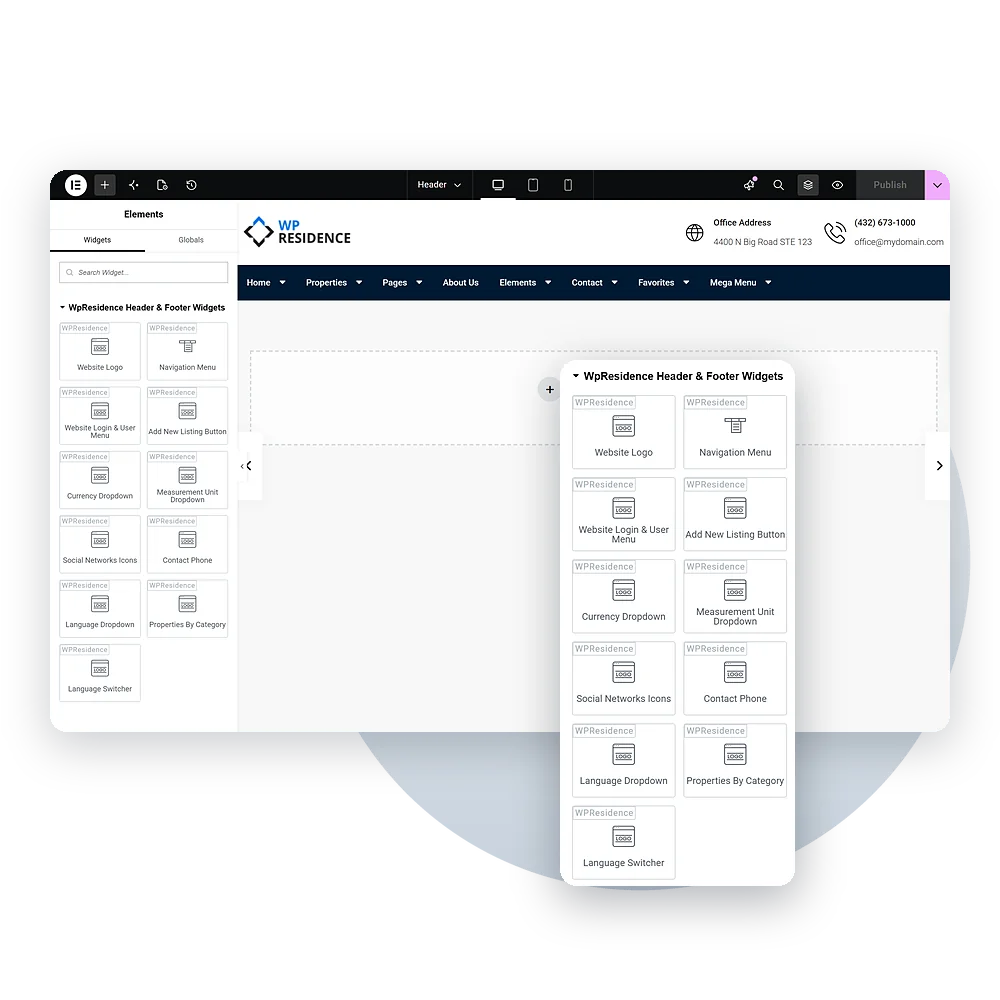
Custom Made Widgets
Add Widgets for More Features
Make your headers better with helpful tools like menus, social media links, and language buttons. These help people explore your site more easily.
Visitors can log in, add a listing, call your office or switch language, currency and measurement units directly from the header. Each part is its own widget, so you place only the ones your site needs.
WPResidence Header Builder to Create Custom Headers
The WPResidence Real Estate Theme makes it easy to build your real estate website the way you like. With the Header Builder, you can pick one of 5 built-in header layouts, including a vertical side header, or build your own header in Studio. These headers help your site look neat and professional, so it stands out.
With Elementor’s drag-and-drop tools, you don’t need to know any code. Just choose the style you like, move things around, and change the colors to match your brand. You can also use different headers for your homepage, blog, and property pages to keep your site tidy.
Your header will look great on any device—computer, tablet, or phone. You can also add things like menus, social links, and language buttons to help visitors find what they need.
Setting up your header is simple! Go to Theme Options → Header. Pick your style, upload your logo, set your menu, and choose your colors. For bigger changes, you can use custom CSS or change theme files—but use a child theme to keep your edits safe.