
What the WPResidence REST API, child theme, hooks and builders give a developer who standardizes client work on one real estate theme.
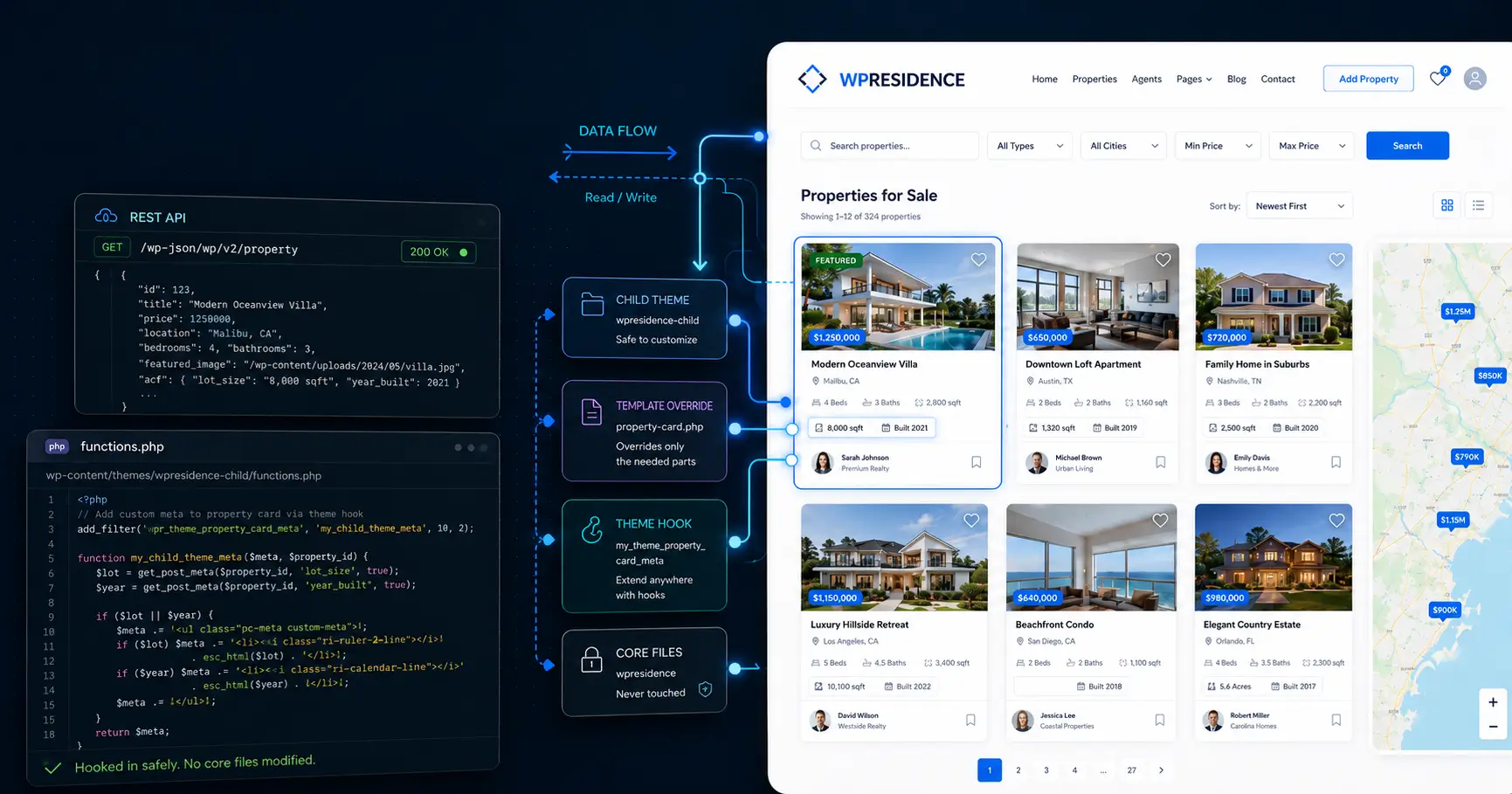

Yes. External apps can read and write property, agent, agency and developer records through the WPResidence REST API, and a public Postman workspace documents the requests so you can start scripting. The API has 17 route groups, from properties, agents and agencies to invoices, messages and saved searches. See the real estate API overview and the routes and endpoints guide.
The API is built around the records a real estate site runs on: properties, agents, agencies and developers (the development-company profiles), each with list, view, add, edit and delete routes. It also covers invoices, reviews, messages, favorites, saved searches, tour requests, notifications, user registration and the logged-in user's profile.
A portal can pull listings into a separate front end, a custom dashboard can write updates back, and another system can keep agents and listings in sync. Your listings stay in WordPress post types.
Import the Postman collection to see the documented requests, then script the jobs you need: creating properties, updating listings and running sync jobs. Write access needs JWT authentication: install the JWT Authentication for WP-API plugin and add a secret key to wp-config.php before create and update calls work. See authentication for API requests.

None of the safe ways to extend WPResidence touch its core files: the included child theme, template overrides, action and filter hooks, the Custom Fields Builder and Theme Options. Your work lives outside the parent theme, so updates don't overwrite it.
Safe ways to extend WPResidence:
WPResidence comes with a child theme, which is where all site-specific work belongs: custom CSS, template changes and small functions. It sits apart from the parent, so you can update the theme without losing your changes. Build one master child theme, clone it per project, and every build starts from the same tested base.
To change a template, copy that file from the theme into your child theme and edit the copy; WordPress uses your version and leaves the original untouched. Because you never edited core files, an update can't overwrite your work. After a major update, compare your overridden templates with the new versions.
For behavior changes beyond templates, the theme's action and filter hooks let you extend what it does without editing core logic. Check the changelog after each update for changes that affect your code.
Before you write PHP, check the Custom Fields Builder. It adds property fields from the WordPress admin in five types: short text, long text, number, date and dropdown. Define a field such as Energy Class or View Type, and it appears in the property submission form; add it to your search form in the search builder to use it as a filter. For most client sites, the first question is whether the Custom Fields Builder can do it.

The WPResidence help site covers the path from first install to API work, with video tutorials, a changelog for every release, the Postman workspace and private support tickets.
The help articles follow real project steps: installation, demo import, header and footer setup and each Theme Options panel, with screenshots. Troubleshooting articles cover common problems such as 500 errors, maps that don't show and image processing. They shorten debugging on edge cases, but you still need to read them.
The changelog lists new features, template changes and compatibility notes for each release, which helps when you update many client sites. Support runs through private tickets at care.wpestate.org, answered by our in-house team.
A direct license includes a year of updates and support. If you don't renew, the site keeps working; new updates and new tickets stop.

For most real estate client projects, very little. Theme Options, the Custom Fields Builder, the search form builder, membership packages and 212 Elementor widgets cover most client requests. Custom code is for unusual data rules, and for some experimental business models WPResidence isn't the right base.
Theme Options has hundreds of settings for layout, display and behavior. The Custom Fields Builder adds property fields in five types (short text, long text, number, date and dropdown) that you can use in submission forms and as search filters, and the search builder offers 8 advanced search form types. You also get 50 one-click demos, 212 Elementor widgets and Studio templates for property, agent, agency, developer and category pages. Roles cover User, Agent, Agency and Developer, each with a front-end dashboard, plus a built-in CRM. For international sites, WPEstate Translate is included, the theme ships translation files for 40+ languages with right-to-left support, and WPML and Weglot also work.
WPResidence loads scripts and styles through standard WordPress enqueue calls and uses standard WordPress extension points. For speed, the theme cache stores heavy real estate queries, CSS and JS can be minified, and map pins can be read from a file. Plan on PHP 8 and a memory limit of 256MB or higher, and measure PageSpeed on your own build.
Some experimental business models need a fully custom stack. WPResidence is an options-and-child-theme framework, not a headless SDK: it turns common real estate requests into settings and modules. Gating video or virtual tours for paid members isn't built in and needs a membership or content-restriction plugin, and custom coding isn't part of support. See how WPResidence compares with Houzez.

You can automate WPResidence in two ways: scripts that call the REST API, and webhooks the theme sends when something happens. In Theme Options you set a webhook URL and choose which forms send to it, the Contact Form Builder has its own webhook, and the CRM can send webhooks on CRM events, so leads can go to Zapier, Make or your own endpoint.
For MLS listings, MLSImport, our own plugin, pulls RESO Web API feeds into WordPress as property posts and syncs every hour. You map MLS fields to theme fields once, and you can import by office so each branch shows its own listings.
WPEstate Translate, included with the theme, creates linked copies of properties, agents and agencies per language, with rules for which custom fields are translated and which are copied. Multi-currency stores one price per property and converts it for display, with daily exchange rates from the Currencylayer API or rates you set, and Indian lakh and crore formats.
PayPal, Stripe and wire transfer are built in; turn on WooCommerce payments to use a WooCommerce gateway for packages and listing fees. The HubSpot integration sends contacts, deals and tickets from your forms to HubSpot.